
Arcane: Behind Bars
Arcane: Behind Bars is a project all about bringing the awesome weapons and tools from Arcane to life! (Hopefully)
Screenshots
About this Mod
DISCONTINUED!!!
Check the Curseforge for the reason!
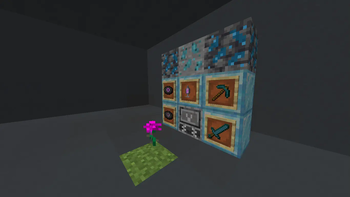
Arcane: Behind Bars hopes to bring the world of Arcane into Minecraft, to introduce powerful weapons, tools, and materials inspired by Arcane. Explore the potential of Hextech and Shimmer, craft legendary items, and uncover new resources hidden deep underground.
Features:
Spoiler
Rio Flower & Rio Leaf: Unique plant-based resources from Arcane
Malleable Shimmer & Processed Shimmer:
Experience the transformative power of ShimmerHextech Ore & Deepslate Hextech Ore:
Mine valuable materials to craft powerful itemsHextech Tools:
Craft hightech gear using Hextech CrystalsSyringes: Utilize mysterious substances with unique effects
Music Discs: Discover tracks inspired by Arcane
For crafting recipes and details, I’d recommend using the Just Enough Items (JEI) mod and if you have any problems/ questions please contact me.
Credits:
Mod Developer:
GoofyTurtleGuy
Textures:
GoofyTurtleGuy
Assets & Sound Design:
Riot Games (Arcane)
Feedback & Support
Have suggestions or found a bug? Contact me at [email protected]
Note: This is a fan-made mod and is not affiliated with Mojang, Microsoft, or Riot Games.
Available Versions
How to Install Arcane: Behind Bars on Your Server
Order Server
Order a Minecraft Java server with at least 3 GB RAM (4 GB recommended).
Set forge Loader
In the panel under "Egg", select the forge loader and matching Minecraft version (1.20.1).
Install Mod
Open the mod browser in the dashboard and search for "Arcane: Behind Bars". Click "Install" – done! Alternatively, upload the .jar via SFTP to the /mods folder.
Compatibility
Mod Loaders
Minecraft Versions
1.20.1
Server-side
✓ RequiredRecommended RAM
4 GB(min. 3 GB)Frequently Asked Questions
Arcane: Behind Bars server crashes on startup – what to do?
Most common cause: wrong forge version or insufficient RAM. Check the server log (latest.log) for "OutOfMemoryError" or "Mixin" errors. With Mado Hosting: ensure at least 3 GB RAM is allocated and the loader matches the mod version (1.20.1). You can switch loaders with one click in the panel.
Is Arcane: Behind Bars compatible with forge?
Arcane: Behind Bars officially supports forge for Minecraft 1.20.1. The Mado dashboard automatically detects incompatible loader combinations.
Server lagging with Arcane: Behind Bars – how to optimize performance?
Recommended RAM: 4 GB (per 8 players). Use /spark profiler to check if Arcane: Behind Bars consumes the most tick time. Common fixes: reduce server view-distance to 8-10, install "performant" or "starlight" as supplementary mods on Forge. With Mado Hosting, your server runs on NVMe SSDs with dedicated CPU cores for minimal latency.
Similar Mods




![[TaCZ] Timeless and Classics Zero](https://cdn.modrinth.com/data/SzzJttH8/fd27766d2bb8390d284696b1dbd358f87e081439_96.webp)

Rent Modded Server
Install Arcane: Behind Bars with just one click on your server.