
Arcane Hand
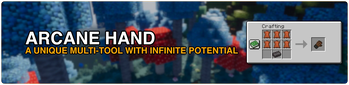
Adds a unique multi-tool with a unique enchantment system.
Screenshots


About this Mod
NOTICE: Arcane Hand is no longer being maintained in favor of the Arcanity mod.

Arcane Hand is a mod that adds a new item, the Gauntlet. The Gauntlet is a multi-tool that serves as a weapon, pickaxe, axe, shovel, and hoe, all in one. Unlike most tools in Minecraft, the Gauntlet cannot be enchanted inside an Enchanting Table. Instead, you must use the new Arcane Console.

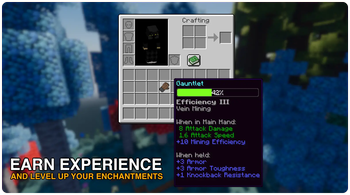
The Arcane Console allows you to select any enchantment you desire, allowing you to enable and disable enchantments as needed. After selecting an enchantment, you must level it up with experience.
There are four new enchantments added specifically for the Gauntlet:
- Abundance: Similar to Fortune and Looting. Causes mobs and blocks to have a chance to drop more loot. (Max Levels: 3)
- Blaze: Sets mobs on fire and also smelts the drops of blocks. (Max Levels: 1)
- Collect: When mining, items will be collected directly into your inventory. (Max Levels: 1)
- Excavate: When mining, you will mine in a 3x3 area. (Max Levels: 1)
- Vein Mining: When mining, matching connected blocks will also be broken. (Max Levels: 1)

To use a selected enchantment, you must level it up with experience. Hold the gauntlet and pick up experience orbs to level up your enchantments. If you have several enchantments selected, one will be chosen at random to progress.
While hovering over a Gauntlet, you can scroll to view the experience progression for your enchantments.

Gauntlets can be dyed by combining them with dye(s). Using a dyed gauntlet on a cauldron containing water removes any dye from it.
Permissions
✅ You may use this mod in modpacks.
✅ You may create add-ons, extensions, or companion mods.
✅ You may submit pull requests to contribute to the code.
❌ You may not publish this mod or modified versions anywhere without explicit permission.
Available Versions
How to Install Arcane Hand on Your Server
Order Server
Order a Minecraft Java server with at least 3 GB RAM (4 GB recommended).
Set fabric Loader
In the panel under "Egg", select the fabric loader and matching Minecraft version (1.21.10).
Install Mod
Open the mod browser in the dashboard and search for "Arcane Hand". Click "Install" – done! Alternatively, upload the .jar via SFTP to the /mods folder.
Compatibility
Mod Loaders
Minecraft Versions
1.21.10, 1.21.9, 1.21.8 (+2 more)
Server-side
✓ RequiredRecommended RAM
4 GB(min. 3 GB)Frequently Asked Questions
Arcane Hand server crashes on startup – what to do?
Most common cause: wrong fabric version or insufficient RAM. Check the server log (latest.log) for "OutOfMemoryError" or "Mixin" errors. With Mado Hosting: ensure at least 3 GB RAM is allocated and the loader matches the mod version (1.21.10). You can switch loaders with one click in the panel.
Is Arcane Hand compatible with fabric?
Arcane Hand officially supports fabric for Minecraft 1.21.10, 1.21.9, 1.21.8. The Mado dashboard automatically detects incompatible loader combinations.
Server lagging with Arcane Hand – how to optimize performance?
Recommended RAM: 4 GB (per 8 players). Use /spark profiler to check if Arcane Hand consumes the most tick time. Common fixes: reduce server view-distance to 8-10, install "performant" or "starlight" as supplementary mods on Forge. With Mado Hosting, your server runs on NVMe SSDs with dedicated CPU cores for minimal latency.
Similar Mods




![[TaCZ] Timeless and Classics Zero](https://cdn.modrinth.com/data/SzzJttH8/fd27766d2bb8390d284696b1dbd358f87e081439_96.webp)

Rent Modded Server
Install Arcane Hand with just one click on your server.