
Arda's Backpack
Expand your inventory with Arda's Backpack! This essential storage mod adds portable, upgradable backpacks to Minecraft, allowing you to carry more loot and manage your items with ease. Upgrade from basic leather to powerful ore-infused tiers.
Screenshots

About this Mod

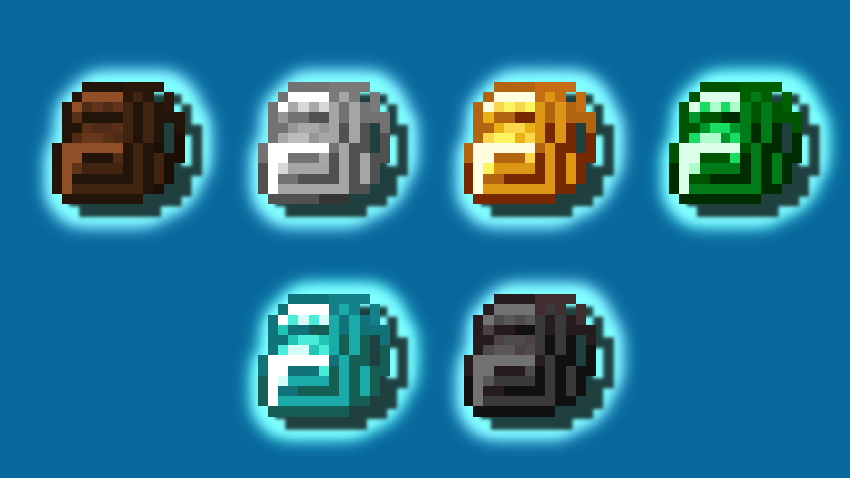

Advanced Storage Expansion
Arda's Backpack introduces a sophisticated tier-based storage system to your Minecraft experience. This mod adds 6 unique backpacks, each meticulously balanced and integrated with vanilla ore progression. Whether you are a casual explorer or a hardcore miner, these portable storage solutions ensure you never have to leave precious loot behind. Simply right-click to access your expanded inventory instantly.

Mastering the Craft
The journey to ultimate storage requires master craftsmanship. Unlike basic leather bags, Arda's Backpacks utilize a multi-stage material processing system:
1. Preparation: Combine leather pieces to create Stitched Leather.
2. Curing: Heat the Stitched Leather in a furnace to toughen the fibers, transforming it into Rugged Leather.
3. Reinforcement: For high-capacity tiers (Gold, Diamond, Emerald), you must process your materials further into Thick Rugged Leather to handle the weight of the ores.

Supported Environments
Optimized for performance and stability across multiple loaders:
1.21.1 - NeoForge
(Next-Gen Performance)1.20.1 - Forge
(The Modding Standard)1.16.5 - Forge
(Classic Experience)
Explore My Masterpiece
Looking for a deeper challenge? Experience the dark mysteries and powerful entities in my primary project:

Modpack Policy: You are free to include this mod in any modpack. No additional permission is required.
Available Versions
How to Install Arda's Backpack on Your Server
Order Server
Order a Minecraft Java server with at least 3 GB RAM (4 GB recommended).
Set forge Loader
In the panel under "Egg", select the forge loader and matching Minecraft version (1.21.1).
Install Mod
Open the mod browser in the dashboard and search for "Arda's Backpack". Click "Install" – done! Alternatively, upload the .jar via SFTP to the /mods folder.
Compatibility
Mod Loaders
Minecraft Versions
1.21.1, 1.20.1, 1.16.5
Server-side
✓ RequiredRecommended RAM
4 GB(min. 3 GB)Frequently Asked Questions
Arda's Backpack server crashes on startup – what to do?
Most common cause: wrong forge version or insufficient RAM. Check the server log (latest.log) for "OutOfMemoryError" or "Mixin" errors. With Mado Hosting: ensure at least 3 GB RAM is allocated and the loader matches the mod version (1.21.1). You can switch loaders with one click in the panel.
Is Arda's Backpack compatible with forge and neoforge?
Arda's Backpack officially supports forge, neoforge for Minecraft 1.21.1, 1.20.1, 1.16.5. The Mado dashboard automatically detects incompatible loader combinations.
Server lagging with Arda's Backpack – how to optimize performance?
Recommended RAM: 4 GB (per 8 players). Use /spark profiler to check if Arda's Backpack consumes the most tick time. Common fixes: reduce server view-distance to 8-10, install "performant" or "starlight" as supplementary mods on Forge. With Mado Hosting, your server runs on NVMe SSDs with dedicated CPU cores for minimal latency.
Similar Mods




Rent Modded Server
Install Arda's Backpack with just one click on your server.