
areamonitor
A Minecraft Forge mod for monitoring specific areas and automatically switching player game modes.
Screenshots
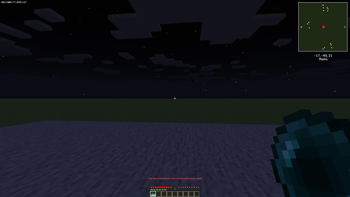

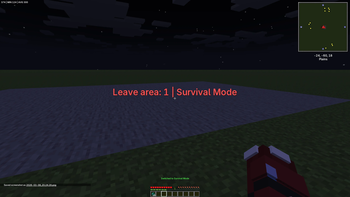
About this Mod
AreaMonitor Mod
版本: 2.0.1
支持游戏版本: Minecraft 1.20.1
模组加载器: Forge 47.0.35+
📖 概述 / Overview
AreaMonitor 是一个功能强大、性能高效的 Minecraft 服务器管理模组。它的核心功能是允许管理员定义三维区域,并在此区域内自动执行规则,例如在玩家进入或离开时切换其游戏模式。它是管理服务器保护区、创造玩法地图和构建有序游戏环境的理想工具。
AreaMonitor is a powerful and high-performance Minecraft server management mod. Its core function is to allow administrators to define 3D areas and automatically enforce rules within them, such as switching a player‘s game mode upon entry or exit. It is the ideal tool for managing server safe zones, creating gameplay maps, and building an organized game environment.
✨ 特性 / Features
- 🔍 多区域管理: 创建、编辑和管理无限数量的独立监控区域。
Multi-Area Management: Create, edit, and manage an unlimited number of independent monitoring zones. - 🎮 自动模式切换: 当玩家进入或离开区域时,自动在生存、创造、冒险、旁观模式间切换。
Automatic Mode Switching: Automatically switch between Survival, Creative, Adventure, and Spectator modes when players enter or leave an area. - 👁️ 可视化工具: 使用木斧轻松选择区域,并通过实时粒子效果查看边界。
Visual Tools: Easily select areas with a wooden axe and view boundaries with real-time particle effects. - ⚡ 高性能设计: 采用智能算法,监控数百个区域对服务器性能影响极小。
High-Performance Design: Uses smart algorithms to monitor hundreds of areas with minimal server impact. - 🌍 全维度支持: 兼容主世界、下界、末地及所有模组维度。
Full Dimension Support: Compatible with the Overworld, Nether, End, and all modded dimensions. - 🛡️ 安全规则: 支持区域白名单、禁用特定物品、限制传送,保护关键区域。
Security Rules: Supports area whitelists, disabling specific items, and restricting teleportation to protect critical zones. - 🌐 多语言: 完整支持英语和中文界面与提示。
Multi-Language: Full English and Chinese localization for UI and messages. - ⚙️ 热重载配置: 使用JSON文件配置,支持运行时重载,无需重启服务器。
Hot-Reload Configs: Configure via JSON files with runtime reload support; no server restart needed.
🚀 快速入门 / Quick Start
- 安装模组: 将模组文件放入服务器的
mods文件夹。
Install: Place the mod file in your server‘smodsfolder. - 获取工具: 在游戏中输入
/areamonitor visual tool获得木斧选择工具。
Get Tool: In-game, type/areamonitor visual toolto get the wooden axe selector. - 选择区域: 用木斧右键点击两个对角的方块来定义长方体区域。
Select Area: Right-click two diagonal blocks with the axe to define a cuboid area. - 创建区域: 输入
/areamonitor selection create <区域名称>。
Create Area: Type/areamonitor selection create <AreaName>. - 设置规则:
Set Rules:- 进入模式:
/areamonitor area setEnterMode <区域名称> creative
Enter Mode:/areamonitor area setEnterMode <AreaName> creative - 离开模式:
/areamonitor area setLeaveMode <区域名称> survival
Leave Mode:/areamonitor area setLeaveMode <AreaName> survival
- 进入模式:
🔧 配置 / Configuration
所有区域配置都保存在 config/areamonitor/areas.json 中。您可以直接编辑此文件或使用游戏内命令。
All area configurations are saved in config/areamonitor/areas.json. You can edit this file directly or use in-game commands.
示例配置 / Example Config:
{
  "spawn_build_zone": {
    "dimension": "minecraft:overworld",
    "minX": -100,
    "maxX": 100,
    "minY": -64,
    "maxY": 256,
    "minZ": -100,
    "maxZ": 100,
    "enterGameMode": "creative",
    "leaveGameMode": "survival",
    "blockedItems": ["minecraft:tnt", "minecraft:flint_and_steel"],
    "whitelistEnabled": false,
    "whitelist": [],
    "enabled": true
  }
}
❓ 常见问题 / FAQ
Q: 这个模组需要安装在客户端吗?
A: 不需要。 仅服务端安装即可实现所有核心功能(如模式切换)。客户端安装仅用于显示区域边界的粒子效果。
Q: Is this mod required on the client?
A: No. Server-side installation is sufficient for all core features (like mode switching). Client installation is only needed to see the area boundary particles.
Q: 如何临时禁用某个区域?
A: 在 areas.json 中将对应区域的 "enabled" 设置为 false,或在游戏中执行 /areamonitor area toggle <区域名称>。
Q: How do I temporarily disable an area?
A: Set "enabled" to false for that area in areas.json, or execute /areamonitor area toggle <AreaName> in-game.
感谢您使用 AreaMonitor Mod! / Thank you for using AreaMonitor Mod!
Available Versions
How to Install areamonitor on Your Server
Order Server
Order a Minecraft Java server with at least 3 GB RAM (4 GB recommended).
Set forge Loader
In the panel under "Egg", select the forge loader and matching Minecraft version (1.20.1).
Install Mod
Open the mod browser in the dashboard and search for "areamonitor". Click "Install" – done! Alternatively, upload the .jar via SFTP to the /mods folder.
Compatibility
Mod Loaders
Minecraft Versions
1.20.1
Server-side
✓ RequiredRecommended RAM
4 GB(min. 3 GB)Frequently Asked Questions
areamonitor server crashes on startup – what to do?
Most common cause: wrong forge version or insufficient RAM. Check the server log (latest.log) for "OutOfMemoryError" or "Mixin" errors. With Mado Hosting: ensure at least 3 GB RAM is allocated and the loader matches the mod version (1.20.1). You can switch loaders with one click in the panel.
Is areamonitor compatible with forge?
areamonitor officially supports forge for Minecraft 1.20.1. The Mado dashboard automatically detects incompatible loader combinations.
Server lagging with areamonitor – how to optimize performance?
Recommended RAM: 4 GB (per 8 players). Use /spark profiler to check if areamonitor consumes the most tick time. Common fixes: reduce server view-distance to 8-10, install "performant" or "starlight" as supplementary mods on Forge. With Mado Hosting, your server runs on NVMe SSDs with dedicated CPU cores for minimal latency.
Similar Mods




Rent Modded Server
Install areamonitor with just one click on your server.