
Area Hints
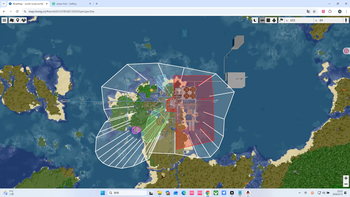
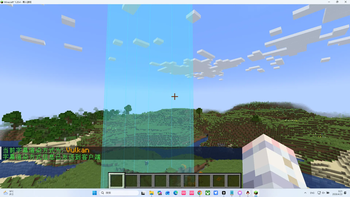
A mod that displays the domain name which could be written by players when you enters an area
Screenshots


About this Mod
🏷️ Areas Hint Mod
Add immersive area name popups to your Minecraft world!
When entering custom regions, elegant area titles appear at the top of your screen. Supports multi-level nesting, dimension default names, and easy creation tools—making exploration feel truly meaningful.
📖 Overview
Areas Hint allows players to define regions (called “domains”) using polygons and display custom names upon entry. All calculations are handled client-side with multithreaded optimization, placing almost zero load on the server. Say goodbye to complex commands and use intuitive tools to mark your world with ease.
✨ Features
- Player Customization: Freely name regions, define boundaries and height.
- High Performance: Zero server load, with client-side optimization and multithreading.
- Automatic Area Titles: Enter places like “Elven Forest” or “Dark Castle” and see smooth title animations appear on screen.
- Multi-level Regions: Supports nested regions (e.g., “Kingdom” → “Throne Room”) with elegant transitions or combined displays.
- Dimension Default Names: Displays the dimension name (e.g., “Wilderness Continent”) when outside all regions.
- Easy Creation Tool: Use
/areahint easyaddfor an interactive setup—just walk and click to create areas. - Fully Customizable: Modify names, colors, heights, split or merge regions anytime.
- Beautiful & Smooth UI: RPG-style title display (inspired by Genshin Impact), with adjustable styles and smooth animations.
- No Claim Restrictions: Mark any place freely—explore without limits.
🎯 Why Choose Areas Hint?
- Player-Friendly: No admin permissions required for creating area markers.
- Optimized Performance: Client-side processing keeps multiplayer smooth.
- Plug and Play: Install and start marking areas with simple commands.
- Highly Compatible: Works seamlessly with minimaps, shaders, and optimization mods.
🛠️ Features Overview
- Polygon-based region definition with multi-level domains (top-level / subdomains).
- Ray-casting detection to determine player position.
- Multiple rendering methods (CPU, OpenGL, Vulkan).
- Rich subtitle style customization.
- Full command system for configuration and management.
- Interactive domain creation tool EasyAdd, designed for ease of use.
📋 Command System
Basic Commands
| Command | Description | Permission |
|---|---|---|
/areahint help |
Show all commands and usage | Everyone |
/areahint reload |
Reload config and domain files | Admin |
View & Manage Domains
| Command | Description | Permission |
|---|---|---|
/areahint check |
Show all combined domain lists | Everyone |
/areahint delete |
Interactive domain deletion | Everyone (own domains only) |
Create & Edit Domains
| Command | Description | Permission |
|---|---|---|
/areahint easyadd |
Start interactive domain creation | Everyone |
/areahint rename |
Start interactive rename | Everyone |
/areahint expandarea |
Expand domain interactively | Everyone |
/areahint shrinkarea |
Shrink domain interactively | Everyone |
/areahint dividearea |
Split domain interactively | Everyone |
Vertex Editing
| Command | Description | Permission |
|---|---|---|
/areahint addhint |
Add vertices interactively | Everyone |
/areahint deletehint |
Delete vertices interactively | Everyone |
Style & Display Settings
| Command | Description | Permission |
|---|---|---|
/areahint recolor |
Recolor domains | Everyone |
/areahint sethigh |
Set domain height | Everyone |
/areahint subtitlerender |
View/set render mode (cpu/opengl/vulkan) | Everyone |
/areahint subtitlestyle |
Choose subtitle style interactively | Everyone |
/areahint subtitlesize |
Choose subtitle size interactively | Everyone |
Dimension Domain Management
| Command | Description | Permission |
|---|---|---|
/areahint dimensionalityname |
Manage dimension names | Everyone |
/areahint dimensionalitycolor |
Manage dimension colors | Everyone |
/areahint firstdimname <name> |
Set name on first entry to dimension | Everyone |
/areahint firstdimname_skip |
Skip first-time naming | Everyone |
Other Features
| Command | Description | Permission |
|---|---|---|
/areahint replacebutton |
Interactive keybinding replacement | Everyone |
/areahint boundviz |
Toggle boundary visualization | Everyone |
/areahint language |
Choose language interactively | Everyone |
/areahint debug |
Toggle debug mode | Admin |
/areahint frequency <1-60> |
Set detection frequency | Everyone |
/areahint serverlanguage <code> |
Set server log language | Console (permission level 4) |
🏰 Use Cases
- RPG Servers: Name towns, dungeons, and wilderness areas to enhance immersion.
- Adventure Maps: Add story-driven area titles or hidden location names.
- Building Servers: Label large builds with names or authors.
- Singleplayer Worlds: Mark your base, farms, mines—create your own journey log.
✅ Compatibility
Areas Hint is fully compatible with the following mods (tested):
(Keep your original compatibility list as-is, since mod names remain unchanged.)
🌟 Final Words
Areas Hint is more than just a mod—it’s the “place naming system” of your Minecraft world. It makes every journey feel meaningful and immersive. Whether you're building an epic RPG server or documenting your personal creations, it adds a whole new layer of experience.
Try it now and give your world its own identity!
Available Versions
How to Install Area Hints on Your Server
Order Server
Order a Minecraft Java server with at least 3 GB RAM (4 GB recommended).
Set fabric Loader
In the panel under "Egg", select the fabric loader and matching Minecraft version (1.21.11).
Install Mod
Open the mod browser in the dashboard and search for "Area Hints". Click "Install" – done! Alternatively, upload the .jar via SFTP to the /mods folder.
Compatibility
Mod Loaders
Minecraft Versions
1.21.11, 1.21.10, 1.21.9 (+17 more)
Server-side
✓ RequiredRecommended RAM
4 GB(min. 3 GB)Frequently Asked Questions
Area Hints server crashes on startup – what to do?
Most common cause: wrong fabric version or insufficient RAM. Check the server log (latest.log) for "OutOfMemoryError" or "Mixin" errors. With Mado Hosting: ensure at least 3 GB RAM is allocated and the loader matches the mod version (1.21.11). You can switch loaders with one click in the panel.
Is Area Hints compatible with fabric?
Area Hints officially supports fabric for Minecraft 1.21.11, 1.21.10, 1.21.9. The Mado dashboard automatically detects incompatible loader combinations.
Server lagging with Area Hints – how to optimize performance?
Recommended RAM: 4 GB (per 8 players). Use /spark profiler to check if Area Hints consumes the most tick time. Common fixes: reduce server view-distance to 8-10, install "performant" or "starlight" as supplementary mods on Forge. With Mado Hosting, your server runs on NVMe SSDs with dedicated CPU cores for minimal latency.
Similar Mods




Rent Modded Server
Install Area Hints with just one click on your server.