
Armor Insight
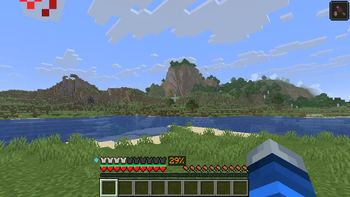
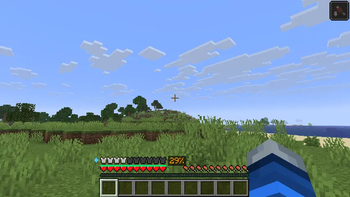
Visualizes hidden armor mechanics — real protection %, enchantment effectiveness, toughness, durability, damage preview, and armor comparison.
Screenshots

About this Mod
Armor Insight
The Armor Insight mod. See what your armor actually does — protection percentage, enchantment effectiveness,
toughness, damage reduction, and more — directly on your HUD.
Minecraft's armor system has five hidden layers that players never see: armor points, armor toughness, enchantment
protection factors (EPFs), damage type specificity, and durability across pieces. Armor Insight makes all of it
visible at a glance, without replacing any vanilla HUD elements.
Features
- Protection Percentage — Shows your real effective damage reduction as a color-coded percentage next to the armor
bar, calculated using Minecraft's actual armor formula including toughness and enchantments - Enchantment Shimmer Overlay — Golden glow on each vanilla armor bar icon that intensifies with enchantment
protection level — instantly see "enchanted" vs "unenchanted" at a glance - Combined Durability Bar — Thin bar below the armor bar showing average durability across all pieces, with a
flashing warning when any piece is critically low - Toughness Indicator — Small diamond icon to the left of the armor bar showing your hidden armor toughness value
(diamond/netherite only) - Damage Type Breakdown — Hover over any armor piece to see protection against each damage type: Melee,
Projectile, Fire, Blast, and Fall - Incoming Damage Preview — Look at a hostile mob to see how much damage they'd deal through your current armor
- Armor Comparison — Hover over an unequipped armor piece to see how swapping it would change your total
protection, toughness, and durability
Controls
| Key | Action |
|---|---|
| V | Toggle all overlays on/off |
Configuration
All features are individually toggleable via config/armorinsight.json. Customize overlay colors, positions, display
styles, critical thresholds, and more.
Compatibility
- Client-side only — works on vanilla servers, Realms, and multiplayer
- Compatible with AppleSkin, Sodium, Iris, Jade, and armor HUD mods
- Minecraft 1.21.11 with Fabric
Installation
- Install Fabric Loader for Minecraft 1.21.11
- Install Fabric API
- Drop the JAR into your
mods/folder
Available Versions
How to Install Armor Insight on Your Server
Order Server
Order a Minecraft Java server with at least 3 GB RAM (4 GB recommended).
Set fabric Loader
In the panel under "Egg", select the fabric loader and matching Minecraft version (26.1.2).
Install Mod
Open the mod browser in the dashboard and search for "Armor Insight". Click "Install" – done! Alternatively, upload the .jar via SFTP to the /mods folder.
Compatibility
Mod Loaders
Minecraft Versions
26.1.2, 1.21.11
Server-side
✗ UnsupportedRecommended RAM
4 GB(min. 3 GB)Frequently Asked Questions
Armor Insight server crashes on startup – what to do?
Most common cause: wrong fabric version or insufficient RAM. Check the server log (latest.log) for "OutOfMemoryError" or "Mixin" errors. With Mado Hosting: ensure at least 3 GB RAM is allocated and the loader matches the mod version (26.1.2). You can switch loaders with one click in the panel.
Is Armor Insight compatible with fabric?
Armor Insight officially supports fabric for Minecraft 26.1.2, 1.21.11. The Mado dashboard automatically detects incompatible loader combinations.
Server lagging with Armor Insight – how to optimize performance?
Recommended RAM: 4 GB (per 8 players). Use /spark profiler to check if Armor Insight consumes the most tick time. Common fixes: reduce server view-distance to 8-10, install "performant" or "starlight" as supplementary mods on Forge. With Mado Hosting, your server runs on NVMe SSDs with dedicated CPU cores for minimal latency.
Similar Mods



![[TaCZ] Timeless and Classics Zero](https://cdn.modrinth.com/data/SzzJttH8/fd27766d2bb8390d284696b1dbd358f87e081439_96.webp)


Rent Modded Server
Install Armor Insight with just one click on your server.