
Armor Stand 12 Poses
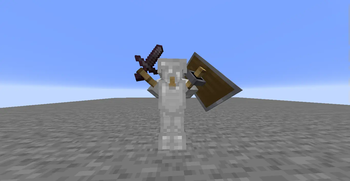
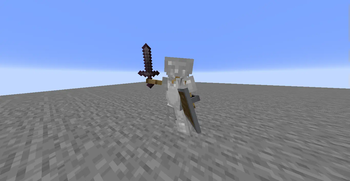
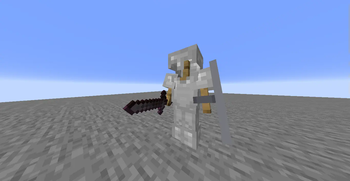
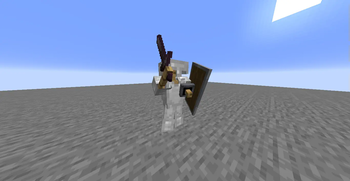
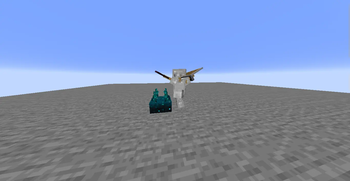
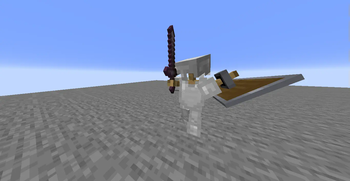
This datapack adds 12 different positions from the Bedrock version of Minecraft to the Java version.
Screenshots
About this Mod
Java Armor Stand Poses (12 Poses)
Bedrock Armor Stand Poses is a Minecraft Java data pack that brings 12 unique armor stand poses from Bedrock Edition to Java Edition.
✨ Features
Adds 12 Bedrock-style armor stand poses

Manual interaction: Right-click on the leg section of the armor stand while directly facing the block it is standing on

Redstone compatible: Any redstone signal exactly 1 block away from the stand triggers a pose change

Works in both single-player and multiplayer worlds
⚠️ For Redstone activation to work properly, the signal must be exactly 1 block away from the armor stand. Even the slightest misplacement can cause the system to malfunction.
🛠️ How does it work?
Each pose change cycles through 12 different positions.
Players can manually trigger it by interacting with it.
Redstone blocks, torches, redstones, repeaters, comparators, buttons, levers, and more are supported (as long as they are active and properly placed). It works on the same principle as redstone systems in Minecraft. When sending signals, you can set up the system as if you were sending signals to normal systems.
Notes:
Automatically creates arms for all armor stands, allowing you to add any shield and sword you want to the armor stands. (All armor stands spawn with arms.)
**📦 Installation
**
Download the Datapack .zip file.
Place it in your world's datapacks folder.
Enter your world and run the
/reload
command. You are now ready to use the new armor stand placement system!
🧱 Compatibility
Minecraft Java Edition 1.21.5+

No mod or resource pack required
👤 Creator
Created by egementoni0922 ❤️
💬 Feedback and Requests
If you have any requests or feedback, please message EgemenKaragoz on Discord.
🌐 ITITAN Hosting

Available Versions
How to Install Armor Stand 12 Poses on Your Server
Order Server
Order a Minecraft Java server with at least 3 GB RAM (4 GB recommended).
Set datapack Loader
In the panel under "Egg", select the datapack loader and matching Minecraft version (1.21.7).
Install Mod
Open the mod browser in the dashboard and search for "Armor Stand 12 Poses". Click "Install" – done! Alternatively, upload the .jar via SFTP to the /mods folder.
Compatibility
Mod Loaders
Minecraft Versions
1.21.7, 1.21.6, 1.21.5
Server-side
✓ RequiredRecommended RAM
4 GB(min. 3 GB)Frequently Asked Questions
Armor Stand 12 Poses server crashes on startup – what to do?
Most common cause: wrong datapack version or insufficient RAM. Check the server log (latest.log) for "OutOfMemoryError" or "Mixin" errors. With Mado Hosting: ensure at least 3 GB RAM is allocated and the loader matches the mod version (1.21.7). You can switch loaders with one click in the panel.
Is Armor Stand 12 Poses compatible with datapack and fabric and forge and neoforge and quilt?
Armor Stand 12 Poses officially supports datapack, fabric, forge, neoforge, quilt for Minecraft 1.21.7, 1.21.6, 1.21.5. Note: Forge and Fabric mods are NOT cross-compatible – pick one loader and stick with it. The Mado dashboard automatically detects incompatible loader combinations.
Server lagging with Armor Stand 12 Poses – how to optimize performance?
Recommended RAM: 4 GB (per 8 players). Use /spark profiler to check if Armor Stand 12 Poses consumes the most tick time. Common fixes: reduce server view-distance to 8-10, install "performant" or "starlight" as supplementary mods on Forge. With Mado Hosting, your server runs on NVMe SSDs with dedicated CPU cores for minimal latency.
Similar Mods




![[TaCZ] Timeless and Classics Zero](https://cdn.modrinth.com/data/SzzJttH8/fd27766d2bb8390d284696b1dbd358f87e081439_96.webp)

Rent Modded Server
Install Armor Stand 12 Poses with just one click on your server.