
ArmorConfigs
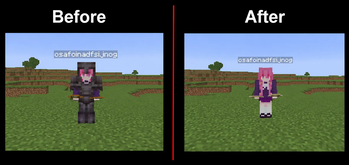
Armor Configs is a client-side Fabric mod that lets you customize the visibility of armor and elytra. Choose which pieces to hide and whether it applies to you or other players — all through an easy Mod Menu interface.
Screenshots
About this Mod
Armor Configs
Armor Configs is a lightweight client-side Fabric mod that gives you full control over how armor and elytra are rendered in Minecraft. Whether you want a cleaner look, better visibility in PvP, or just more control over your character’s appearance, this mod lets you customize armor rendering exactly the way you want.
✨ Features
Hide your own armor independently from other players
Hide other players’ armor without affecting your own
Hide your own elytra or only others’ elytra
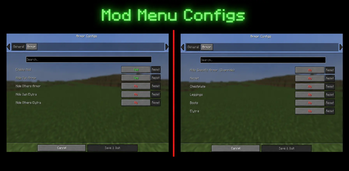
Advanced "Hide Specific Armor" override mode:
- Hide only selected armor pieces (helmet, chestplate, leggings, boots)
- Works per-piece with accurate rendering (no full armor removal bugs)
- Applies to both yourself and other players
Separate Elytra control even when using the override system
Clean and simple ModMenu configuration screen
All settings are saved automatically and persist between game restarts
⚙️ How it works
Armor Configs hooks into Minecraft’s modern 1.21 render system to give precise control over armor visibility. It safely modifies rendering on the client side without affecting gameplay, server behavior, or other players.
🎯 Use cases
- Improve visibility in PvP
- Take clean screenshots without armor clutter
- Customize your player appearance
- Reduce visual noise in crowded areas
🔒 Client-side only
This mod is entirely client-side:
- ✔ Works on any server
- ✔ No server installation required
- ✔ Does not give gameplay advantages
🧩 Compatibility
- Minecraft 1.21.11
- Fabric Loader
- Fabric API (required)
- ModMenu (optional, for configuration UI)
Simple, powerful, and built for modern Minecraft rendering — Armor Configs gives you full visual control without compromising performance or compatibility.
Available Versions
How to Install ArmorConfigs on Your Server
Order Server
Order a Minecraft Java server with at least 3 GB RAM (4 GB recommended).
Set fabric Loader
In the panel under "Egg", select the fabric loader and matching Minecraft version (1.21.11).
Install Mod
Open the mod browser in the dashboard and search for "ArmorConfigs". Click "Install" – done! Alternatively, upload the .jar via SFTP to the /mods folder.
Compatibility
Mod Loaders
Minecraft Versions
1.21.11
Server-side
✗ UnsupportedRecommended RAM
4 GB(min. 3 GB)Frequently Asked Questions
ArmorConfigs server crashes on startup – what to do?
Most common cause: wrong fabric version or insufficient RAM. Check the server log (latest.log) for "OutOfMemoryError" or "Mixin" errors. With Mado Hosting: ensure at least 3 GB RAM is allocated and the loader matches the mod version (1.21.11). You can switch loaders with one click in the panel.
Is ArmorConfigs compatible with fabric?
ArmorConfigs officially supports fabric for Minecraft 1.21.11. The Mado dashboard automatically detects incompatible loader combinations.
Server lagging with ArmorConfigs – how to optimize performance?
Recommended RAM: 4 GB (per 8 players). Use /spark profiler to check if ArmorConfigs consumes the most tick time. Common fixes: reduce server view-distance to 8-10, install "performant" or "starlight" as supplementary mods on Forge. With Mado Hosting, your server runs on NVMe SSDs with dedicated CPU cores for minimal latency.
Similar Mods




![[TaCZ] Timeless and Classics Zero](https://cdn.modrinth.com/data/SzzJttH8/fd27766d2bb8390d284696b1dbd358f87e081439_96.webp)

Rent Modded Server
Install ArmorConfigs with just one click on your server.