
Armored Up
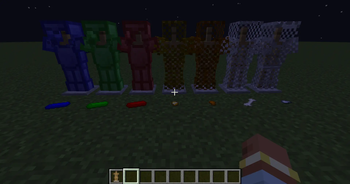
Lots of armor, made by the crucible, superheater, and ingot mold.
Screenshots

About this Mod
**--WARNING--
This mod is still very in development and is very buggy.
JEI is required.
----------------**
ARMORED UP
Have you ever wanted more armors in the game? Well, this mod does exactly that! These armors are made in many ways.
Some are made with a normal ingredient, like Goldmail and Bonemail. The majority of them, however, are made with the Crucible, Superheater, and Ingot Mold.
The forge setup
The main ingredient is Plaster, made by putting terracotta in a Blast Furnace. After this, you can make the 3 main components.
The Crucible
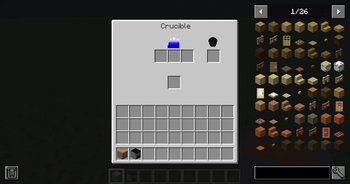
Made with 7 plaster, this is where the raw ores will be smelted. Unfortunately, it needs a lot of heat to work. that is where the Superheater comes in.
The Superheater
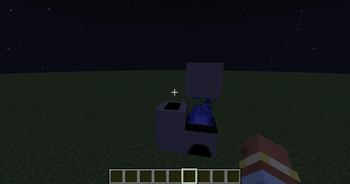
Made with 8 plaster and a blast furnace, placing a lava bucket inside will create Superheated Fire above it, melting almost anything! Place the superheater 2 blocks below the crucible so that the flames lick the bottom of it.
Now, after placing 3 of the ores in the crucible's top slots and a bucket in the other slot, you will get a bucket of the melted material. Now we just need to make it something useful.
The Ingot Mold
Made with 4 plaster, This is how you turn the melted material into ingots. Just right click it with the bucket of melted material, and you will get the ingot of that material!
All the armors
This is all of the armors in each version, with their respective material to craft them.
0.1.0:
Chainmail: iron nugget
Goldmail: gold nugget
Coppermail: copper nugget
Bonemail: bone
Emerald: emerald ingot
Lapis: lapis ingot
Redstone: redstone ingot
There is another, advanced armor, but you can only get it in Creative Mode (right now...)
Available Versions
How to Install Armored Up on Your Server
Order Server
Order a Minecraft Java server with at least 3 GB RAM (4 GB recommended).
Set neoforge Loader
In the panel under "Egg", select the neoforge loader and matching Minecraft version (1.21.4).
Install Mod
Open the mod browser in the dashboard and search for "Armored Up". Click "Install" – done! Alternatively, upload the .jar via SFTP to the /mods folder.
Compatibility
Mod Loaders
Minecraft Versions
1.21.4
Server-side
✓ RequiredRecommended RAM
4 GB(min. 3 GB)Frequently Asked Questions
Armored Up server crashes on startup – what to do?
Most common cause: wrong neoforge version or insufficient RAM. Check the server log (latest.log) for "OutOfMemoryError" or "Mixin" errors. With Mado Hosting: ensure at least 3 GB RAM is allocated and the loader matches the mod version (1.21.4). You can switch loaders with one click in the panel.
Is Armored Up compatible with neoforge?
Armored Up officially supports neoforge for Minecraft 1.21.4. The Mado dashboard automatically detects incompatible loader combinations.
Server lagging with Armored Up – how to optimize performance?
Recommended RAM: 4 GB (per 8 players). Use /spark profiler to check if Armored Up consumes the most tick time. Common fixes: reduce server view-distance to 8-10, install "performant" or "starlight" as supplementary mods on Forge. With Mado Hosting, your server runs on NVMe SSDs with dedicated CPU cores for minimal latency.
Similar Mods




![[TaCZ] Timeless and Classics Zero](https://cdn.modrinth.com/data/SzzJttH8/fd27766d2bb8390d284696b1dbd358f87e081439_96.webp)

Rent Modded Server
Install Armored Up with just one click on your server.