ArmorNotifier
Mod warns that your armor will break soon
Screenshots
About this Mod
ArmorNotifier
Never forget to repair your armor again!
ArmorNotifier is a lightweight utility mod that warns you in chat when your armor durability drops below 15%. Stay prepared and never let your armor break in the middle of a fight!
✨ Features
- Automatic Durability Check — Scans your armor every 5 seconds
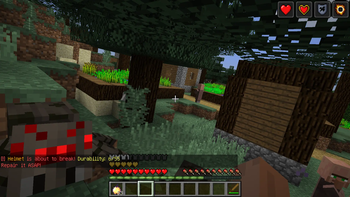
- Chat Warnings — Sends colored warning messages when armor is about to break
- Exact Numbers — Shows remaining durability and percentage for each piece
- Smart Notifications — Warns only once per armor piece until repaired
- Lightweight — No GUI, no configs, just works out of the box
- Multiplayer Compatible — Works on servers and singleplayer
⚠️ Warning Messages
When your armor drops below 15% durability, you'll see:
WARNING! 🥾 Boots is about to break!
Durability left: 45/300 (15.0%)
Repair it as soon as possible!
📦 Installation
- Install Minecraft Forge 1.12.2 (version 14.23.5.2859 or higher)
- Download the mod
.jarfile - Place it in your
.minecraft/modsfolder - Launch the game with Forge profile
- Done! The mod works automatically
🔧 Compatibility
- Minecraft Version: 1.12.2
- Mod Loader: Forge 14.23.5.2859+
- Client/Server: Client-side only
- Conflicts: None known
📋 Supported Armor
✅ All vanilla armor (Leather, Iron, Gold, Diamond, Chainmail)
✅ Armor from other mods (if they use standard durability system)
✅ Any item in armor slots with durability
🎯 Why Use ArmorNotifier?
- Stop losing expensive enchanted armor
- Perfect for hardcore mode
- Essential for long mining sessions
- Great for PvP and PvE combat
- Never waste resources on emergency repairs
📸 How It Looks
[Add screenshots here of the warning messages in chat]
🆓 License
This mod is free and open source. Feel free to use it in modpacks!
💬 Feedback
Found a bug or have a suggestion? Leave a comment below!
Stay protected! ⚔️🛡️
Available Versions
How to Install ArmorNotifier on Your Server
Order Server
Order a Minecraft Java server with at least 3 GB RAM (4 GB recommended).
Set forge Loader
In the panel under "Egg", select the forge loader and matching Minecraft version (1.12.2).
Install Mod
Open the mod browser in the dashboard and search for "ArmorNotifier". Click "Install" – done! Alternatively, upload the .jar via SFTP to the /mods folder.
Compatibility
Mod Loaders
Minecraft Versions
1.12.2
Server-side
✗ UnsupportedRecommended RAM
4 GB(min. 3 GB)Frequently Asked Questions
ArmorNotifier server crashes on startup – what to do?
Most common cause: wrong forge version or insufficient RAM. Check the server log (latest.log) for "OutOfMemoryError" or "Mixin" errors. With Mado Hosting: ensure at least 3 GB RAM is allocated and the loader matches the mod version (1.12.2). You can switch loaders with one click in the panel.
Is ArmorNotifier compatible with forge?
ArmorNotifier officially supports forge for Minecraft 1.12.2. The Mado dashboard automatically detects incompatible loader combinations.
Server lagging with ArmorNotifier – how to optimize performance?
Recommended RAM: 4 GB (per 8 players). Use /spark profiler to check if ArmorNotifier consumes the most tick time. Common fixes: reduce server view-distance to 8-10, install "performant" or "starlight" as supplementary mods on Forge. With Mado Hosting, your server runs on NVMe SSDs with dedicated CPU cores for minimal latency.
Similar Mods




![[TaCZ] Timeless and Classics Zero](https://cdn.modrinth.com/data/SzzJttH8/fd27766d2bb8390d284696b1dbd358f87e081439_96.webp)

Rent Modded Server
Install ArmorNotifier with just one click on your server.