
Armor&Ores
Expanding Boundaries, more content, more opportunities This is our first mod, please do not judge strictly.
Screenshots
About this Mod
Armor and Ores
Adds new ores, tools and unique mechanics to Minecraft!
🔨 What has been added?
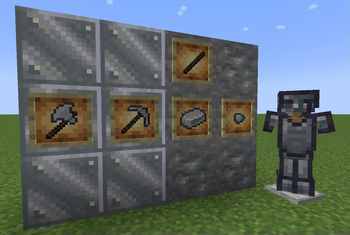
The new ore is Tungsten!
- Generated in the Upper World at an altitude from 0 to 63 (very rare).
- You can create a block, a pickaxe and an axe from tungsten.
- Stronger than diamond, but weaker than nezerite – an ideal intermediate material!
✔️ New mechanics – Cooling of the ephrite rod!
- Place an ephrite rod and a bucket of water in the workbench to get a non-ephrite stick (a key component for future crafting).
🚀 Future plans
- Adding 3D armor with a unique design.
- New ores and tools.
- The ability to configure generation through configs.
⚙️ Technical Information
- Minecraft version: 1.20.1 (Forge)
- Autonomy: Does not require other mods.
- Compatibility: Works in any world, no conflicts with other mods have been detected.
📌 Important: The mod is under active development, stay tuned!
📌 Why is it worth a try?
- Adds useful material between diamond and nezerite.
- Introduces a new method of obtaining nezerite components through alchemy.
- In the future, unique 3D armor and more content!
How to install?
- Download Forge for 1.20.1.
- Place the mod file in the mods folder.
- Launch the game and you're done!
---🔹 Suitable for:**
- Single player game.
- Survival with friends.
- Mod packs (if you need intermediate ore between diamond and nezerite).
--- Download and test!** Feedback and suggestions are welcome!
Available Versions
How to Install Armor&Ores on Your Server
Order Server
Order a Minecraft Java server with at least 3 GB RAM (4 GB recommended).
Set forge Loader
In the panel under "Egg", select the forge loader and matching Minecraft version (1.20.1).
Install Mod
Open the mod browser in the dashboard and search for "Armor&Ores". Click "Install" – done! Alternatively, upload the .jar via SFTP to the /mods folder.
Compatibility
Mod Loaders
Minecraft Versions
1.20.1
Server-side
✓ RequiredRecommended RAM
4 GB(min. 3 GB)Frequently Asked Questions
Armor&Ores server crashes on startup – what to do?
Most common cause: wrong forge version or insufficient RAM. Check the server log (latest.log) for "OutOfMemoryError" or "Mixin" errors. With Mado Hosting: ensure at least 3 GB RAM is allocated and the loader matches the mod version (1.20.1). You can switch loaders with one click in the panel.
Is Armor&Ores compatible with forge?
Armor&Ores officially supports forge for Minecraft 1.20.1. The Mado dashboard automatically detects incompatible loader combinations.
Server lagging with Armor&Ores – how to optimize performance?
Recommended RAM: 4 GB (per 8 players). Use /spark profiler to check if Armor&Ores consumes the most tick time. Common fixes: reduce server view-distance to 8-10, install "performant" or "starlight" as supplementary mods on Forge. With Mado Hosting, your server runs on NVMe SSDs with dedicated CPU cores for minimal latency.
Similar Mods




Rent Modded Server
Install Armor&Ores with just one click on your server.