ArmorStandRedaction
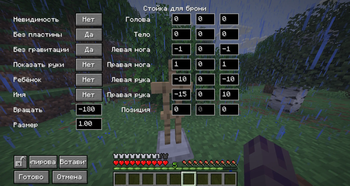
Armor Stand Redaction is a simple armor stand editor mod.
Screenshots
About this Mod
Armor Stand Redaction
🚨 Please notify me if you are installing this mod on a server. Specific configuration will be required—please provide the server IP address as well.
✨ Experience Total Control
Armor Stand Redaction is a comprehensive utility designed to push the boundaries of what is possible with armor stands in your world. This mod provides a sophisticated suite of tools for players and creators who demand precision and creative freedom beyond the vanilla limitations.
🛠️ Advanced Manipulation & Usage
Tired of static, lifeless displays? Armor Stand Redaction introduces a new layer of interaction.
To open the management menu, simply use Shift + Right-Click on an armor stand.
While the core mechanics remain intuitive, the underlying system allows for granular adjustments that were previously inaccessible. Whether you are building a grand museum, a cinematic scene, or a complex decorative environment, this tool adapts to your creative vision.
🔍 Key Features (Overview):
Quick Access: Open the configuration interface instantly with Shift + Right-Click.
Precision Refinement: Fine-tune every aspect of your armor stands with surgical accuracy.
Visual Transformation: Go beyond basic posing; redefine how equipment and entities are presented.
Workflow Optimization: Designed for both quick adjustments and deep, methodical scene building.
Intuitive Interface: A powerful yet seamless experience that integrates directly into your creative process.
⚠️ License and Copyright
All Rights Reserved © 2025 Khai
This mod is proprietary software. By installing or using this mod, you agree to the following terms:
No Modification: You are strictly prohibited from modifying, decompiling, or reassembling the source code and assets (models, textures) of this mod.
No Addons: Creating any additions, addons, or extensions that utilize the code or assets of Armor Stand Redaction is prohibited without the express written consent of the author (Khai).
No Redistribution: You may not upload this mod's files to third-party websites. Distribution is only permitted via the official link on Modrinth.
Available Versions
How to Install ArmorStandRedaction on Your Server
Order Server
Order a Minecraft Java server with at least 3 GB RAM (4 GB recommended).
Set fabric Loader
In the panel under "Egg", select the fabric loader and matching Minecraft version (1.21.10).
Install Mod
Open the mod browser in the dashboard and search for "ArmorStandRedaction". Click "Install" – done! Alternatively, upload the .jar via SFTP to the /mods folder.
Compatibility
Mod Loaders
Minecraft Versions
1.21.10
Server-side
~ OptionalRecommended RAM
4 GB(min. 3 GB)Frequently Asked Questions
ArmorStandRedaction server crashes on startup – what to do?
Most common cause: wrong fabric version or insufficient RAM. Check the server log (latest.log) for "OutOfMemoryError" or "Mixin" errors. With Mado Hosting: ensure at least 3 GB RAM is allocated and the loader matches the mod version (1.21.10). You can switch loaders with one click in the panel.
Is ArmorStandRedaction compatible with fabric?
ArmorStandRedaction officially supports fabric for Minecraft 1.21.10. The Mado dashboard automatically detects incompatible loader combinations.
Server lagging with ArmorStandRedaction – how to optimize performance?
Recommended RAM: 4 GB (per 8 players). Use /spark profiler to check if ArmorStandRedaction consumes the most tick time. Common fixes: reduce server view-distance to 8-10, install "performant" or "starlight" as supplementary mods on Forge. With Mado Hosting, your server runs on NVMe SSDs with dedicated CPU cores for minimal latency.
Rent Modded Server
Install ArmorStandRedaction with just one click on your server.