
Armour Texture Toggle
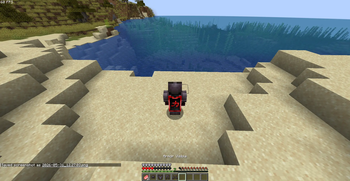
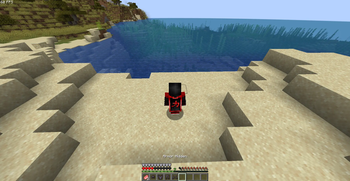
This Mod make Armour texture invisible by pressing a key which is very helpfull to make intro in smp without any fear of death so u will be able to create your intros without fear
Screenshots
About this Mod
Armour Texture Toggle
Want to see your Minecraft skin without sacrificing protection?
Armour Texture Toggle is a lightweight client-side Fabric mod that allows you to hide the visual rendering of your equipped armor while keeping all armor functionality intact.
Features
✅ Hide equipped armor with a single key press
✅ Keep all armor protection and enchantments
✅ Works in first-person and third-person views
✅ Armor remains equipped and fully functional
✅ Client-side only — no server installation required
✅ Lightweight and performance-friendly
✅ Saves your preference between game launches
How It Works
When enabled, the mod prevents your armor from being rendered on your client. Your armor is still equipped, still provides protection, and still works exactly as normal.
You see:
Your skin
No visible armor
The server sees:
Full armor equipped
Other players see:
Full armor equipped
Default Keybind
H — Toggle armor visibility
Armor Hidden
Armor Visible
Perfect For
PvP players
Content creators
Skin showcases
Screenshot creators
Players who want to see their skin while staying protected
Hide your armor. Keep your protection. See your skin. 🔥
Available Versions
How to Install Armour Texture Toggle on Your Server
Order Server
Order a Minecraft Java server with at least 3 GB RAM (4 GB recommended).
Set fabric Loader
In the panel under "Egg", select the fabric loader and matching Minecraft version (1.21.11).
Install Mod
Open the mod browser in the dashboard and search for "Armour Texture Toggle". Click "Install" – done! Alternatively, upload the .jar via SFTP to the /mods folder.
Compatibility
Mod Loaders
Minecraft Versions
1.21.11, 1.21.1
Server-side
✗ UnsupportedRecommended RAM
4 GB(min. 3 GB)Frequently Asked Questions
Armour Texture Toggle server crashes on startup – what to do?
Most common cause: wrong fabric version or insufficient RAM. Check the server log (latest.log) for "OutOfMemoryError" or "Mixin" errors. With Mado Hosting: ensure at least 3 GB RAM is allocated and the loader matches the mod version (1.21.11). You can switch loaders with one click in the panel.
Is Armour Texture Toggle compatible with fabric?
Armour Texture Toggle officially supports fabric for Minecraft 1.21.11, 1.21.1. The Mado dashboard automatically detects incompatible loader combinations.
Server lagging with Armour Texture Toggle – how to optimize performance?
Recommended RAM: 4 GB (per 8 players). Use /spark profiler to check if Armour Texture Toggle consumes the most tick time. Common fixes: reduce server view-distance to 8-10, install "performant" or "starlight" as supplementary mods on Forge. With Mado Hosting, your server runs on NVMe SSDs with dedicated CPU cores for minimal latency.
Similar Mods




![[TaCZ] Timeless and Classics Zero](https://cdn.modrinth.com/data/SzzJttH8/fd27766d2bb8390d284696b1dbd358f87e081439_96.webp)

Rent Modded Server
Install Armour Texture Toggle with just one click on your server.