
Aros' Fletching
Use fletching table, create new types of arrows!
Screenshots
About this Mod

About
Aros' fletching is about creating arrows with new different mechanics.
Content
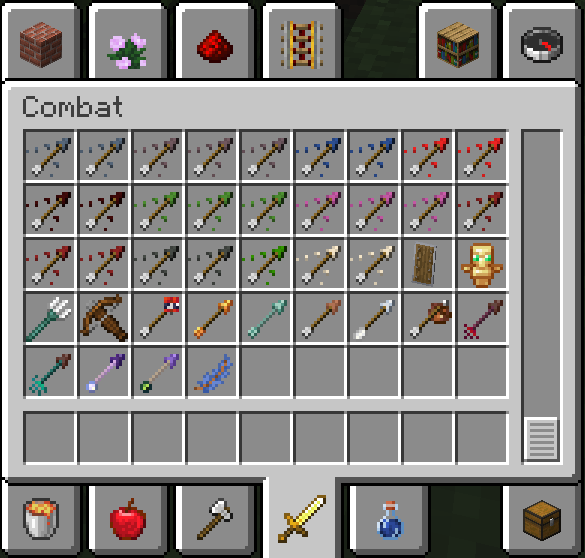
Mod adds a few new arrows, including:
Beginner arrow - weaker and easy crafted version of default arrow
Crimson arrow - When hit by an entity, applies the rage effect
Warped arrow - When hit by an entity, applies the confusion effect
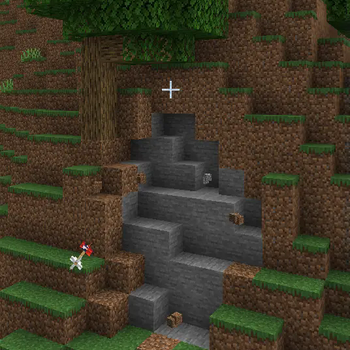
Glowing arrow - lights up after hitting a block. Can be used as an accessible light source in caves
Messenger arrow - can store one item like a bundle, doesn't despawns
Prismarine arrow - doesn't slow down in water
Tnt arrow - explodes on collision
Terracotta arrow - shatters into ceramic shards after hitting the entity. Very fragile
"Sight" - When hit by an entity, it does not allow it to despawn. If an arrow hits a player, it applies the all-seeing effect to him
"Oblivion" - When hit by an entity, it permanently erases entity's AI. If an arrow hits a player, it permanently applies the confusion effect to them
All these arrows, like the default one, are created in the fletching table
A few effects:
Rage - If the effect is applied to a mob, then it begins to attack everyone indiscriminately. When applied to a player, they become rabid
Confusion - If the effect is applied to a mob, it stops attacking (almost) anyone. When applied to a player, they will no longer be able to switch slots and open screens like inventory or chest
All-seeing - When applied to the player, they begin to see invisible entities
And enchanted feather with whistle mechanic.
After the player hits an entity, they can whistle to glow up entity, or damage it (depends on feather)
Available Versions
How to Install Aros' Fletching on Your Server
Order Server
Order a Minecraft Java server with at least 3 GB RAM (4 GB recommended).
Set fabric Loader
In the panel under "Egg", select the fabric loader and matching Minecraft version (1.19.4).
Install Mod
Open the mod browser in the dashboard and search for "Aros' Fletching". Click "Install" – done! Alternatively, upload the .jar via SFTP to the /mods folder.
Compatibility
Mod Loaders
Minecraft Versions
1.19.4, 1.19.3, 1.19.2
Server-side
✓ RequiredRecommended RAM
4 GB(min. 3 GB)Frequently Asked Questions
Aros' Fletching server crashes on startup – what to do?
Most common cause: wrong fabric version or insufficient RAM. Check the server log (latest.log) for "OutOfMemoryError" or "Mixin" errors. With Mado Hosting: ensure at least 3 GB RAM is allocated and the loader matches the mod version (1.19.4). You can switch loaders with one click in the panel.
Is Aros' Fletching compatible with fabric?
Aros' Fletching officially supports fabric for Minecraft 1.19.4, 1.19.3, 1.19.2. The Mado dashboard automatically detects incompatible loader combinations.
Server lagging with Aros' Fletching – how to optimize performance?
Recommended RAM: 4 GB (per 8 players). Use /spark profiler to check if Aros' Fletching consumes the most tick time. Common fixes: reduce server view-distance to 8-10, install "performant" or "starlight" as supplementary mods on Forge. With Mado Hosting, your server runs on NVMe SSDs with dedicated CPU cores for minimal latency.
Similar Mods




![[TaCZ] Timeless and Classics Zero](https://cdn.modrinth.com/data/SzzJttH8/fd27766d2bb8390d284696b1dbd358f87e081439_96.webp)

Rent Modded Server
Install Aros' Fletching with just one click on your server.