
ARprod's Security
Adds new materials, blocks and tools, all to protect you from those pesky thieves!
Screenshots
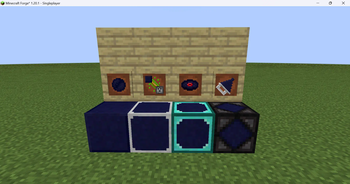
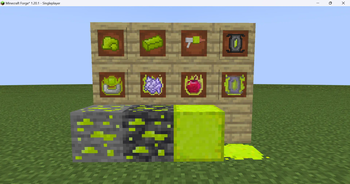
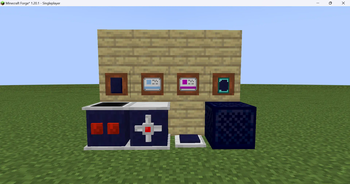
About this Mod
Has anyone been stealing all your stuff? Or you just want to add uranium to the game?
Well, introducing

Obifium is a unique material crafted by combining flint and obsidian, and it introduces a range of powerful and practical features to enhance gameplay. With obifium, you can create durable blocks, doors, safes, and more.
Obifium Blocks are crafted from four obifium pieces and can be upgraded through tiers, including iron, diamond, netherite, and endite (with ARprod’s Endite mod). Each upgrade strengthens the block, making it highly resistant and ideal for secure construction projects.
Obifium Doors come with a locking mechanism, allowing only the owner to open them. Like the blocks, they can also be upgraded through various tiers for increased security, perfect for safeguarding homes and bases.
The Obifium Safe functions as a lockable chest, offering a secure place to store valuable items. Though it can't be upgraded, it ensures your most important possessions stay protected from theft or tampering in multiplayer environments.
The Obifium Drill adds utility to mining, allowing players to break a 3-block-wide section of materials simultaneously. However, it comes with limitations—it’s imprecise and cannot be enchanted, maintaining balance in the game without making it overpowered.
For defense or mischief, the Obifium Landmine explodes when stepped on by a player but doesn’t break any blocks, making it a tactical tool for traps and PvP scenarios without causing landscape damage.
Finally, Uranium opens the door to a range of fun, radioactive items, allowing players to explore new ways to harness its power. Download the mod to discover all the exciting new possibilities!
This mod was made for my modpack, so unless all other mods in it are updated this one won't be
Versions older than 3.2.0 are on CurseForge
Available Versions
How to Install ARprod's Security on Your Server
Order Server
Order a Minecraft Java server with at least 3 GB RAM (4 GB recommended).
Set forge Loader
In the panel under "Egg", select the forge loader and matching Minecraft version (1.20.1).
Install Mod
Open the mod browser in the dashboard and search for "ARprod's Security". Click "Install" – done! Alternatively, upload the .jar via SFTP to the /mods folder.
Compatibility
Mod Loaders
Minecraft Versions
1.20.1
Server-side
✓ RequiredRecommended RAM
4 GB(min. 3 GB)Frequently Asked Questions
ARprod's Security server crashes on startup – what to do?
Most common cause: wrong forge version or insufficient RAM. Check the server log (latest.log) for "OutOfMemoryError" or "Mixin" errors. With Mado Hosting: ensure at least 3 GB RAM is allocated and the loader matches the mod version (1.20.1). You can switch loaders with one click in the panel.
Is ARprod's Security compatible with forge?
ARprod's Security officially supports forge for Minecraft 1.20.1. The Mado dashboard automatically detects incompatible loader combinations.
Server lagging with ARprod's Security – how to optimize performance?
Recommended RAM: 4 GB (per 8 players). Use /spark profiler to check if ARprod's Security consumes the most tick time. Common fixes: reduce server view-distance to 8-10, install "performant" or "starlight" as supplementary mods on Forge. With Mado Hosting, your server runs on NVMe SSDs with dedicated CPU cores for minimal latency.
Similar Mods



![CobbleDollars [Cobblemon Addon]](https://cdn.modrinth.com/data/s7N7AsqL/684040a264fc1d7f9b856ec5d2da39767398c7ad.png)

Rent Modded Server
Install ARprod's Security with just one click on your server.