
Arreglando Cobblemon
Trae evoluciones automáticas al subir de nivel y una interfaz clásica para aprender o gestionar movimientos al estilo de la saga principal
Screenshots
About this Mod
🟢 Arreglando Cobblemon
¡Recupera la fluidez y la nostalgia de los juegos clásicos en tu mundo de Minecraft! Este Sidemod elimina la necesidad de gestionar manualmente las evoluciones y los ataques desde el menú del equipo, introduciendo Interfaces Gráficas (GUIs) inmersivas que aparecen en el momento exacto de la acción.
Este mod está diseñado para funcionar como un complemento natural de Cobblemon, mejorando la experiencia de juego sin romper la estética.
✨ Características Principales
🧬 Evolución Automática e Inmersiva
Olvídate de recibir una notificación en el chat y tener que abrir el menú "M" para evolucionar.
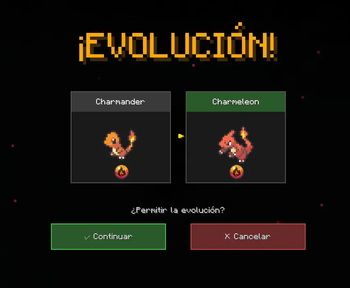
• Activación Instantánea: Al igual que en los juegos de la saga principal o Pixelmon, cuando tu Pokémon alcanza el nivel o cumple los requisitos, el proceso de evolución comienza automáticamente.
• Tú tienes el control: Aparecerá una GUI emergente que te informará que tu Pokémon está evolucionando.
• Opción de Cancelar: ¿Quieres mantener a tu Pokémon en su forma actual? Simplemente presiona el botón de Cancelar en la pantalla para detener el proceso.

⚔️ Sistema de Aprendizaje de Movimientos
¡Se acabó el perder movimientos por accidente o que se descarten automáticamente!
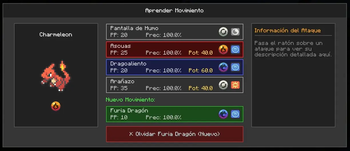
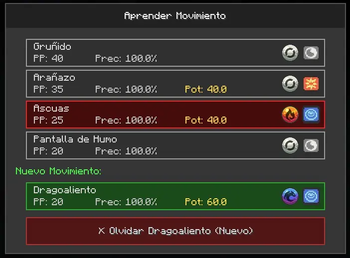
• Gestión Inteligente: Si tu Pokémon intenta aprender un movimiento nuevo y ya tiene los 4 espacios ocupados, el juego se pausará y se abrirá una interfaz de selección.
• Selección Visual: Verás una lista clara con tus 4 ataques actuales y el nuevo movimiento.
• Decisión Estratégica: Haz clic simplemente en el ataque que deseas olvidar para reemplazarlo, o rechaza el nuevo movimiento si prefieres tu set actual.

🛠️ Requisitos e Instalación
• Requiere Cobblemon (versión 1.7+ recomendada para la 1.21.1).
• Instalación: Coloca el archivo .jar tanto en la carpeta de mods del Servidor como del Cliente (necesario para ver las interfaces).
ingles
🟢 Arreglando Cobblemon
Bring back the fluidity and nostalgia of the classic games to your Minecraft world! This Sidemod eliminates the need to manually manage evolutions and moves from the team menu by introducing immersive Graphical User Interfaces (GUIs) that pop up at the exact moment of the action. This mod is designed to work as a natural complement to Cobblemon, enhancing the gameplay experience without breaking the aesthetic.
✨ Key Features
🧬 Automatic and Immersive Evolution
Forget about receiving a chat notification and having to open the "M" menu to evolve.
• Instant Activation: Just like in the main series games or Pixelmon, when your Pokémon reaches the required level or meets the requirements, the evolution process starts automatically.
• You're in Control: A pop-up GUI will appear to inform you that your Pokémon is evolving.
• Option to Cancel: Do you want to keep your Pokémon in its current form? Simply press the Cancel button on the screen to stop the process.
⚔️ Move Learning System
No more accidentally losing moves or having them automatically discarded!
• Smart Management: If your Pokémon tries to learn a new move and already has 4 slots occupied, the game will pause and a selection interface will open.
• Visual Selection: You will see a clear list with your 4 current moves and the new move.
• Strategic Decision: Simply click on the move you wish to forget to replace it, or reject the new move if you prefer your current set.
🛠️ Requirements and Installation
• Requires Cobblemon (version 1.7+ recommended for 1.21.1).
• Installation: Place the .jar file in both the Server and Client mod folders (necessary to view the interfaces).
Available Versions
How to Install Arreglando Cobblemon on Your Server
Order Server
Order a Minecraft Java server with at least 3 GB RAM (4 GB recommended).
Set fabric Loader
In the panel under "Egg", select the fabric loader and matching Minecraft version (1.21.1).
Install Mod
Open the mod browser in the dashboard and search for "Arreglando Cobblemon". Click "Install" – done! Alternatively, upload the .jar via SFTP to the /mods folder.
Compatibility
Mod Loaders
Minecraft Versions
1.21.1
Server-side
✗ UnsupportedRecommended RAM
4 GB(min. 3 GB)Frequently Asked Questions
Arreglando Cobblemon server crashes on startup – what to do?
Most common cause: wrong fabric version or insufficient RAM. Check the server log (latest.log) for "OutOfMemoryError" or "Mixin" errors. With Mado Hosting: ensure at least 3 GB RAM is allocated and the loader matches the mod version (1.21.1). You can switch loaders with one click in the panel.
Is Arreglando Cobblemon compatible with fabric and neoforge?
Arreglando Cobblemon officially supports fabric, neoforge for Minecraft 1.21.1. The Mado dashboard automatically detects incompatible loader combinations.
Server lagging with Arreglando Cobblemon – how to optimize performance?
Recommended RAM: 4 GB (per 8 players). Use /spark profiler to check if Arreglando Cobblemon consumes the most tick time. Common fixes: reduce server view-distance to 8-10, install "performant" or "starlight" as supplementary mods on Forge. With Mado Hosting, your server runs on NVMe SSDs with dedicated CPU cores for minimal latency.
Similar Mods




Rent Modded Server
Install Arreglando Cobblemon with just one click on your server.
Details
- License
- Creative Commons Attribution Non Commercial No Derivatives 4.0 International
- Server-side
- Unsupported