
Arsonage
Fire-related mod for Minecraft
Screenshots


About this Mod
Arsonage is a mod which aims to expand upon the fire-related aspects of Minecraft through a few additions.
Additions as of now:
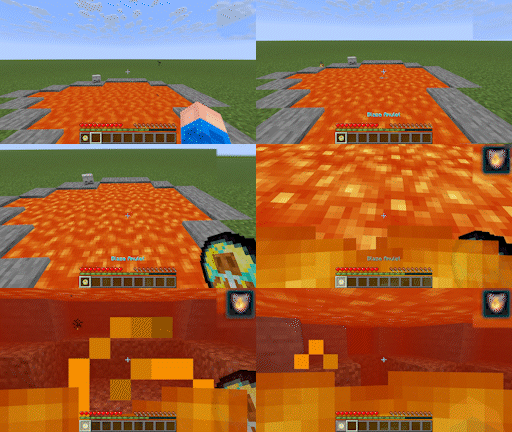
Blaze Amulet - When in your inventory, coming into contact with fire or hot blocks causes fire resistance to be granted for 30 seconds, after which there's a cooldown period of 2 minutes.
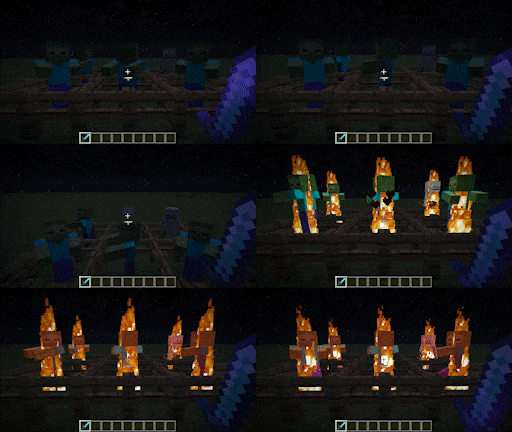
Scorch - An enchantment similar to Fire Aspect, but ignites all enemies within distance of the player, distance increasing based on enchantment level (max 3). Which mobs are affected by Scorch is configurable. By default, allays, villagers, wandering traders, iron golems, cats, wolves, and happy ghasts are unaffected by Scorch's secondary effect, but will still be set on fire if directly hit.
That's all?
I really want to add more features to this mod, but I really need your feedback to make it possible. Any suggestions, big or small, can go a long way in the scope of this mod's development. I want to know what the community wants so I can deliver in places where vanilla seems lacking.
You may use this in your modpack with due credit.
Please enjoy!
Available Versions
How to Install Arsonage on Your Server
Order Server
Order a Minecraft Java server with at least 3 GB RAM (4 GB recommended).
Set neoforge Loader
In the panel under "Egg", select the neoforge loader and matching Minecraft version (1.21.8).
Install Mod
Open the mod browser in the dashboard and search for "Arsonage". Click "Install" – done! Alternatively, upload the .jar via SFTP to the /mods folder.
Compatibility
Mod Loaders
Minecraft Versions
1.21.8, 1.21.7, 1.21.6 (+6 more)
Server-side
✓ RequiredRecommended RAM
4 GB(min. 3 GB)Frequently Asked Questions
Arsonage server crashes on startup – what to do?
Most common cause: wrong neoforge version or insufficient RAM. Check the server log (latest.log) for "OutOfMemoryError" or "Mixin" errors. With Mado Hosting: ensure at least 3 GB RAM is allocated and the loader matches the mod version (1.21.8). You can switch loaders with one click in the panel.
Is Arsonage compatible with neoforge?
Arsonage officially supports neoforge for Minecraft 1.21.8, 1.21.7, 1.21.6. The Mado dashboard automatically detects incompatible loader combinations.
Server lagging with Arsonage – how to optimize performance?
Recommended RAM: 4 GB (per 8 players). Use /spark profiler to check if Arsonage consumes the most tick time. Common fixes: reduce server view-distance to 8-10, install "performant" or "starlight" as supplementary mods on Forge. With Mado Hosting, your server runs on NVMe SSDs with dedicated CPU cores for minimal latency.
Similar Mods



![[TaCZ] Timeless and Classics Zero](https://cdn.modrinth.com/data/SzzJttH8/fd27766d2bb8390d284696b1dbd358f87e081439_96.webp)


Rent Modded Server
Install Arsonage with just one click on your server.