
Ascend Fruit
Ascend up terrain like in Zelda using this new type of chorus fruit.
Screenshots
About this Mod
Ascend Fruit
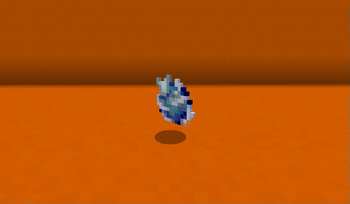
This mod introduces the ascend fruit, a very useful item which lets you teleport through terrain to the top.

Inspired by the ascend ability from The Legend of Zelda: Tears of the Kingdom, it's perfect for quickly exiting a cave while mining. However, you can also use it to traverse up mountains, go to the next floor in your base, or many other ways.
How it works
- Eat the Ascend Fruit near a ceiling
- Teleport to the nearest open space above you
Usage video
Crafting
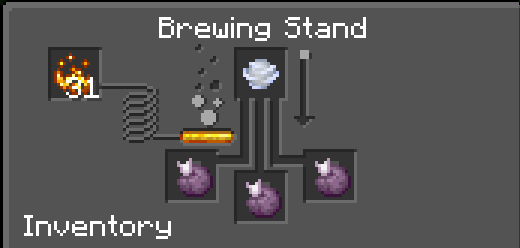
To craft it place a wind charge at the top in a brewing stand and chorus fruit at the bottom and it will change into the ascend fruit.
Some notes:
- Teleporting onto liquids is currently not possible. If there's an ocean above you the teleport will fail. I might change this in the future.
- You have to be close to the ceiling (withing 7 air blocks) to teleport. The destination has to be 2 blocks high.
- Teleporting may fail for other reasons, but your fruit won't be consumed whenever it fails to teleport you.
Support the mod
Thanks for at least reading this description. This is my first Minecraft mod, and I'm learning as I go. If you found this mod useful, consider giving a tip.

Available Versions
How to Install Ascend Fruit on Your Server
Order Server
Order a Minecraft Java server with at least 3 GB RAM (4 GB recommended).
Set fabric Loader
In the panel under "Egg", select the fabric loader and matching Minecraft version (1.21.11).
Install Mod
Open the mod browser in the dashboard and search for "Ascend Fruit". Click "Install" – done! Alternatively, upload the .jar via SFTP to the /mods folder.
Compatibility
Mod Loaders
Minecraft Versions
1.21.11, 1.21.8, 1.21.7 (+6 more)
Server-side
✓ RequiredRecommended RAM
4 GB(min. 3 GB)Frequently Asked Questions
Ascend Fruit server crashes on startup – what to do?
Most common cause: wrong fabric version or insufficient RAM. Check the server log (latest.log) for "OutOfMemoryError" or "Mixin" errors. With Mado Hosting: ensure at least 3 GB RAM is allocated and the loader matches the mod version (1.21.11). You can switch loaders with one click in the panel.
Is Ascend Fruit compatible with fabric?
Ascend Fruit officially supports fabric for Minecraft 1.21.11, 1.21.8, 1.21.7. The Mado dashboard automatically detects incompatible loader combinations.
Server lagging with Ascend Fruit – how to optimize performance?
Recommended RAM: 4 GB (per 8 players). Use /spark profiler to check if Ascend Fruit consumes the most tick time. Common fixes: reduce server view-distance to 8-10, install "performant" or "starlight" as supplementary mods on Forge. With Mado Hosting, your server runs on NVMe SSDs with dedicated CPU cores for minimal latency.
Similar Mods



Rent Modded Server
Install Ascend Fruit with just one click on your server.