
ASM Robots
A Minecraft mod around coding robots in assembly
Screenshots
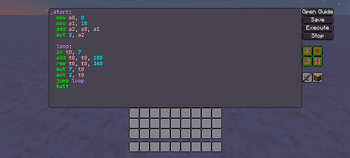
About this Mod
ASM Robots
Table of Contents
About
A Minecraft mod around coding robots in assembly.
This mod is similar to mods such as Computer Craft and OpenComputers, except with 2 main differences:
- You program an entity instead of a block
- You program in assembly instead of in lua
Why I made this
- I like coding in assembly and wanted to make something with assembly myself (and because doing this with assembly is easier than writing a compiler)
- I was inspired by Mnemonimov releasing (great game btw, if you also like assembly you should try it)
- I wanted to make something like Computer Craft for a while
- I chose to use entities to distinguish it from Computer Craft and because I haven't seen much in the way of programmable entities in Minecraft
Documentation
Documentation can be accessed from the code editor in the robot's UI.
I will probably make it available out of the game at some point.
Installation
Install the mod by putting the file into minecraft/mods/ alongside a version of LDLib2, Kotlin for Forge and GuideME on a neoforge install for 26.1.2.
If you do not know how to install NeoForge, see their user guide.
Building
To build the mod, clone this repo and run gradle neoforge:build
Demo

Available Versions
How to Install ASM Robots on Your Server
Order Server
Order a Minecraft Java server with at least 3 GB RAM (4 GB recommended).
Set neoforge Loader
In the panel under "Egg", select the neoforge loader and matching Minecraft version (26.1.2).
Install Mod
Open the mod browser in the dashboard and search for "ASM Robots". Click "Install" – done! Alternatively, upload the .jar via SFTP to the /mods folder.
Compatibility
Mod Loaders
Minecraft Versions
26.1.2
Server-side
✓ RequiredRecommended RAM
4 GB(min. 3 GB)Frequently Asked Questions
ASM Robots server crashes on startup – what to do?
Most common cause: wrong neoforge version or insufficient RAM. Check the server log (latest.log) for "OutOfMemoryError" or "Mixin" errors. With Mado Hosting: ensure at least 3 GB RAM is allocated and the loader matches the mod version (26.1.2). You can switch loaders with one click in the panel.
Is ASM Robots compatible with neoforge?
ASM Robots officially supports neoforge for Minecraft 26.1.2. The Mado dashboard automatically detects incompatible loader combinations.
Server lagging with ASM Robots – how to optimize performance?
Recommended RAM: 4 GB (per 8 players). Use /spark profiler to check if ASM Robots consumes the most tick time. Common fixes: reduce server view-distance to 8-10, install "performant" or "starlight" as supplementary mods on Forge. With Mado Hosting, your server runs on NVMe SSDs with dedicated CPU cores for minimal latency.
Similar Mods





Rent Modded Server
Install ASM Robots with just one click on your server.