
Assassin's Craft Chronicles
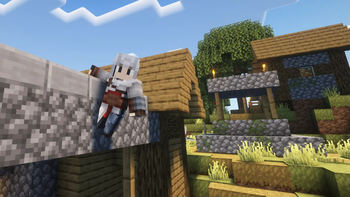
Dive into Minecraft with the "Assassin's Craft Chronicles". In early access, experience iconic outfits and weapons from the series. Items currently in Creative tab; crafting recipes coming soon. Assassin's Creed
Screenshots

About this Mod


Assassin's Creed Mod for Minecraft - Early Access
Dive into the rich world of "Assassin's Creed" right within Minecraft! This mod brings iconic outfits, weapons, locations, and mechanics from the acclaimed series into your favorite sandbox game. Whether you're parkouring across rooftops or engaging in stealthy assassinations, the spirit of the Brotherhood awaits you.
🔷 Features (Current & Upcoming):
- Outfits & Capes: Authentic Assassin outfits from various eras.
- Weapons: A diverse arsenal of weapons.
Locations: Viewpoint synchronization and hideouts to explore.[not implemented yet]
🔶 Accessing Mod Items:
Currently, all items and features of the mod can only be accessed through the Creative tab. We're actively working on introducing crafting recipes for all items. Stay tuned!
🔷 Early Access Notice:
This mod is still under active development. By joining this early access, you're becoming part of the development process.
🔷 We Need Your Help!
Your feedback is invaluable! Help shape this mod by:
- Reporting bugs or issues.
- Suggesting enhancements.
- Sharing your experiences.
Together, we'll make this mod a true testament to the "Assassin's Creed" legacy.
🔷 Stay Updated:
Follow our updates and join our community for discussions and more.
Thank you for your support, and welcome to the Brotherhood!
Available Versions
How to Install Assassin's Craft Chronicles on Your Server
Order Server
Order a Minecraft Java server with at least 3 GB RAM (4 GB recommended).
Set forge Loader
In the panel under "Egg", select the forge loader and matching Minecraft version (1.20.1).
Install Mod
Open the mod browser in the dashboard and search for "Assassin's Craft Chronicles". Click "Install" – done! Alternatively, upload the .jar via SFTP to the /mods folder.
Compatibility
Mod Loaders
Minecraft Versions
1.20.1, 1.19.2
Server-side
✓ RequiredRecommended RAM
4 GB(min. 3 GB)Frequently Asked Questions
Assassin's Craft Chronicles server crashes on startup – what to do?
Most common cause: wrong forge version or insufficient RAM. Check the server log (latest.log) for "OutOfMemoryError" or "Mixin" errors. With Mado Hosting: ensure at least 3 GB RAM is allocated and the loader matches the mod version (1.20.1). You can switch loaders with one click in the panel.
Is Assassin's Craft Chronicles compatible with forge?
Assassin's Craft Chronicles officially supports forge for Minecraft 1.20.1, 1.19.2. The Mado dashboard automatically detects incompatible loader combinations.
Server lagging with Assassin's Craft Chronicles – how to optimize performance?
Recommended RAM: 4 GB (per 8 players). Use /spark profiler to check if Assassin's Craft Chronicles consumes the most tick time. Common fixes: reduce server view-distance to 8-10, install "performant" or "starlight" as supplementary mods on Forge. With Mado Hosting, your server runs on NVMe SSDs with dedicated CPU cores for minimal latency.
Similar Mods




Rent Modded Server
Install Assassin's Craft Chronicles with just one click on your server.