
Astro! Reforged
Redesigned, polished version of the Astro! mod developed by Prismatica.
Screenshots
About this Mod
A version of the Astro! mod developed by Prismatica focused on making its effects more reliable, more understandable, and more thematically consistent with base Minecraft.
Overview
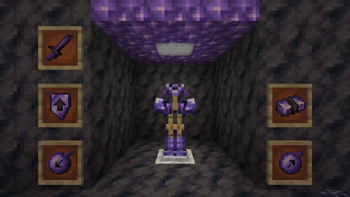
Astro! is a small mod that adds a new armor type, Mauveine, as well as a small amount of related items. Mauveine is crafted by combining Netherite Scrap and Amethyst Clusters, and provides gravity-defying powers!
This set works well with other mods and is generally designed to be an alternative to Netherite. Try it out with other movement items!
Recipes
All Astro! Reforged recipes are visible on EMI. Rather than using the original Astro! recipes, Astro! Reforged adds a new Smithing Template; the Mauveine Upgrade Smithing Template. Found in Ancient Cities, this template is used to apply Mauveine Ingots to Diamond Armor and Swords.
Items
Mauveine Armor
Mauveine armor reduces your gravity and damage taken from fall damage. Each piece provides 20% Gravity Reduction and 25% Fall Reduction, providing full fall immunity with a full set and an extra block and a half of jump height.
The reduced gravity is disabled while sneaking.
Gravity Bombs
Astro! Reforged has two gravity bombs; the Low Gravity Bomb and the High Gravity Bomb. These bombs are throwable, deal a small amount of damage when hitting an entity, and 'deploy' once they hit a block.
Once deployed, they become immune to gravity and release a large AoE, modifying the gravity of all entities within about 10 blocks. High Gravity Bombs increase gravity by 800% and Low Gravity Bombs reduce gravity by 70%.
Gravity Bombs stack with each other and Mauveine armor. Mauveine armor's Gravity Reduction is applied last.
Available Versions
How to Install Astro! Reforged on Your Server
Order Server
Order a Minecraft Java server with at least 3 GB RAM (4 GB recommended).
Set fabric Loader
In the panel under "Egg", select the fabric loader and matching Minecraft version (1.20.1).
Install Mod
Open the mod browser in the dashboard and search for "Astro! Reforged". Click "Install" – done! Alternatively, upload the .jar via SFTP to the /mods folder.
Compatibility
Mod Loaders
Minecraft Versions
1.20.1
Server-side
✓ RequiredRecommended RAM
4 GB(min. 3 GB)Frequently Asked Questions
Astro! Reforged server crashes on startup – what to do?
Most common cause: wrong fabric version or insufficient RAM. Check the server log (latest.log) for "OutOfMemoryError" or "Mixin" errors. With Mado Hosting: ensure at least 3 GB RAM is allocated and the loader matches the mod version (1.20.1). You can switch loaders with one click in the panel.
Is Astro! Reforged compatible with fabric?
Astro! Reforged officially supports fabric for Minecraft 1.20.1. The Mado dashboard automatically detects incompatible loader combinations.
Server lagging with Astro! Reforged – how to optimize performance?
Recommended RAM: 4 GB (per 8 players). Use /spark profiler to check if Astro! Reforged consumes the most tick time. Common fixes: reduce server view-distance to 8-10, install "performant" or "starlight" as supplementary mods on Forge. With Mado Hosting, your server runs on NVMe SSDs with dedicated CPU cores for minimal latency.
Similar Mods




![[TaCZ] Timeless and Classics Zero](https://cdn.modrinth.com/data/SzzJttH8/fd27766d2bb8390d284696b1dbd358f87e081439_96.webp)

Rent Modded Server
Install Astro! Reforged with just one click on your server.