
Atlas Core
A library (currently only for configs) used by Atlas Development projects
Screenshots
About this Mod
Atlas Core
A mod library for Atlas Projects
A simple library that currently provides a command library and a robust config system, if admittedly incomplete.
However, it will be expanded to suit more needs as time progresses, and improvements to the config will be made.
Commands
As of right now, the command library consists of adding an argument type that allows you to use interchangeable arguments, as in, if certain arguments are not needed, then one can have the user specify the arguments provided with proper suggestions in the format <arg_name>=<arg_value>.
However, in the future the plan is to create a parameters argument which allows you to insert [--someArg value -someOtherArg], matching usual command line parameters, with suggestions for what to input.
In addition, eventually an easier way to achieve wanted results for vanilla argument types and ones which are added by Atlas Core when they are used as opts arguments.
Configs
By default, configs are stored in ./config/<mod_id>/<config_path>.json, which is where you will be able to access and edit them.
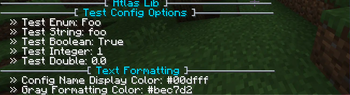
If the config has a GUI, it will appear in the Atlas Configs menu inside of Options on both pause screen and title screen. If Mod Menu is installed, the Atlas Configs menu appears as the config for Atlas Core. If a mod has an attached default config with a screen, it will become the config screen for that mod in Mod Menu.
Configs can also be read or manipulated using the command /atlas_config, which lets you reset, read, or reload configs all at once, reset, read, or reload a particular config, or edit, reset, or retrieve the value of a specific option.
For mod developers
Intrested in using this for your mod?
I recommend checking out the README to see how to implement it in your mod.
Available Versions
How to Install Atlas Core on Your Server
Order Server
Order a Minecraft Java server with at least 3 GB RAM (4 GB recommended).
Set fabric Loader
In the panel under "Egg", select the fabric loader and matching Minecraft version (26.1.2).
Install Mod
Open the mod browser in the dashboard and search for "Atlas Core". Click "Install" – done! Alternatively, upload the .jar via SFTP to the /mods folder.
Compatibility
Mod Loaders
Minecraft Versions
26.1.2, 26.1.1, 26.1 (+30 more)
Server-side
✓ RequiredRecommended RAM
4 GB(min. 3 GB)Frequently Asked Questions
Atlas Core server crashes on startup – what to do?
Most common cause: wrong fabric version or insufficient RAM. Check the server log (latest.log) for "OutOfMemoryError" or "Mixin" errors. With Mado Hosting: ensure at least 3 GB RAM is allocated and the loader matches the mod version (26.1.2). You can switch loaders with one click in the panel.
Is Atlas Core compatible with fabric and forge and neoforge and quilt?
Atlas Core officially supports fabric, forge, neoforge, quilt for Minecraft 26.1.2, 26.1.1, 26.1. Note: Forge and Fabric mods are NOT cross-compatible – pick one loader and stick with it. The Mado dashboard automatically detects incompatible loader combinations.
Server lagging with Atlas Core – how to optimize performance?
Recommended RAM: 4 GB (per 8 players). Use /spark profiler to check if Atlas Core consumes the most tick time. Common fixes: reduce server view-distance to 8-10, install "performant" or "starlight" as supplementary mods on Forge. With Mado Hosting, your server runs on NVMe SSDs with dedicated CPU cores for minimal latency.
Similar Mods



Rent Modded Server
Install Atlas Core with just one click on your server.