
Atlas-Map
New map mode, that will not feel like you are cheating
Screenshots
About this Mod
Atlas
One map. Always growing. Always in your hands.
Atlas replaces Minecraft's chunk-by-chunk map clutter with a single, expanding map you
craft, equip, and explore with. As you travel, it charts the world for you — for exactly
the empty maps vanilla would cost, so it never feels like cheating.
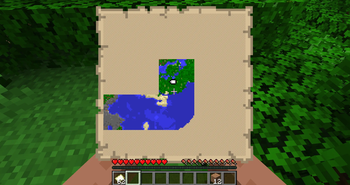
The map is drawn by Minecraft's own map engine, so it looks pixel-for-pixel identical
to a vanilla map — just bigger, and in your hands while you walk.
How it works
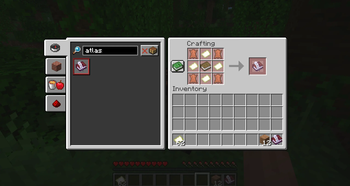
- Craft one Atlas from leather, empty maps, and a book.
- Equip it in the dedicated Atlas slot (in your inventory, above the offhand).
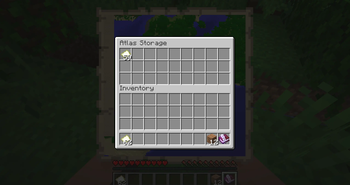
- Load it with empty maps — right-click the held Atlas to open its storage.
- Explore. While equipped, the Atlas spends one empty map per new 128×128 area it
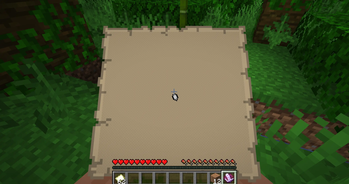
charts — true vanilla parity. - Press M to raise it in your hands like a vanilla map and keep walking.
Features
- 🗺️ A single growing map — no chests full of paper, no item frames.
- ✋ Held in your hands — press M and explore with the map up, just like holding a
vanilla map. No full-screen menu breaking your immersion. - 🔍 Scroll to zoom, stand still to grab a cursor and drag to pan.
- 📍 Your own marker shows exactly where you are and which way you face.
- ⚖️ Vanilla economy — 1 empty map = one 128×128 tile. Never cheaper than vanilla.
- 🟢 Doesn't touch vanilla maps — never crafted an Atlas? You'll notice zero changes.
Available Versions
How to Install Atlas-Map on Your Server
Order Server
Order a Minecraft Java server with at least 3 GB RAM (4 GB recommended).
Set fabric Loader
In the panel under "Egg", select the fabric loader and matching Minecraft version (26.1.2).
Install Mod
Open the mod browser in the dashboard and search for "Atlas-Map". Click "Install" – done! Alternatively, upload the .jar via SFTP to the /mods folder.
Compatibility
Mod Loaders
Minecraft Versions
26.1.2
Server-side
✓ RequiredRecommended RAM
4 GB(min. 3 GB)Frequently Asked Questions
Atlas-Map server crashes on startup – what to do?
Most common cause: wrong fabric version or insufficient RAM. Check the server log (latest.log) for "OutOfMemoryError" or "Mixin" errors. With Mado Hosting: ensure at least 3 GB RAM is allocated and the loader matches the mod version (26.1.2). You can switch loaders with one click in the panel.
Is Atlas-Map compatible with fabric?
Atlas-Map officially supports fabric for Minecraft 26.1.2. The Mado dashboard automatically detects incompatible loader combinations.
Server lagging with Atlas-Map – how to optimize performance?
Recommended RAM: 4 GB (per 8 players). Use /spark profiler to check if Atlas-Map consumes the most tick time. Common fixes: reduce server view-distance to 8-10, install "performant" or "starlight" as supplementary mods on Forge. With Mado Hosting, your server runs on NVMe SSDs with dedicated CPU cores for minimal latency.
Similar Mods




Rent Modded Server
Install Atlas-Map with just one click on your server.