
Atomics Client
Atomics Client is a customizable Fabric PvP client that adds clean visuals, totem pop customization, combat overlays, stats tracking, and useful quality-of-life tools.
Screenshots
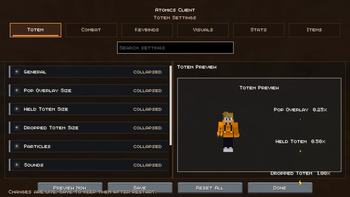
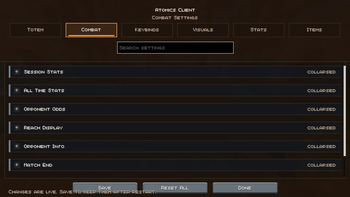
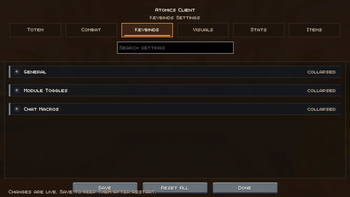
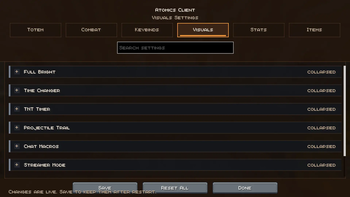
About this Mod
🟢 Atomics Client
A customizable Minecraft PvP client focused on clean visuals, useful overlays, combat info, and quality-of-life tools.
✨ Overview
Atomics Client gives you simple control over the visuals and tools that matter during PvP.
Customize totem pops, overlays, nametags, shield/fire visuals, PvP stats, Friend/Foe tracking, zoom, fullbright, freelook, macros, armor HUD, food preview overlays, and more through a clean in-game settings menu.
Most settings update live without needing to restart your game.
🎨 Main Features
🔹 Visual Customization
- Totem hue shifting and pop customization
- Totem retextures using other Minecraft items
- Adjustable pop overlays, particles, and sounds
- Shield and fire overlay controls
- Empty bucket overlay
- Projectile trails
- Food preview overlay
- Partial status icons
⚔️ PvP Tools
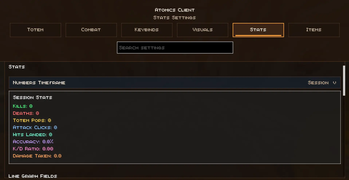
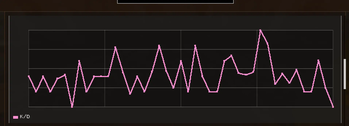
- PvP stats display
- Win-odds style estimates
- Session and all-time stat tracking
- Reach display
- TNT timer
- Auto GG
- Customizable Armor HUD
- Low armor durability warnings
🛡️ Armor HUD
- Shows armor durability on screen
- Custom HUD positioning
- Horizontal or vertical layout
- Adjustable armor spacing
- Optional hotbar-style border
- Durability display modes:
- Numbers
- Percent
- Bars
🍗 Food Preview Overlay
- Shows food and saturation preview while holding food
- Customizable overlay appearance
- Helps preview hunger changes before eating
🏷️ Nametag Customization
- Custom nametag modules
- Toggleable ping, pop counter, win odds, and opponent stats
- Reorderable nametag items
- Tier-style PvP tags and icons
🧑🤝🧑 Friend/Foe System
- Mark players as friends, foes, or neutral
- Colored Friend/Foe overlays
- Configurable overlay style, color, and opacity
- Optional friend attack protection
🛠️ Quality-of-Life
- Zoom
- Freelook
- Full Bright
- Time Changer
- Streamer Mode
- Chat Macros
- Dual Spectate Camera
🎛️ Clean Settings UI
- Organized tabs and sections
- Searchable settings
- Keybinds menu
- Armor HUD position editor
- Mod Menu support
- Live config updates
⚡ Performance
Atomics Client is built to stay lightweight while giving you extra PvP visuals, overlays, and useful client-side tools.
🧪 Compatibility
- Minecraft:
1.21.11 - Loader:
Fabric - Requires:
Fabric API - Optional:
Mod Menu
💬 Final Note
Atomics Client is made for players who want more control over how their game looks and feels during PvP, without needing a bunch of separate mods.
Available Versions
How to Install Atomics Client on Your Server
Order Server
Order a Minecraft Java server with at least 3 GB RAM (4 GB recommended).
Set fabric Loader
In the panel under "Egg", select the fabric loader and matching Minecraft version (26.1.2).
Install Mod
Open the mod browser in the dashboard and search for "Atomics Client". Click "Install" – done! Alternatively, upload the .jar via SFTP to the /mods folder.
Compatibility
Mod Loaders
Minecraft Versions
26.1.2, 1.21.11, 1.21.4 (+6 more)
Server-side
✗ UnsupportedRecommended RAM
4 GB(min. 3 GB)Frequently Asked Questions
Atomics Client server crashes on startup – what to do?
Most common cause: wrong fabric version or insufficient RAM. Check the server log (latest.log) for "OutOfMemoryError" or "Mixin" errors. With Mado Hosting: ensure at least 3 GB RAM is allocated and the loader matches the mod version (26.1.2). You can switch loaders with one click in the panel.
Is Atomics Client compatible with fabric and forge?
Atomics Client officially supports fabric, forge for Minecraft 26.1.2, 1.21.11, 1.21.4. Note: Forge and Fabric mods are NOT cross-compatible – pick one loader and stick with it. The Mado dashboard automatically detects incompatible loader combinations.
Server lagging with Atomics Client – how to optimize performance?
Recommended RAM: 4 GB (per 8 players). Use /spark profiler to check if Atomics Client consumes the most tick time. Common fixes: reduce server view-distance to 8-10, install "performant" or "starlight" as supplementary mods on Forge. With Mado Hosting, your server runs on NVMe SSDs with dedicated CPU cores for minimal latency.
Similar Mods



![[TaCZ] Timeless and Classics Zero](https://cdn.modrinth.com/data/SzzJttH8/fd27766d2bb8390d284696b1dbd358f87e081439_96.webp)


Rent Modded Server
Install Atomics Client with just one click on your server.