
AudioPlayer - Vanilla+ Radio Bridge
A server-side/singleplayer addon that bridges AudioPlayer and Vanilla+ Radio, allowing you to broadcast custom music from a Jukebox.
Screenshots
About this Mod
AudioPlayer - Vanilla+ Radio Bridge
A lightweight server-side/singleplayer Fabric addon that connects AudioPlayer and Vanilla+ Radio.
With this addon, players can broadcast their custom music discs and uploaded audio tracks across the entire server using the radio network!
📻 How it works
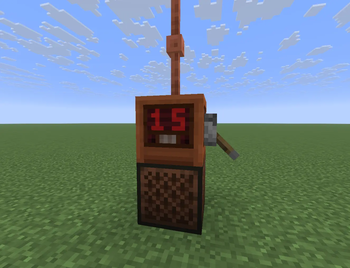
- Place a Vanilla+ Radio block directly on top of a Jukebox.
- Set the radio mode to Broadcast by right-clicking it.
- Insert any custom music disc created via AudioPlayer into the Jukebox.
- The audio stream is automatically broadcasted to all active radio receivers tuned into the same Redstone frequency across the world!
🛠️ Installation
- Server-side only: This mod only needs to be installed on the server. Players do not need to download it to join and listen to the music!
- Dependencies: Requires Simple Voice Chat, AudioPlayer, and Vanilla+ Radio installed on the server.
⚠ IMPORTANT ⚠
- Redstone Control Changes: To prevent conflicts (since working Jukeboxes can emit redstone signals), the Radio transmitter block will ONLY read its channel from the 4 horizontal sides (North, South, East, West). Redstone inputs from the top and bottom are completely ignored. Make sure your redstone wire or levers are connected to the sides of the Radio block to switch channels successfully!
- Custom Music Discs Only: This addon strictly intercepts the digital Opus audio stream. Therefore, it will only work with custom audio tracks or uploaded music discs from the AudioPlayer mod. Vanilla Minecraft music discs will play normally in the Jukebox but will not be broadcasted over the radio.
Available Versions
How to Install AudioPlayer - Vanilla+ Radio Bridge on Your Server
Order Server
Order a Minecraft Java server with at least 3 GB RAM (4 GB recommended).
Set fabric Loader
In the panel under "Egg", select the fabric loader and matching Minecraft version (1.21.10).
Install Mod
Open the mod browser in the dashboard and search for "AudioPlayer - Vanilla+ Radio Bridge". Click "Install" – done! Alternatively, upload the .jar via SFTP to the /mods folder.
Compatibility
Mod Loaders
Minecraft Versions
1.21.10
Server-side
✓ RequiredRecommended RAM
4 GB(min. 3 GB)Frequently Asked Questions
AudioPlayer - Vanilla+ Radio Bridge server crashes on startup – what to do?
Most common cause: wrong fabric version or insufficient RAM. Check the server log (latest.log) for "OutOfMemoryError" or "Mixin" errors. With Mado Hosting: ensure at least 3 GB RAM is allocated and the loader matches the mod version (1.21.10). You can switch loaders with one click in the panel.
Is AudioPlayer - Vanilla+ Radio Bridge compatible with fabric?
AudioPlayer - Vanilla+ Radio Bridge officially supports fabric for Minecraft 1.21.10. The Mado dashboard automatically detects incompatible loader combinations.
Server lagging with AudioPlayer - Vanilla+ Radio Bridge – how to optimize performance?
Recommended RAM: 4 GB (per 8 players). Use /spark profiler to check if AudioPlayer - Vanilla+ Radio Bridge consumes the most tick time. Common fixes: reduce server view-distance to 8-10, install "performant" or "starlight" as supplementary mods on Forge. With Mado Hosting, your server runs on NVMe SSDs with dedicated CPU cores for minimal latency.
Similar Mods






Rent Modded Server
Install AudioPlayer - Vanilla+ Radio Bridge with just one click on your server.