
AuraCraft
AuraCraft adds token-based, persistent effect progression for SMP-style gameplay.
Screenshots
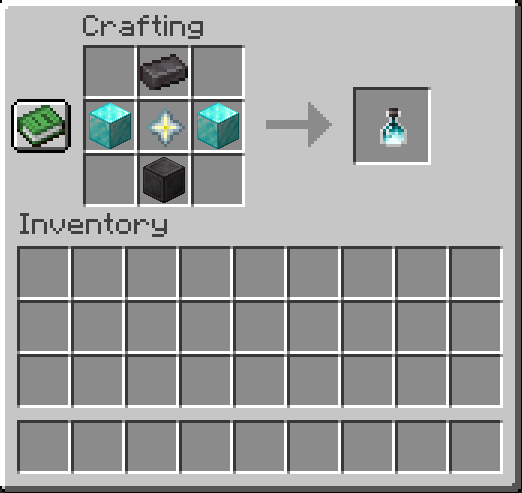
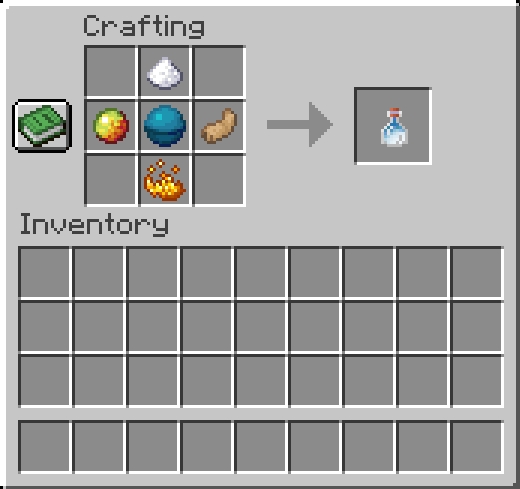
About this Mod
AuraCraft (Fabric)
AuraCraft adds a persistent, point-based aura system for SMP-style gameplay. Players choose status effects as auras through an in-game UI, upgrade them over time, and defend them in PvP. Server admins control balance through GameRules and config.
Features
- Press Y (default) to open the Aura Picker at any time - even with no points to spend.
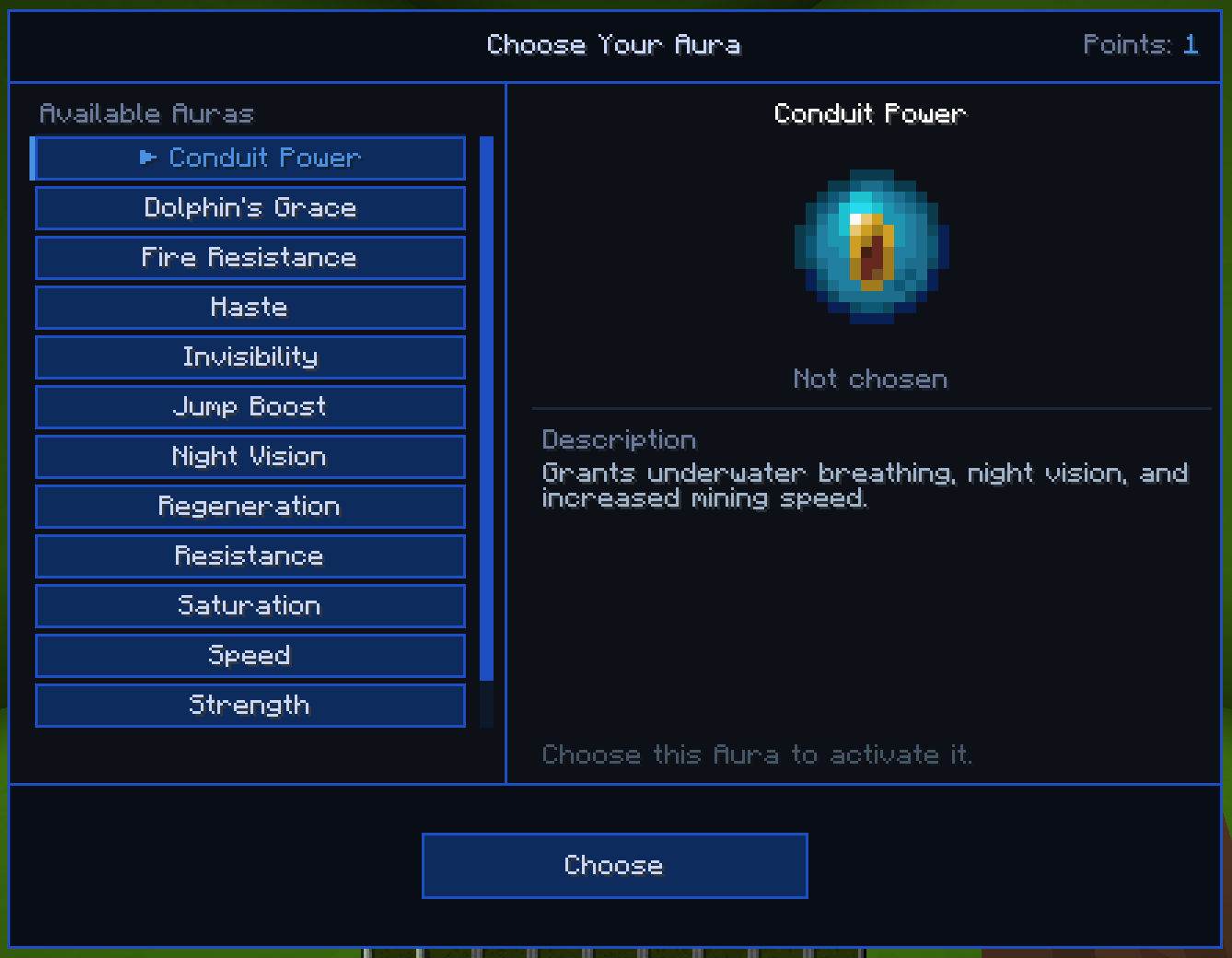
- Selected auras persist across sessions and are reapplied automatically on login.
- Picking the same aura again upgrades it (e.g. Speed I -> Speed II), up to a configurable max level.
- Combined cap prevents overstacking:
selected auras + unspent points ≤ max_auras. - Restoration Queue - auras lost to PvP or voluntarily withdrawn are remembered. Using an Aura Plus restores the most recently lost aura automatically before granting a new point.
- PvP loss system: dying to a player removes your most recent aura (or a point if you have none). The killer receives an Aura Plus drop if
drop_plus_on_killis enabled. - Multiplayer handshake gate - clients without AuraCraft or on a mismatched version are rejected on join.
- Mod Menu config screen with per-aura enable/disable toggles and upgrade caps.
Items
| Item | Stack | Behavior |
|---|---|---|
Aura Plus  |
1 | Restores your most recently lost aura (if queued), otherwise grants +1 point. Not consumed in creative mode. |
Aura Reset  |
8 | Refunds all points (invested + unspent), capped at max_auras. Requires at least one previously selected aura. Not consumed in creative mode. |
Commands
All /aura commands require GameMaster (OP level 2+), except /aura withdraw.
/aura- Toggle the AuraCraft UI on/off server-wide./aura status [player]- View a player's current points and selected auras./aura reset [player]- Refund all points for repicking (mirrors the Aura Reset item)./aura restart [player]- Hard reset: returns player to 1 point, clears all auras and the restoration queue./aura plus [player] [amount]- Grant extra points to a player./aura remove [player] [amount]- Remove points or auras from a player./aura withdraw [amount]- Convert your own points/auras into Aura Plus items (self-use).
GameRules
Configured in-game via /gamerule under the AuraCraft category.
| Rule | Default | Description |
|---|---|---|
max_auras |
3 |
Combined load cap (selected auras + unspent points) |
drop_plus_on_kill |
true |
Whether killing a player drops an Aura Plus |
enable_heart_recipe |
true |
Whether the Heart of the Sea -> Aura Plus recipe is craftable |
Config
Config file: config/auracraft.json
Controls per-aura availability and max upgrade level only. Gameplay numbers are managed through GameRules.
{
  "enabledAuras": {
    "minecraft:speed": true,
    "minecraft:strength": true,
    "minecraft:blindness": false
  },
  "auraUpgradeLevels": {
    "minecraft:speed": 2,
    "minecraft:strength": 1
  }
}
enabledAuras- Which auras appear in the picker UI.auraUpgradeLevels- Max upgrade level per aura (1= base only,2= one upgrade, etc.).
License
This mod is licensed under the MIT License. See the LICENSE file for details.
Available Versions
How to Install AuraCraft on Your Server
Order Server
Order a Minecraft Java server with at least 3 GB RAM (4 GB recommended).
Set fabric Loader
In the panel under "Egg", select the fabric loader and matching Minecraft version (26.1.2).
Install Mod
Open the mod browser in the dashboard and search for "AuraCraft". Click "Install" – done! Alternatively, upload the .jar via SFTP to the /mods folder.
Compatibility
Mod Loaders
Minecraft Versions
26.1.2
Server-side
✓ RequiredRecommended RAM
4 GB(min. 3 GB)Frequently Asked Questions
AuraCraft server crashes on startup – what to do?
Most common cause: wrong fabric version or insufficient RAM. Check the server log (latest.log) for "OutOfMemoryError" or "Mixin" errors. With Mado Hosting: ensure at least 3 GB RAM is allocated and the loader matches the mod version (26.1.2). You can switch loaders with one click in the panel.
Is AuraCraft compatible with fabric?
AuraCraft officially supports fabric for Minecraft 26.1.2. The Mado dashboard automatically detects incompatible loader combinations.
Server lagging with AuraCraft – how to optimize performance?
Recommended RAM: 4 GB (per 8 players). Use /spark profiler to check if AuraCraft consumes the most tick time. Common fixes: reduce server view-distance to 8-10, install "performant" or "starlight" as supplementary mods on Forge. With Mado Hosting, your server runs on NVMe SSDs with dedicated CPU cores for minimal latency.
Similar Mods




Rent Modded Server
Install AuraCraft with just one click on your server.