
Aurora pvp
A Minecraft PvP mod that's half done, sorry idk how to code it, will get better hopefully over the weeks to come. It works tho... only for 1.21.11 for now.
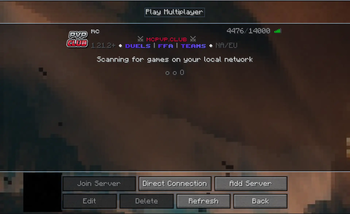
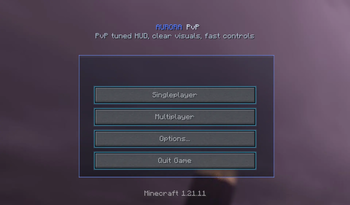
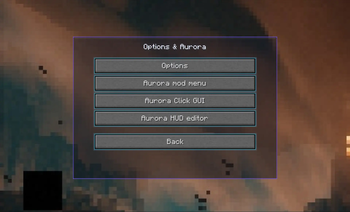
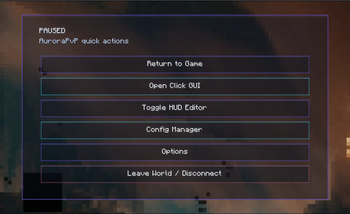
Screenshots
About this Mod
Aurora PvP
Built for cleaner fights and better control
Fabric 1.21.11 • Client-side PvP utility mod
For server owners
If you would like to opt out of people having this client on your server, please check the versions for the Fabric server mod and Paper plugin for server opt-out. Thank you.
UPDATED 1.7.4
Hope you like it :3
What is Aurora PvP?
Aurora PvP is a modular PvP-focused client that improves how combat feels and plays without overcomplicating Minecraft.
The goal isn’t to overload the game with features, but to refine the parts that actually matter in PvP:
- visibility
- awareness
- control
Everything is designed to feel smooth, useful, and consistent with vanilla gameplay.
Combat Features
Aurora PvP includes several features that help you better understand and react during fights:
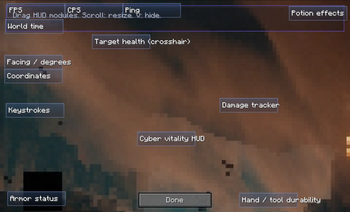
- Player Outline (PvP)
- Highlights players so they’re easier to track in combat
- Target Health (Crosshair)
- Displays enemy health directly in your crosshair for faster decisions
- Damage Tracker
- Shows how much damage you’re dealing in real time
- Hit Particles
- Adds clear visual feedback when landing hits
These features give you better awareness without getting in the way of gameplay.
Visual Improvements
The mod reduces unnecessary visual clutter and improves clarity:
- NoRender
- Removes distracting or unimportant visuals and can improve performance
- Makes it easier to see key elements during fights
- Block Overlay
- Improves block interaction visibility for building and PvP
- Movement and Control
Movement-related features are designed to make gameplay more comfortable and consistent:
- Toggle Sprint
- Toggle Sneak
- Free Look (hold key)
- Zoom (hold + scroll)
These changes don’t alter core mechanics but make movement easier to manage during fights.
HUD and Information
Aurora PvP adds useful on-screen information without cluttering the display:
- Cyber Vitality HUD (in progress)
- Hand / Tool Durability
- Potion Effects Display
- World Time
- Facing / Degrees
All HUD elements are designed to be simple and readable.
Customisation
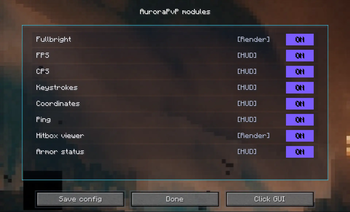
All modules can be toggled through an in-game GUI.
You can choose exactly which features you want to use and configure the mod to match your playstyle.
Visual Style
Based on the in-game experience and gallery, the mod focuses on:
- clean outlines
- minimal HUD elements
- clear particle effects
- reduced visual clutter
The result is a more focused and readable PvP experience.
Development Status
Aurora PvP is still being developed.
Some features may not work perfectly yet, and improvements to stability, visuals, and UI are ongoing. More updates and features are planned.
Requirements
- Minecraft 1.21.11
- Fabric Loader
Final Notes
Aurora PvP is built around making combat clearer and more controlled without changing the core feel of the game.
If you want a cleaner PvP experience with better feedback and visibility, this mod is designed for that.
Available Versions
How to Install Aurora pvp on Your Server
Order Server
Order a Minecraft Java server with at least 3 GB RAM (4 GB recommended).
Set fabric Loader
In the panel under "Egg", select the fabric loader and matching Minecraft version (1.21.11).
Install Mod
Open the mod browser in the dashboard and search for "Aurora pvp". Click "Install" – done! Alternatively, upload the .jar via SFTP to the /mods folder.
Compatibility
Mod Loaders
Minecraft Versions
1.21.11
Server-side
✗ UnsupportedRecommended RAM
4 GB(min. 3 GB)Frequently Asked Questions
Aurora pvp server crashes on startup – what to do?
Most common cause: wrong fabric version or insufficient RAM. Check the server log (latest.log) for "OutOfMemoryError" or "Mixin" errors. With Mado Hosting: ensure at least 3 GB RAM is allocated and the loader matches the mod version (1.21.11). You can switch loaders with one click in the panel.
Is Aurora pvp compatible with fabric?
Aurora pvp officially supports fabric for Minecraft 1.21.11. The Mado dashboard automatically detects incompatible loader combinations.
Server lagging with Aurora pvp – how to optimize performance?
Recommended RAM: 4 GB (per 8 players). Use /spark profiler to check if Aurora pvp consumes the most tick time. Common fixes: reduce server view-distance to 8-10, install "performant" or "starlight" as supplementary mods on Forge. With Mado Hosting, your server runs on NVMe SSDs with dedicated CPU cores for minimal latency.
Similar Mods






Rent Modded Server
Install Aurora pvp with just one click on your server.