
Auto Eater
This is a simple client mod to stop worrying about eating all the time, that selects the food and eats it. It detects whenever the foodbar falls a certain threshold, selects food in your hotbar, and starts eating it.
Screenshots


About this Mod
Auto Eater Mod
This is a simple client mod to stop worrying about eating all the time, selecting the food and eating. It detects whenever the foodbar falls below a certain threshold, selects food in your hotbar, and starts eating, and selects back the slot you had. You can add items to a blacklist to prevent eating unwanted items.
Features
Killswitch with hotkey:
Lets you turn Auto Eater on or off instantly by pressing
,without opening the config screen. Useful when you want full manual control for combat, building, or other precise actions.Customizable Food Blacklist:
Prevents specific foods from being eaten automatically. This is useful for rare, valuable, or dangerous foods like golden apples or suspicious stew.
Auto hunger threshold:
The threshold can automatically adapt to your food supply instead of using one fixed hunger value. In
Auto (min)it prefers the least nutritious available food, and inAuto (max)it prefers the most nutritious food.Return to previous selected slot when done:
After auto-eating, the mod switches you back to the hotbar slot you were using before it started.
Auto Eating cancelation with cooldown:
Auto-eating can be canceled by scrolling away or by pressing left click, and the mod then stays inactive for a configurable amount of time. Getting hit also cancels the mod for safety.
Include Inventory:
If no food is available in the hotbar, auto-eater will search through your inventory and pull out food to your last hotbar slot, and auto-eat it.
Want to see a feature implemented? Please make a feaure request.
Config
Configurations are available through the mod menu.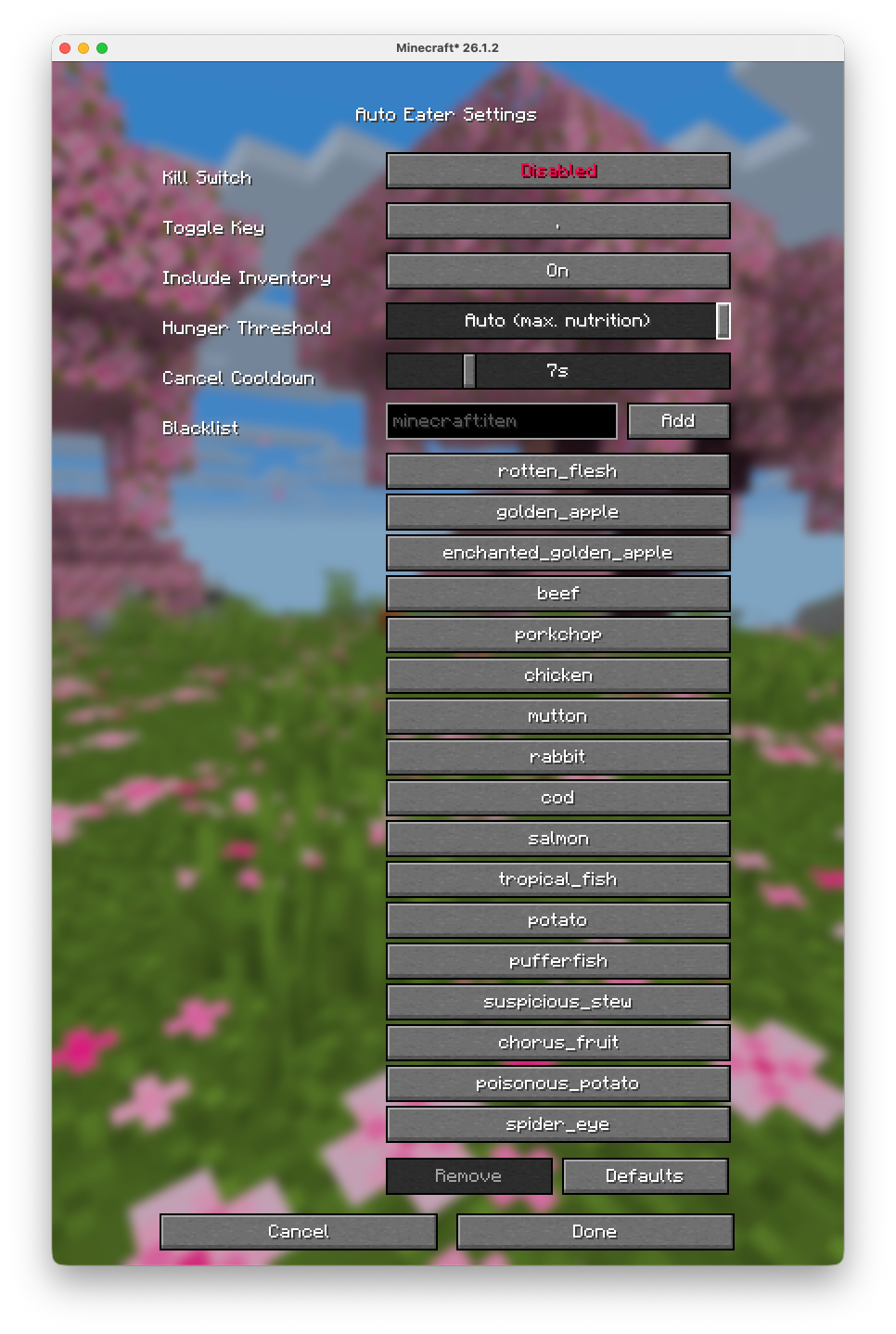
Server Warning
Some servers use plugins that turn your inventory into a UI (for example shops, menus, or other item-based interfaces). In those cases, Auto-Eater can mistakenly try to eat UI items or interfere with menu interactions. On large servers that use that tipe of interfaces (e.g. Hypixel), it is recommended to turn Auto-Eaeter off while using those plugin/UIs.GitHub Source
Available Versions
How to Install Auto Eater on Your Server
Order Server
Order a Minecraft Java server with at least 3 GB RAM (4 GB recommended).
Set fabric Loader
In the panel under "Egg", select the fabric loader and matching Minecraft version (26.1.2).
Install Mod
Open the mod browser in the dashboard and search for "Auto Eater". Click "Install" – done! Alternatively, upload the .jar via SFTP to the /mods folder.
Compatibility
Mod Loaders
Minecraft Versions
26.1.2, 26.1.1, 26.1 (+5 more)
Server-side
✗ UnsupportedRecommended RAM
4 GB(min. 3 GB)Frequently Asked Questions
Auto Eater server crashes on startup – what to do?
Most common cause: wrong fabric version or insufficient RAM. Check the server log (latest.log) for "OutOfMemoryError" or "Mixin" errors. With Mado Hosting: ensure at least 3 GB RAM is allocated and the loader matches the mod version (26.1.2). You can switch loaders with one click in the panel.
Is Auto Eater compatible with fabric?
Auto Eater officially supports fabric for Minecraft 26.1.2, 26.1.1, 26.1. The Mado dashboard automatically detects incompatible loader combinations.
Server lagging with Auto Eater – how to optimize performance?
Recommended RAM: 4 GB (per 8 players). Use /spark profiler to check if Auto Eater consumes the most tick time. Common fixes: reduce server view-distance to 8-10, install "performant" or "starlight" as supplementary mods on Forge. With Mado Hosting, your server runs on NVMe SSDs with dedicated CPU cores for minimal latency.
Rent Modded Server
Install Auto Eater with just one click on your server.