
Auto Greeting - Server
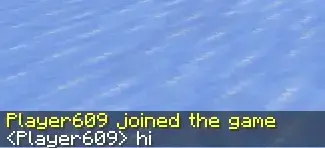
A Fabric mod that automatically sends greeting messages.
Screenshots
About this Mod
Languages
Auto Greeting - Server
A Fabric mod that automatically sends greeting messages when a player joins the server
The mod supports both plain chat messages and commands.
Features
- Supports multiple messages
- Supports plain chat messages and commands
- Supports blacklist / whitelist rules for player names
- Supports placeholders
- Automatically sends messages when a player joins the server
Command Overview
/servergreet ...
Notes:
[a|b]meansaorb
For example:
/servergreet [whitelist|blacklist] list
means either:
/servergreet whitelist list
or
/servergreet blacklist list
Server Side Commands
Status
Controls whether auto greeting is enabled or disabled.
/servergreet status
/servergreet status enable
/servergreet status disable
/servergreet status toggle
Message
Controls what the mod sends.
You can use placeholders.
/servergreet message add <message>
/servergreet message add <message> <index>
/servergreet message remove
/servergreet message remove <index>
/servergreet message remove all
/servergreet message list
Placeholders
| Placeholder | Description |
|---|---|
@player |
Player name |
@UUID |
UUID |
@X |
X coordinate (up to 3 decimals) |
@Y |
Y coordinate (up to 3 decimals) |
@Z |
Z coordinate (up to 3 decimals) |
@health |
Current health |
@level |
Current experience level |
Blacklist / Whitelist
/servergreet [whitelist|blacklist] list
/servergreet [whitelist|blacklist] clear confirm

/servergreet [whitelist|blacklist] [match|except] list

/servergreet [whitelist|blacklist] [match|except] [equal|contain|startWith|endWith] add <pattern>
/servergreet [whitelist|blacklist] [match|except] [equal|contain|startWith|endWith] remove
/servergreet [whitelist|blacklist] [match|except] [equal|contain|startWith|endWith] remove <index>
/servergreet [whitelist|blacklist] [match|except] [equal|contain|startWith|endWith] remove all
/servergreet [whitelist|blacklist] [match|except] [equal|contain|startWith|endWith] list
Examples
/servergreet message add Welcome @player!
/servergreet message add Player @player joined at (@X, @Y, @Z)
/servergreet message add HP=@health Level=@level
Message Behavior
If a message does start with /, it is executed as a command.
If a message does not start with /, it is sent as a normal chat message.
Filtering
- blacklist
- whitelist
matchrulesexceptrulesequalcontainstartWithendWith
These rules are used to decide whether a joining player's name should trigger greeting logic.
Filtering behavior
- If a player matches the blacklist, they are ignored
- If a player matches the blacklist but also matches blacklist except, they are allowed again
- If the whitelist is not empty, only players matching the whitelist are allowed
- If a player matches the whitelist but also matches whitelist except, they are ignored
Notes
indexis optional and 1-basedadd <message> <index>inserts before the existing item at that position- If
indexis omitted or out of range, the message is appended remove <index>removes the specified itemremovewithout an index removes the last itemremove allclears the message listclear confirmclears the entire blacklist or whitelist rule set- Numeric values are formatted with up to 3 decimal places, with trailing zeros removed
Supported Versions
- Minecraft 26.1.2
- Fabric Loader 0.19.2+
- Fabric API 0.150.0+
- Java 25
License
MIT
Available Versions
How to Install Auto Greeting - Server on Your Server
Order Server
Order a Minecraft Java server with at least 3 GB RAM (4 GB recommended).
Set fabric Loader
In the panel under "Egg", select the fabric loader and matching Minecraft version (26.1.2).
Install Mod
Open the mod browser in the dashboard and search for "Auto Greeting - Server". Click "Install" – done! Alternatively, upload the .jar via SFTP to the /mods folder.
Compatibility
Mod Loaders
Minecraft Versions
26.1.2, 1.21.11
Server-side
✓ RequiredRecommended RAM
4 GB(min. 3 GB)Frequently Asked Questions
Auto Greeting - Server server crashes on startup – what to do?
Most common cause: wrong fabric version or insufficient RAM. Check the server log (latest.log) for "OutOfMemoryError" or "Mixin" errors. With Mado Hosting: ensure at least 3 GB RAM is allocated and the loader matches the mod version (26.1.2). You can switch loaders with one click in the panel.
Is Auto Greeting - Server compatible with fabric?
Auto Greeting - Server officially supports fabric for Minecraft 26.1.2, 1.21.11. The Mado dashboard automatically detects incompatible loader combinations.
Server lagging with Auto Greeting - Server – how to optimize performance?
Recommended RAM: 4 GB (per 8 players). Use /spark profiler to check if Auto Greeting - Server consumes the most tick time. Common fixes: reduce server view-distance to 8-10, install "performant" or "starlight" as supplementary mods on Forge. With Mado Hosting, your server runs on NVMe SSDs with dedicated CPU cores for minimal latency.
Similar Mods






Rent Modded Server
Install Auto Greeting - Server with just one click on your server.