
Auto Plant Crops
Provides a set of features that helps with farming that works both on singleplayer and multiplayer.
Screenshots
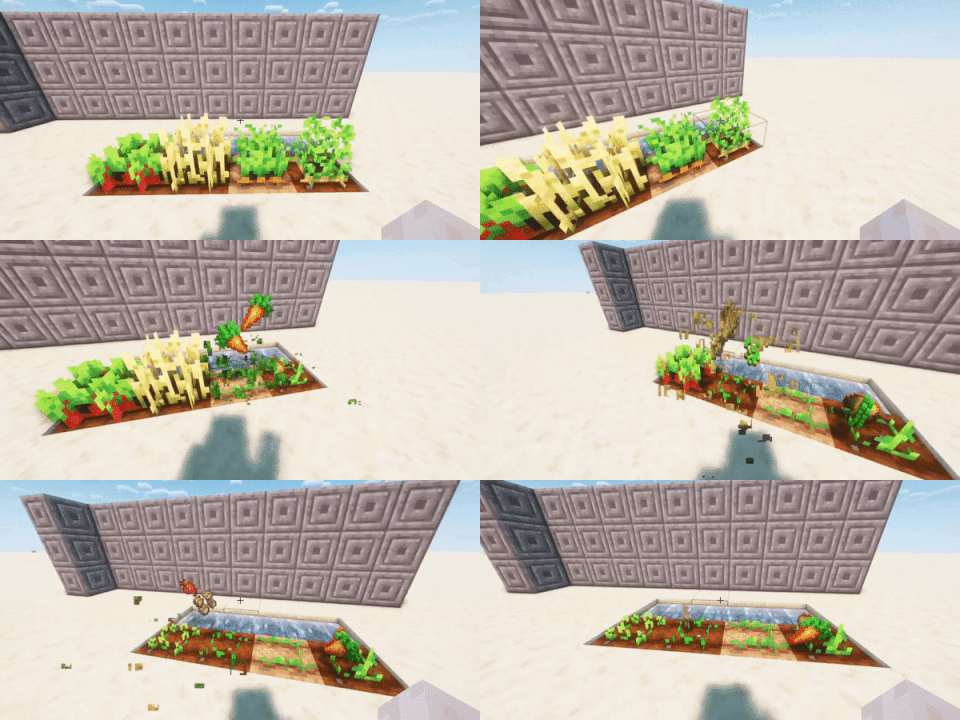
About this Mod
5000+ downloads, Thank you guys so much for the support :)
Features:
Auto plant seed upon breaking it
Supports almost all crops
Works in both SinglePlayer & Multiplayer
autoplantcropsDelay: set a delay between each hoeing/planting/bonemealing in ms
plantMultiple : Plant seeds both on and around the broken crop if set to true.
plantOnWalkOver: Automatically plants seed upon walking over farmland while holding seed if set to true.
plantDespiteAge: Plant seed upon broken crop despite it being not ageddenough for harvest if set to true, won't work if cancelBreakUnlessAged is on.
cancelBreakUnlessAged: Prevents the client from breaking and sending break packets to server, won't work if plantDespiteAge is on.
farmLandMuliple : same as plantMultiple but with turning dirts into farmland
autoFarmLand: Auto turns grass/dirt into farmland upon while over it while holding a hoe if set to true.
boneMealMultiple : same as plantMultiple but with bonemeals
boneMealDelay : set a delay before using bonemeal in order to prevent being kicked by server
autoBoneMeal: Bone meal seed upon walking over seed while holding bone meal if set to true.
switchBackToSlot: switches back to previous slot after finished with replacing crops.
autoplantcrops: Disable the entire mod if set to False.
autoReplant: Whether to replant the crop or not, useful if you want to use any other functionalites of the mods except for replanting.
Demos:
Demo1 (singleplayer)
Demo2(multiplayer)
Demo3(multiplayer)
Config:
Config file's named is autofarmcropsconf and it's located in %APPDATA%/.minecraft/config
Hold down Z to quickly disable the mod without having to run the command, the key can be changed!
Commands:
/AutoPlantCropsCommandList: will show a list of options and their status.
/
/autoplantcropsDelay
Contribution:
Contributions/suggestions/issues,conflicts reports, are all welcomed and are highly appreciated :)
Available Versions
How to Install Auto Plant Crops on Your Server
Order Server
Order a Minecraft Java server with at least 3 GB RAM (4 GB recommended).
Set fabric Loader
In the panel under "Egg", select the fabric loader and matching Minecraft version (1.21.10).
Install Mod
Open the mod browser in the dashboard and search for "Auto Plant Crops". Click "Install" – done! Alternatively, upload the .jar via SFTP to the /mods folder.
Compatibility
Mod Loaders
Minecraft Versions
1.21.10, 1.21.9, 1.21.8 (+20 more)
Server-side
✗ UnsupportedRecommended RAM
4 GB(min. 3 GB)Frequently Asked Questions
Auto Plant Crops server crashes on startup – what to do?
Most common cause: wrong fabric version or insufficient RAM. Check the server log (latest.log) for "OutOfMemoryError" or "Mixin" errors. With Mado Hosting: ensure at least 3 GB RAM is allocated and the loader matches the mod version (1.21.10). You can switch loaders with one click in the panel.
Is Auto Plant Crops compatible with fabric?
Auto Plant Crops officially supports fabric for Minecraft 1.21.10, 1.21.9, 1.21.8. The Mado dashboard automatically detects incompatible loader combinations.
Server lagging with Auto Plant Crops – how to optimize performance?
Recommended RAM: 4 GB (per 8 players). Use /spark profiler to check if Auto Plant Crops consumes the most tick time. Common fixes: reduce server view-distance to 8-10, install "performant" or "starlight" as supplementary mods on Forge. With Mado Hosting, your server runs on NVMe SSDs with dedicated CPU cores for minimal latency.
Similar Mods




![[TaCZ] Timeless and Classics Zero](https://cdn.modrinth.com/data/SzzJttH8/fd27766d2bb8390d284696b1dbd358f87e081439_96.webp)

Rent Modded Server
Install Auto Plant Crops with just one click on your server.