
AutoCongrats
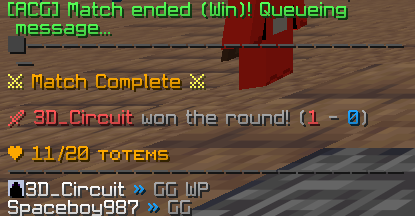
This is a mod I made that automatically says a programmable phrase when you win or lose a duel in PVP!
Screenshots

About this Mod
AutoCongrats
AutoCongrats is a Minecraft mod made by 3D_Circuit, a Minecraft YouTuber, that automatically says a programmable phrase upon winning or losing a duel.
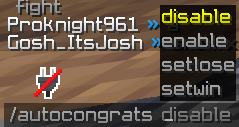
This tool was made for people who can't type "GG" fast enough, or are just too lazy. Each message can be customized to your liking and can be toggled off with /autocongrats disable.And of course, it can also be enabled, with /autocongrats enable.
WARNING : USE AT YOUR OWN RISK. Some servers cheat detection systems MAY flag this as macros. Please be careful while using this mod.
Usage
Download
- Download the mod from the official sources (Modrinth) alongside Fabric API.
Commands
/autocongrats [disable|enable] Enable/disable messages.
/autocongrats [setlose|setwin] (Your win/loss phrase) Changes your win/loss phrase
You can toggle the config GUI with RIGHT SHIFT
If you have any questions or ideas, please join my Discord server and mention me!
Thanks to bkhr for helping me keep the description for this project in order!
Available Versions
How to Install AutoCongrats on Your Server
Order Server
Order a Minecraft Java server with at least 3 GB RAM (4 GB recommended).
Set fabric Loader
In the panel under "Egg", select the fabric loader and matching Minecraft version (1.21.11).
Install Mod
Open the mod browser in the dashboard and search for "AutoCongrats". Click "Install" – done! Alternatively, upload the .jar via SFTP to the /mods folder.
Compatibility
Mod Loaders
Minecraft Versions
1.21.11
Server-side
✗ UnsupportedRecommended RAM
4 GB(min. 3 GB)Frequently Asked Questions
AutoCongrats server crashes on startup – what to do?
Most common cause: wrong fabric version or insufficient RAM. Check the server log (latest.log) for "OutOfMemoryError" or "Mixin" errors. With Mado Hosting: ensure at least 3 GB RAM is allocated and the loader matches the mod version (1.21.11). You can switch loaders with one click in the panel.
Is AutoCongrats compatible with fabric?
AutoCongrats officially supports fabric for Minecraft 1.21.11. The Mado dashboard automatically detects incompatible loader combinations.
Server lagging with AutoCongrats – how to optimize performance?
Recommended RAM: 4 GB (per 8 players). Use /spark profiler to check if AutoCongrats consumes the most tick time. Common fixes: reduce server view-distance to 8-10, install "performant" or "starlight" as supplementary mods on Forge. With Mado Hosting, your server runs on NVMe SSDs with dedicated CPU cores for minimal latency.
Similar Mods






Rent Modded Server
Install AutoCongrats with just one click on your server.