
Autocrafting Table by Sephamm
Autocrafting Table brings simple and powerful automation to Minecraft Forge 1.20.1. Define a recipe with a pattern, supply items in the buffer, and let the table craft automatically and output items to connected inventories.
Screenshots

About this Mod
Autocrafting Table by Sephamm
Autocrafting Table by Sephamm adds a powerful and intuitive automatic crafting solution to Minecraft, designed to simplify automation while staying close to the vanilla experience.
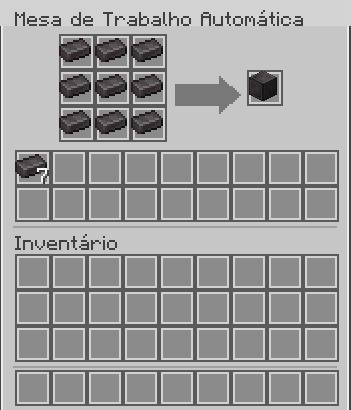
The Autocrafting Table uses a 3×3 pattern system to define recipes and a separate internal buffer to store and consume crafting materials. Once configured, the table crafts items automatically at a configurable interval, without requiring redstone or player interaction.
Crafted items can be exported directly into connected inventories such as chests, allowing seamless integration into automated setups and farms.
✨ Features
Automatic crafting without redstone
3×3 pattern grid to define recipes
Separate internal buffer for consumed items
Automatic output to connected inventories
Configurable crafting speed via commands
Clean, vanilla-inspired GUI
Fully compatible with Minecraft Forge 1.20.1
🕹️ Commands
/sephamm autocraft interval – shows the current crafting interval
/sephamm autocraft interval
/sephamm autocraft interval reset – resets to default values
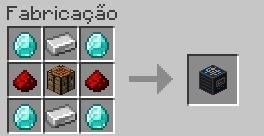
🔨 Crafting
The Autocrafting Table can be crafted using a balanced recipe that fits naturally into the game’s progression.
📌 Notes
The pattern is never consumed
Only valid recipes are processed
Crafting stops automatically when resources run out
No item duplication
Works with all standard vanilla crafting recipes
Available Versions
How to Install Autocrafting Table by Sephamm on Your Server
Order Server
Order a Minecraft Java server with at least 3 GB RAM (4 GB recommended).
Set forge Loader
In the panel under "Egg", select the forge loader and matching Minecraft version (1.20.1).
Install Mod
Open the mod browser in the dashboard and search for "Autocrafting Table by Sephamm". Click "Install" – done! Alternatively, upload the .jar via SFTP to the /mods folder.
Compatibility
Mod Loaders
Minecraft Versions
1.20.1
Server-side
✓ RequiredRecommended RAM
4 GB(min. 3 GB)Frequently Asked Questions
Autocrafting Table by Sephamm server crashes on startup – what to do?
Most common cause: wrong forge version or insufficient RAM. Check the server log (latest.log) for "OutOfMemoryError" or "Mixin" errors. With Mado Hosting: ensure at least 3 GB RAM is allocated and the loader matches the mod version (1.20.1). You can switch loaders with one click in the panel.
Is Autocrafting Table by Sephamm compatible with forge?
Autocrafting Table by Sephamm officially supports forge for Minecraft 1.20.1. The Mado dashboard automatically detects incompatible loader combinations.
Server lagging with Autocrafting Table by Sephamm – how to optimize performance?
Recommended RAM: 4 GB (per 8 players). Use /spark profiler to check if Autocrafting Table by Sephamm consumes the most tick time. Common fixes: reduce server view-distance to 8-10, install "performant" or "starlight" as supplementary mods on Forge. With Mado Hosting, your server runs on NVMe SSDs with dedicated CPU cores for minimal latency.
Rent Modded Server
Install Autocrafting Table by Sephamm with just one click on your server.