
AutoEat
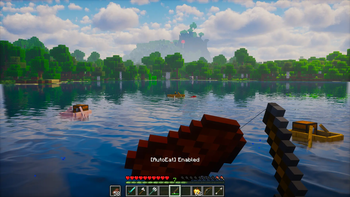
Automatically eats when your hunger drops so you can focus on your adventure.
Screenshots



About this Mod

AutoEat - Stay full, stay alive!
AutoEat automatically eats for you when your hunger drops, so you can keep mining, fighting, and building without interruptions.
Supports Fabric, Forge, Quilt, and NeoForge, with updates for newer Minecraft versions.
✨ Features
- Smart auto-eat – configurable hunger threshold or "eat until full"
- Panic mode – prioritizes premium food when your health is low
- Pause on hit – optionally stop eating when damaged, with cooldown
- Force-place support – place blocks mid-eat, AutoEat resumes after a short cooldown
- Offhand support – optionally use offhand first, compatible with fishing rods
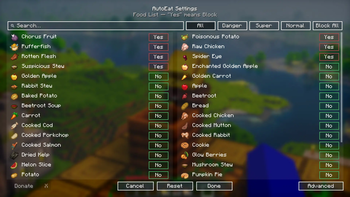
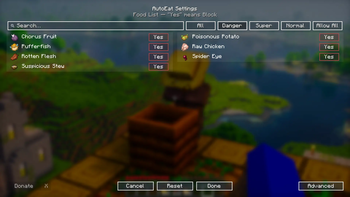
- Food priority – per-food allow/block list with search, filters (Danger, Super, Normal), and mass toggle
- Clean UI – toggle key (
H), settings menu (J), advanced settings sliders, and optional toast notifications - Client-side only – no server installation required
- And More
🔧 Requirements
- Minecraft: Supported versions are listed in each release
- Loaders:
- Fabric Loader (requires Fabric API)
- Quilt (planned)
- Forge
- NeoForge
- Java: 17 & 21+
📖 Usage
- Press
Jto open settings and configure thresholds, panic health, and per-food blacklist. - Toggle AutoEat on/off with
H(toast notification optional). - Enjoy uninterrupted adventures!
⬇️ Download






📜 License & Permissions
- License: All Rights Reserved
- Redistribution is not allowed outside of Modrinth/CurseForge without permission.
- Modpack usage is allowed as long as you link back to this project.
🤝 Credits
- Author: Zynwro
- Contact: linktr.ee/zynwro
Available Versions
How to Install AutoEat on Your Server
Order Server
Order a Minecraft Java server with at least 3 GB RAM (4 GB recommended).
Set fabric Loader
In the panel under "Egg", select the fabric loader and matching Minecraft version (26.1.2).
Install Mod
Open the mod browser in the dashboard and search for "AutoEat". Click "Install" – done! Alternatively, upload the .jar via SFTP to the /mods folder.
Compatibility
Mod Loaders
Minecraft Versions
26.1.2, 26.1.1, 26.1 (+19 more)
Server-side
✗ UnsupportedRecommended RAM
4 GB(min. 3 GB)Frequently Asked Questions
AutoEat server crashes on startup – what to do?
Most common cause: wrong fabric version or insufficient RAM. Check the server log (latest.log) for "OutOfMemoryError" or "Mixin" errors. With Mado Hosting: ensure at least 3 GB RAM is allocated and the loader matches the mod version (26.1.2). You can switch loaders with one click in the panel.
Is AutoEat compatible with fabric and forge and neoforge?
AutoEat officially supports fabric, forge, neoforge for Minecraft 26.1.2, 26.1.1, 26.1. Note: Forge and Fabric mods are NOT cross-compatible – pick one loader and stick with it. The Mado dashboard automatically detects incompatible loader combinations.
Server lagging with AutoEat – how to optimize performance?
Recommended RAM: 4 GB (per 8 players). Use /spark profiler to check if AutoEat consumes the most tick time. Common fixes: reduce server view-distance to 8-10, install "performant" or "starlight" as supplementary mods on Forge. With Mado Hosting, your server runs on NVMe SSDs with dedicated CPU cores for minimal latency.
Similar Mods



Rent Modded Server
Install AutoEat with just one click on your server.