
Auto Hotbar
Configure your hotbar automatically
Screenshots
About this Mod
AutoHotbar
Fabric mod for setting up your hotbar with priority rules. Press a key, items snap into place.
How it works
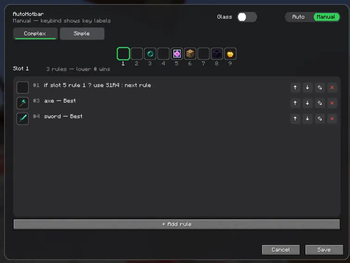
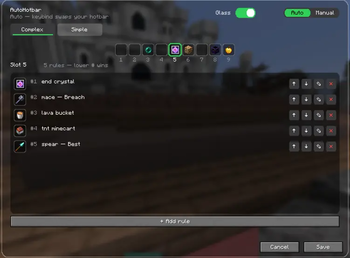
Each hotbar slot gets a list of rules ordered by priority. Hit the keybind and the mod swaps stuff around to match.
Rules can be:
- a specific item, with optional enchant requirements
- a weapon category (best sword, fastest pickaxe, density mace, etc.)
- a conditional:
if slot 5 rule 1 matched then use S1R1 else next rule - empty (leaves the slot blank)
Modes
Auto swaps your hotbar instantly when you press the key.
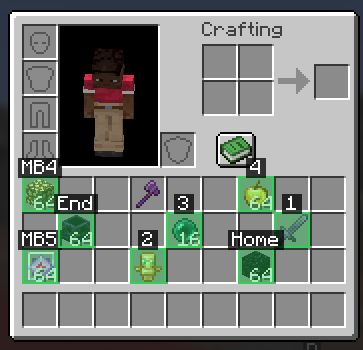
Manual does not touch the hotbar. Pressing the key arms an overlay. Next time you open your inventory, matching items get tinted and labeled with the hotbar key they should go to. You move them yourself.
Simple vs Complex
Complex is one big rule set.
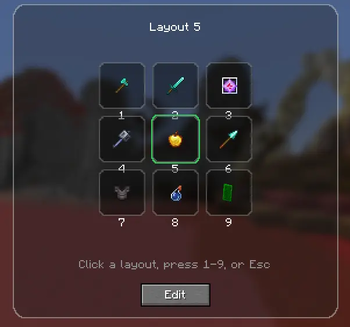
Simple is layouts. Make a crystal layout, a mining layout, a uhc layout, whatever. Each one has its own 9 slots of rules and a custom item icon. Press the key and a 3x3 wheel opens.
Weapon types
Sword, axe, pickaxe, shovel, hoe, bow, crossbow, mace, trident, spear (1.21.11), block.
Variants include Best, Highest Durability, Fastest, Best Material, Density, Breach, Lunge, Loyalty, Riptide, Channeling, Impaling, Hardest, Softest, Most Amount, Blast Resistant, Luminous.
Keys
- R: rearrange / arm overlay
- H: open config
Rebindable under Controls.
Commands: /autohotbar arrange|config|toggle|reload|help
Disclaimer
This mod might be disallowed in certain pvp servers. So you should use Auto Hotbar (Fair Play)
version which does not include the auto version and only allows manual mode which should be allowed everywhere (Auto Hotbar includes manual mode so you dont have to download Fair Play version)
it's vibe coded btw
Available Versions
How to Install Auto Hotbar on Your Server
Order Server
Order a Minecraft Java server with at least 3 GB RAM (4 GB recommended).
Set fabric Loader
In the panel under "Egg", select the fabric loader and matching Minecraft version (26.1.2).
Install Mod
Open the mod browser in the dashboard and search for "Auto Hotbar". Click "Install" – done! Alternatively, upload the .jar via SFTP to the /mods folder.
Compatibility
Mod Loaders
Minecraft Versions
26.1.2, 26.1.1, 26.1 (+12 more)
Server-side
✗ UnsupportedRecommended RAM
4 GB(min. 3 GB)Frequently Asked Questions
Auto Hotbar server crashes on startup – what to do?
Most common cause: wrong fabric version or insufficient RAM. Check the server log (latest.log) for "OutOfMemoryError" or "Mixin" errors. With Mado Hosting: ensure at least 3 GB RAM is allocated and the loader matches the mod version (26.1.2). You can switch loaders with one click in the panel.
Is Auto Hotbar compatible with fabric?
Auto Hotbar officially supports fabric for Minecraft 26.1.2, 26.1.1, 26.1. The Mado dashboard automatically detects incompatible loader combinations.
Server lagging with Auto Hotbar – how to optimize performance?
Recommended RAM: 4 GB (per 8 players). Use /spark profiler to check if Auto Hotbar consumes the most tick time. Common fixes: reduce server view-distance to 8-10, install "performant" or "starlight" as supplementary mods on Forge. With Mado Hosting, your server runs on NVMe SSDs with dedicated CPU cores for minimal latency.
Similar Mods



![[TaCZ] Timeless and Classics Zero](https://cdn.modrinth.com/data/SzzJttH8/fd27766d2bb8390d284696b1dbd358f87e081439_96.webp)


Rent Modded Server
Install Auto Hotbar with just one click on your server.