
AutoLogin
Automatic password entry when logging in to a Minecraft server that has its own authorization system.
Screenshots
About this Mod
English
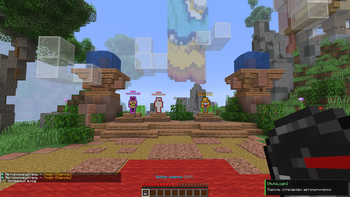
AutoLogin is a client mod for Fabric that automatically sends the /login command when you log in to a server with an authorization system. You no longer need to enter your password manually every time.
Features
- Automatic login - the mod monitors chat messages and automatically sends /login
as soon as the server requests authorization. - Multiple servers - store passwords for multiple servers at once; the mod will select the right one by IP.
- Auto-save password - if you manually enter /login, /l, /register, or /reg for the first time, the mod will remember the password and log in automatically.
- Custom triggers - a list of trigger words that define the authorization request, which is fully customizable (support for Russian and English phrases).
- Login delay - a customizable delay before sending the command to avoid issues with slow servers.
- Notifications - a small notification in the corner of the screen indicates that the password has been sent or saved. The display angle is customizable.
Conclusion
This code was written using artificial intelligence.
Русский
AutoLogin — клиентский мод для Fabric, который автоматически отправляет команду /login при входе на сервер с системой авторизации. Больше не нужно каждый раз вводить пароль вручную.
Возможности
- Автоматический вход — мод отслеживает сообщения в чате и, как только сервер запрашивает авторизацию, автоматически отправляет /login <пароль>.
- Несколько серверов — храните пароли сразу для нескольких серверов; мод сам выберет нужный по IP.
- Автосохранение пароля — если вы впервые вручную вводите /login, /l, /register или /reg, мод запоминает пароль и в дальнейшем входит сам.
- Настраиваемые триггеры — список слов-триггеров, по которым определяется запрос авторизации, полностью настраиваемый (поддержка русских и английских фраз).
- Задержка входа — настраиваемая задержка перед отправкой команды, чтобы избежать проблем с медленными серверами.
- Уведомления — небольшое уведомление в углу экрана сообщает о том, что пароль был отправлен или сохранён. Угол отображения настраивается.
Заключение
Этот код был написан с использованием искусственного интеллекта.
Available Versions
How to Install AutoLogin on Your Server
Order Server
Order a Minecraft Java server with at least 3 GB RAM (4 GB recommended).
Set fabric Loader
In the panel under "Egg", select the fabric loader and matching Minecraft version (1.21.11).
Install Mod
Open the mod browser in the dashboard and search for "AutoLogin". Click "Install" – done! Alternatively, upload the .jar via SFTP to the /mods folder.
Compatibility
Mod Loaders
Minecraft Versions
1.21.11, 1.21.10, 1.21.9 (+9 more)
Server-side
✗ UnsupportedRecommended RAM
4 GB(min. 3 GB)Frequently Asked Questions
AutoLogin server crashes on startup – what to do?
Most common cause: wrong fabric version or insufficient RAM. Check the server log (latest.log) for "OutOfMemoryError" or "Mixin" errors. With Mado Hosting: ensure at least 3 GB RAM is allocated and the loader matches the mod version (1.21.11). You can switch loaders with one click in the panel.
Is AutoLogin compatible with fabric?
AutoLogin officially supports fabric for Minecraft 1.21.11, 1.21.10, 1.21.9. The Mado dashboard automatically detects incompatible loader combinations.
Server lagging with AutoLogin – how to optimize performance?
Recommended RAM: 4 GB (per 8 players). Use /spark profiler to check if AutoLogin consumes the most tick time. Common fixes: reduce server view-distance to 8-10, install "performant" or "starlight" as supplementary mods on Forge. With Mado Hosting, your server runs on NVMe SSDs with dedicated CPU cores for minimal latency.
Similar Mods






Rent Modded Server
Install AutoLogin with just one click on your server.