
Automatic Potion Restocker
Automatic Potion Restocker is a mod that instantly refills the hotbar slot with the next matching potion every time you finish drinking or throwing one.
Screenshots
About this Mod
Automatic Potion Restocker
Automatic Potion Restocker is a client-side Fabric mod for Minecraft 1.21.10 that keeps your hotbar stocked with potions during combat.
The moment you finish drinking or throwing a potion, the mod uses legitimate inventory actions to:
- Drop the empty bottle (for drinkable potions), and pull the next matching potion—identical bottle or same effect set—from your inventory back into the same hotbar slot (See Video at the bottom) .
- It supports drink, splash, and lingering potions, so you never have to open your inventory mid-fight.
Features
- Automatic restocking after using a potion
- Works with all potion types such as drinkable, splash, and lingering potions
- All actions go through normal inventory packets, so the mod behaves like a real player and remains compatible with vanilla and most other servers.
HUD Overlay
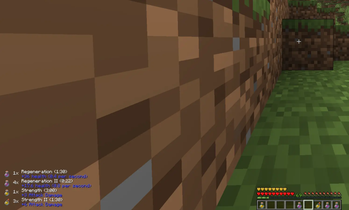
- A lightweight HUD in the bottom-left corner shows how many potions of each type you still have.
- Toggle HUD visibility with P.
- Hold Tab to reveal effect names and duration of the potions next to each icon for quick reference.
- The HUD is minimal and designed not to clutter your screen during combat.
Configuration
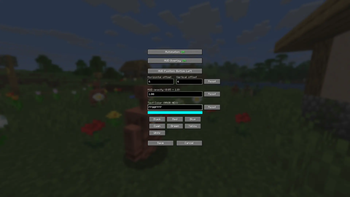
- The mod integrates with Mod Menu and provides a simple configuration screen:
- Enable or disable the automation entirely.
- Toggle the HUD overlay.
- Change the Position (via Offset).
- Change the opacity
- Choose the HUD text color via presets colors or ARGB HEX Codes.
Compatibility
- Client-side only
- Works on any vanilla and most other servers
- Uses only normal inventory actions, making it broadly compatible with other client-side mods
Available Versions
How to Install Automatic Potion Restocker on Your Server
Order Server
Order a Minecraft Java server with at least 3 GB RAM (4 GB recommended).
Set fabric Loader
In the panel under "Egg", select the fabric loader and matching Minecraft version (1.21.11).
Install Mod
Open the mod browser in the dashboard and search for "Automatic Potion Restocker". Click "Install" – done! Alternatively, upload the .jar via SFTP to the /mods folder.
Compatibility
Mod Loaders
Minecraft Versions
1.21.11, 1.21.10, 1.21.9 (+9 more)
Server-side
✗ UnsupportedRecommended RAM
4 GB(min. 3 GB)Frequently Asked Questions
Automatic Potion Restocker server crashes on startup – what to do?
Most common cause: wrong fabric version or insufficient RAM. Check the server log (latest.log) for "OutOfMemoryError" or "Mixin" errors. With Mado Hosting: ensure at least 3 GB RAM is allocated and the loader matches the mod version (1.21.11). You can switch loaders with one click in the panel.
Is Automatic Potion Restocker compatible with fabric?
Automatic Potion Restocker officially supports fabric for Minecraft 1.21.11, 1.21.10, 1.21.9. The Mado dashboard automatically detects incompatible loader combinations.
Server lagging with Automatic Potion Restocker – how to optimize performance?
Recommended RAM: 4 GB (per 8 players). Use /spark profiler to check if Automatic Potion Restocker consumes the most tick time. Common fixes: reduce server view-distance to 8-10, install "performant" or "starlight" as supplementary mods on Forge. With Mado Hosting, your server runs on NVMe SSDs with dedicated CPU cores for minimal latency.
Similar Mods



![[TaCZ] Timeless and Classics Zero](https://cdn.modrinth.com/data/SzzJttH8/fd27766d2bb8390d284696b1dbd358f87e081439_96.webp)


Rent Modded Server
Install Automatic Potion Restocker with just one click on your server.