
Automatic Sorter
Mod where you can sort your items easily and more certain than your redstone sorter.
Screenshots


About this Mod
Why?
Hi, I created mod for easy sorting items in your storage. It is primarily personal mod. I wanted to create sorting system with redstone but that was too much work for me so I programmed something and here we are. If you wanna edit my mod, feel free to use it. I linked my github repository.
What this mod does?
- Provides a simple, fully customizable item-sorting system without needing complex redstone contraptions.
- Automatically distributes items into connected storage chests based on filter rules (whitelist, inventory-based, rejects).
- Allows speed upgrades via Sorter Amplifiers or commands for faster item processing.
How it's working?
There are 4 new items and 4 new commands
Items
- Sorter Controller (Block)
- Filter (Block)
- Pipe (Block)
- Sorter Amplifier (Item)
You need Sorter Controller put under your chest, where you put not sorted items. Then you connect Sorter Controller and Filter by pipes. Filter must facing chest in your storage. Pipes MUST be visually connected to Sorter controller and to filter.
Filter has three modes:
- Whitelist
- Filtering by items in Filter block inventory
- In inventory
- Filtering by items in storage chest where Filter is facing
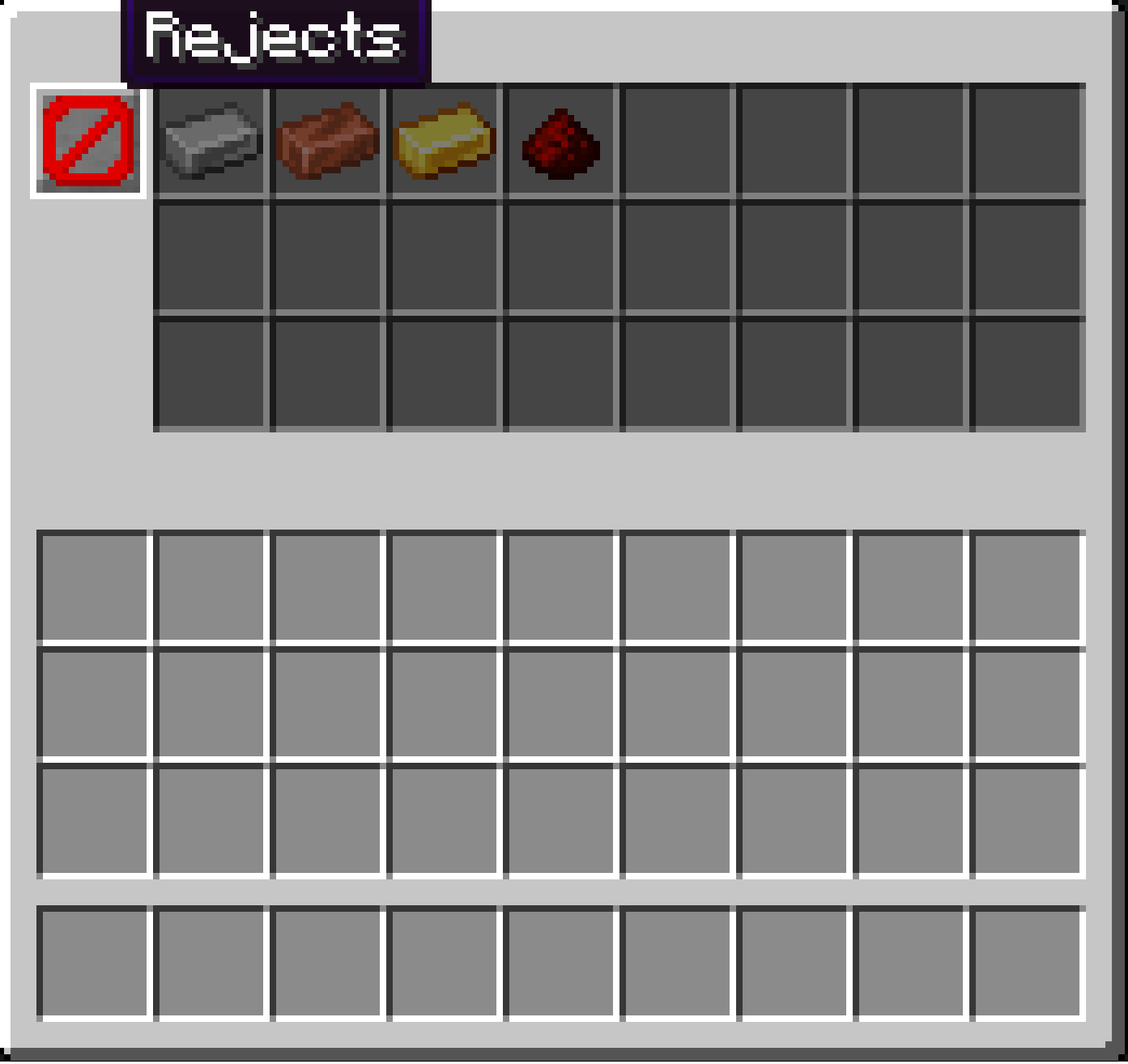
- Rejects
- Accepting items which were rejected by other Filters (more or less like trash bin)
- Also accepting items which have active filtering but not enough room in chest
You can change Filter mode by clicking on icon in Filter menu. You can open Filter menu by right clicking on Filter block.
Items are transported via air, pipes don't have inventories or something like hoppers do. You can UPGRADE sorting speed by putting Sorter Amplifier item into Sorter Controller.
How to craft new items?
There are 4 new recepies:
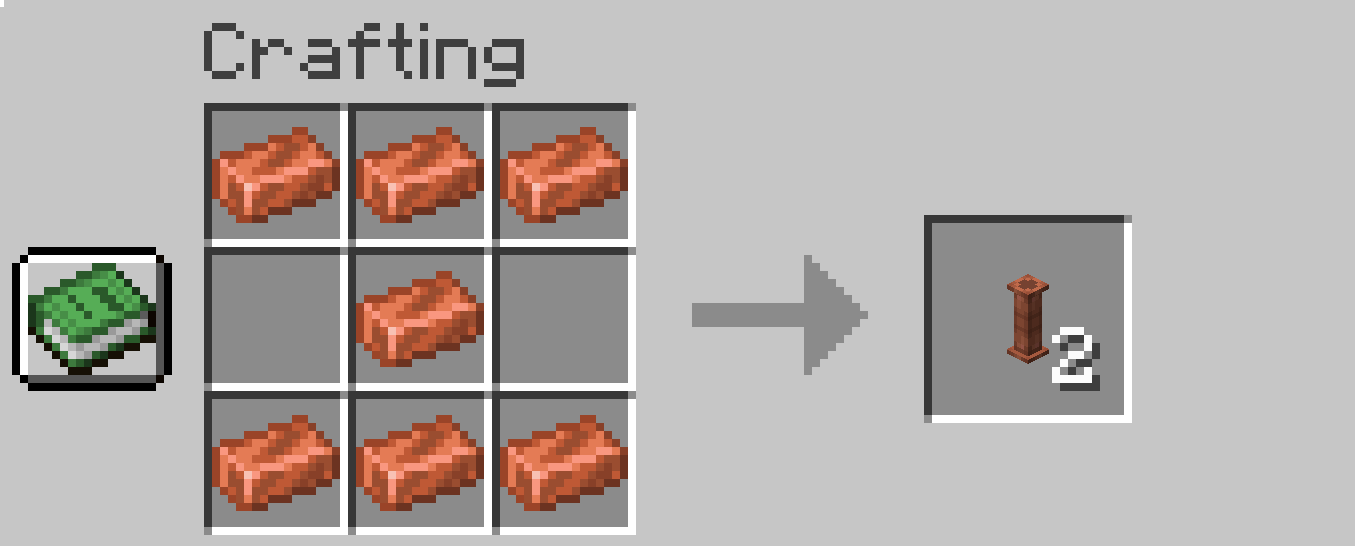
Pipe:
- 7x Copper Ingot
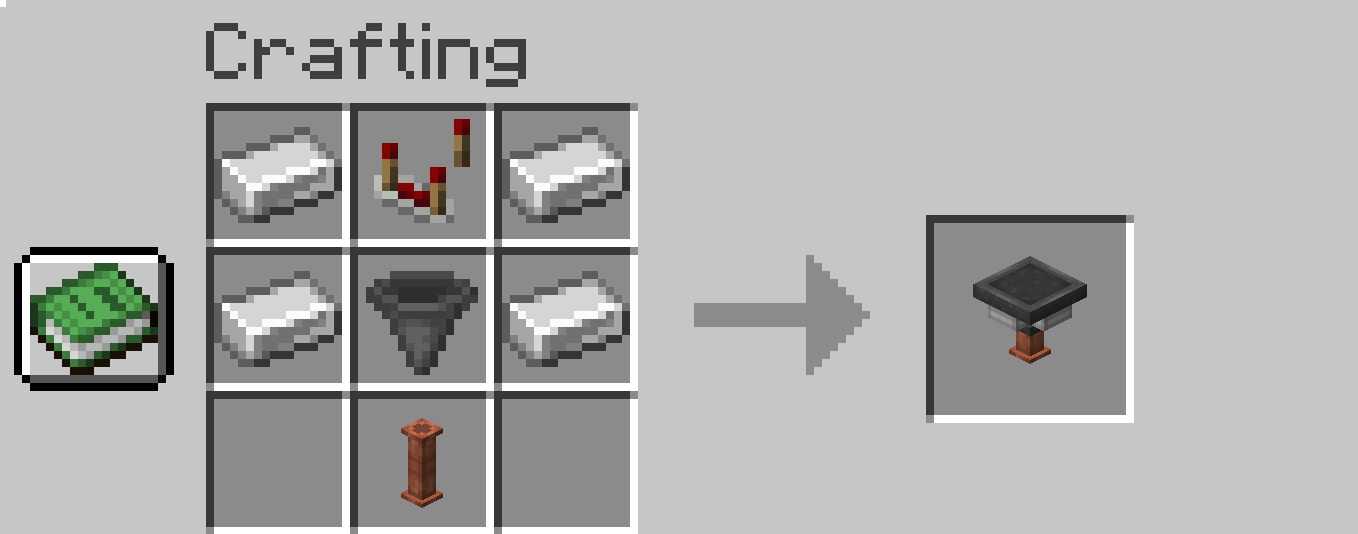
Sorting Controller:
- 4x Iron Ingot
- 1x Redstone comparator
- 1x Hopper
- 1x Pipe
Filter:
- 3x Iron Ingot
- 1x Dropper
- 1x Pipe
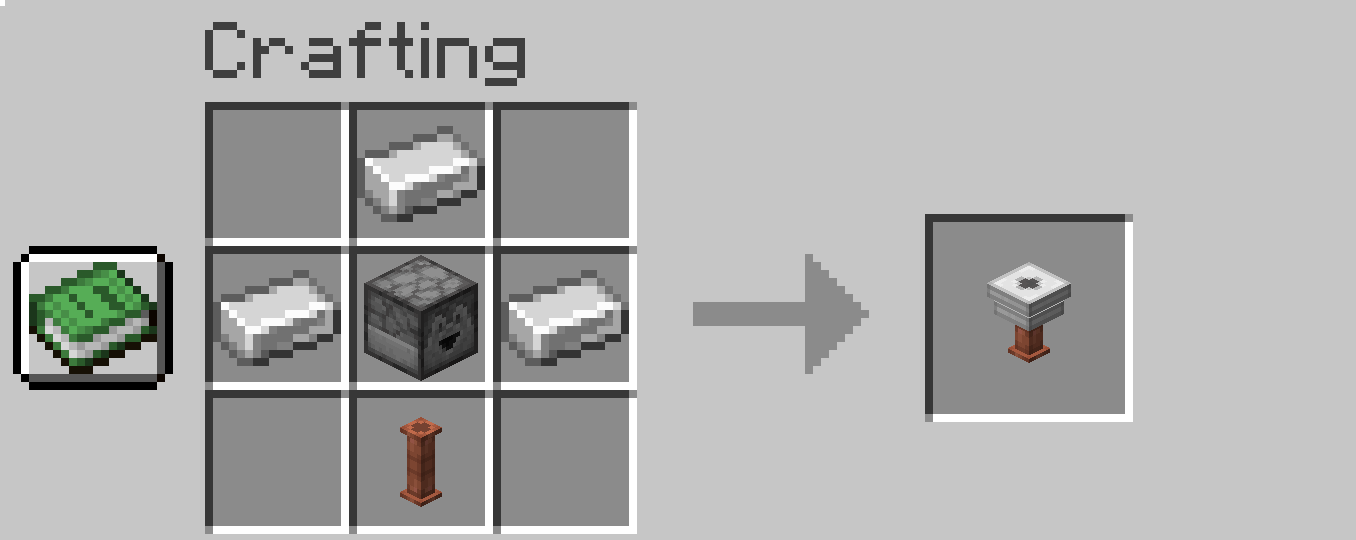
Sorter Amplifier:
- 1x Nether Quartz
- 1x Redstone Dust
- 1x Gold Nugget
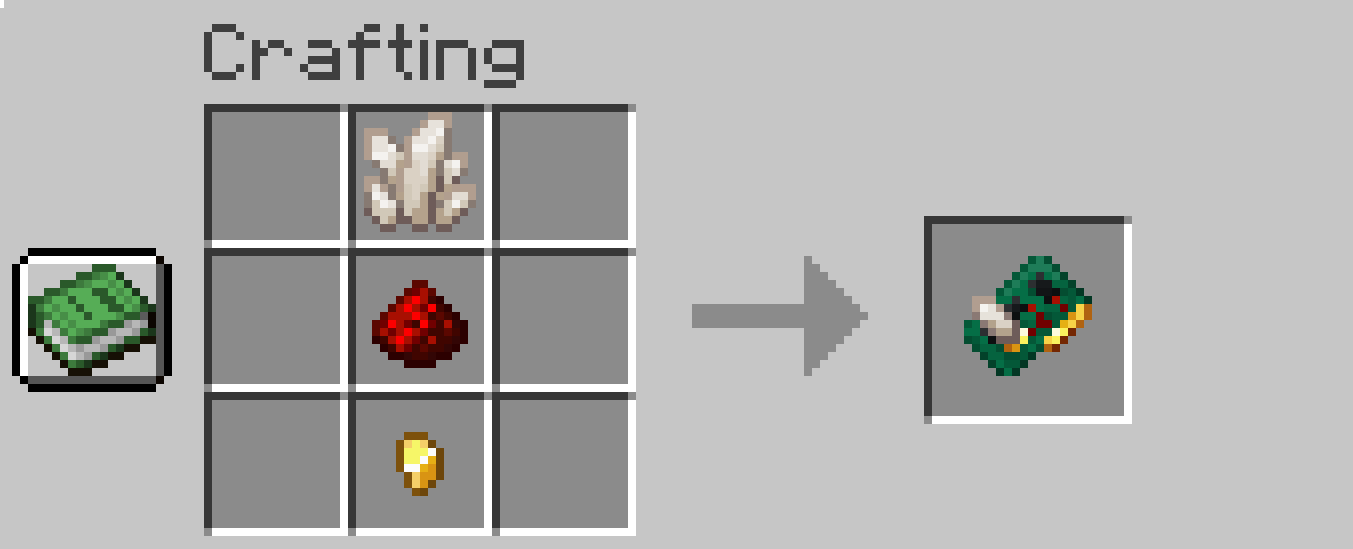
Commands
Sorting is triggering 4 times per second (just hardcoded that way). All new commands are for admins only and starts with as_
- as_basespeed
- Changing base speed of sorting (default 4 = 4 items per second)
- For example: /as_basespeed 4
- as_basespeedboostperupgrade
- Changing upgrade speed boost from Sorter Amplifier (default 0.4)
- For example: /as_basespeedboostperupgrade 0.4
- as_instantsort
- If you don't want to wait just set it to true (default false)
- For example: /as_instantsort false
- as_exportModBlocks
- Purely for debug only. This command saves all mod blocks (only from my mod) to the file sorter_controller_export.json in your minecraft folder in config folder. It saves position and properties of blocks and items in range of the player.
- For example this command saves all blocks in range of 118 from the player
- /as_exportModBlocks 118
- This will help me find the answer about your sorting setup and its much quicker solution than questions like "How your Filters are setup? Do you have screenshots of each one?"
What to do when you encounter a bug?
I need information of your:
- Minecraft version
- Mod loader and it's version (fabric/forge)
- Mod version
- automatic_sorter_export.json (from 1.4.0 - see Commands chapter)
What is meaning behind version numbers?
The version consists of three numbers separated by a dot. For example, 1.3.4.
The first number (1) is the major version of the mod. This number changes when the mod undergoes significant changes. (This is unlikely to happen.)
The second number (3) indicates new features, such as support for new storage mods or general improvements to the mod (new blocks, new items, etc.).
The third number (4) indicates a hotfix. When releasing a version, I might miss a bug during development. When I release a fix, I only increase this number. It is purely a bug fix—no other improvements are included.
Brief Changelog
1.4 - Added Sorter Amplifier and improved Sorter Controller capability
1.3 – Added support for the Assorted Storage mod
1.2 – Filter block upgrade (Rejects mod and quick move support)
1.1 – Added support for the Expanded Storage mod
1.0 - Mod release
Final words
So there it is. Enjoy sorting your loot ^^
Available Versions
How to Install Automatic Sorter on Your Server
Order Server
Order a Minecraft Java server with at least 3 GB RAM (4 GB recommended).
Set fabric Loader
In the panel under "Egg", select the fabric loader and matching Minecraft version (1.21.11).
Install Mod
Open the mod browser in the dashboard and search for "Automatic Sorter". Click "Install" – done! Alternatively, upload the .jar via SFTP to the /mods folder.
Compatibility
Mod Loaders
Minecraft Versions
1.21.11, 1.21.10, 1.21.9 (+20 more)
Server-side
✓ RequiredRecommended RAM
4 GB(min. 3 GB)Frequently Asked Questions
Automatic Sorter server crashes on startup – what to do?
Most common cause: wrong fabric version or insufficient RAM. Check the server log (latest.log) for "OutOfMemoryError" or "Mixin" errors. With Mado Hosting: ensure at least 3 GB RAM is allocated and the loader matches the mod version (1.21.11). You can switch loaders with one click in the panel.
Is Automatic Sorter compatible with fabric and forge?
Automatic Sorter officially supports fabric, forge for Minecraft 1.21.11, 1.21.10, 1.21.9. Note: Forge and Fabric mods are NOT cross-compatible – pick one loader and stick with it. The Mado dashboard automatically detects incompatible loader combinations.
Server lagging with Automatic Sorter – how to optimize performance?
Recommended RAM: 4 GB (per 8 players). Use /spark profiler to check if Automatic Sorter consumes the most tick time. Common fixes: reduce server view-distance to 8-10, install "performant" or "starlight" as supplementary mods on Forge. With Mado Hosting, your server runs on NVMe SSDs with dedicated CPU cores for minimal latency.
Similar Mods


Rent Modded Server
Install Automatic Sorter with just one click on your server.