
AutoMeow
A tiny client-side Fabric mod that automatically replies “meow” in chat when someone says “meow”. Works on Vanilla and Hypixel!
Screenshots
About this Mod
AutoMeow
A tiny client-side Fabric mod that automatically replies “meow” in chat when someone says “meow”.
Works on vanilla servers and Hypixel (no server mod needed).
We now have a discord!!! (link is on the sidebar to the right :3 )
Features
- Auto-reply “meow” when “meow” appears in chat (case-insensitive, whole word).
- Your-message cooldown – replies only after you have sent 3 messages since the last auto-reply.
- Lobby/world reset – cooldown resets when you change world/hub.
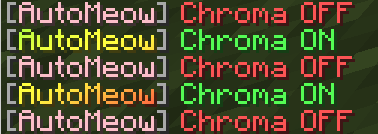
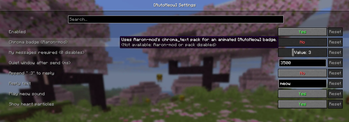
- Optional chroma badge integration with Aaron-mod’s chroma text pack (off by default).
Commands
| Command | Description |
|---|---|
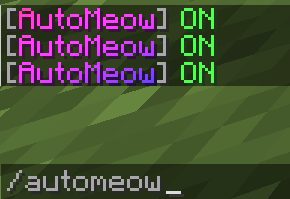
/automeow |
Show current status |
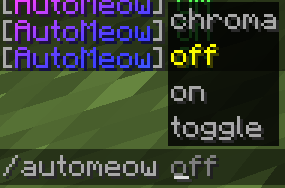
/automeow toggle |
Enable/disable |
/automeow on |
Enable |
/automeow off |
Disable |
/automeow chroma |
Toggle chroma badge (needs Aaron-mod + chroma_text pack) |
Additional Information
The very first “meow” after joining or changing lobby is answered instantly;
after that, AutoMeow waits until you have chatted 3 more times.
Optional chroma (Aaron-mod)
If Aaron-mod is installed and its built-in aaron-mod/chroma_text resource pack is enabled, /automeow chroma switches the [AutoMeow] badge to animated chroma.
If it appears white:
- Options → Resource Packs → ensure “aaron-mod/chroma_text” is enabled and at the top.
- Disable other packs that override text shaders.
- Click Done to reload resources.
Install
- Install Fabric Loader and Fabric API for 1.21.5 OR 1.21.10.
- Drop
automeow-*.jarinto.minecraft/mods/. - Launch the game.
Build from source
# Windows
gradlew.bat build

# macOS/Linux
./gradlew build
Available Versions
How to Install AutoMeow on Your Server
Order Server
Order a Minecraft Java server with at least 3 GB RAM (4 GB recommended).
Set fabric Loader
In the panel under "Egg", select the fabric loader and matching Minecraft version (26.1.2).
Install Mod
Open the mod browser in the dashboard and search for "AutoMeow". Click "Install" – done! Alternatively, upload the .jar via SFTP to the /mods folder.
Compatibility
Mod Loaders
Minecraft Versions
26.1.2, 26.1.1, 26.1 (+3 more)
Server-side
✗ UnsupportedRecommended RAM
4 GB(min. 3 GB)Frequently Asked Questions
AutoMeow server crashes on startup – what to do?
Most common cause: wrong fabric version or insufficient RAM. Check the server log (latest.log) for "OutOfMemoryError" or "Mixin" errors. With Mado Hosting: ensure at least 3 GB RAM is allocated and the loader matches the mod version (26.1.2). You can switch loaders with one click in the panel.
Is AutoMeow compatible with fabric?
AutoMeow officially supports fabric for Minecraft 26.1.2, 26.1.1, 26.1. The Mado dashboard automatically detects incompatible loader combinations.
Server lagging with AutoMeow – how to optimize performance?
Recommended RAM: 4 GB (per 8 players). Use /spark profiler to check if AutoMeow consumes the most tick time. Common fixes: reduce server view-distance to 8-10, install "performant" or "starlight" as supplementary mods on Forge. With Mado Hosting, your server runs on NVMe SSDs with dedicated CPU cores for minimal latency.
Similar Mods






Rent Modded Server
Install AutoMeow with just one click on your server.