![AutoMessage [1.21]](https://cdn.modrinth.com/data/dcenexZe/07113c4ef39674524bab5520a22efcd29891a3aa.jpeg)
AutoMessage [1.21]
⚡ AutoMessage is a high-performance plugin for fully customizable automatic server-wide broadcasts.
Screenshots
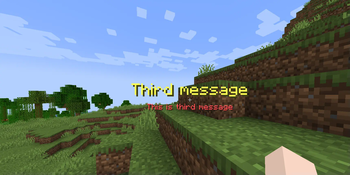

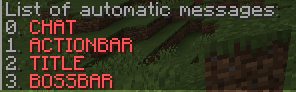
About this Mod
💬 AutoMessage — Ultra-Efficient Broadcasting System





🚀 Lightweight. Customizable. Blazing Fast.
AutoMessage is a high-performance plugin for fully customizable automatic server-wide broadcasts. No lag. No hassle. Just clean, dynamic message delivery across chat, actionbars, titles, and bossbars — all with nearly zero performance impact.
🧠 Features
✅ Multiple broadcast types
• Chat
• ActionBar
• Title & Subtitle
• BossBar (fully configurable: color, style, duration, progress, etc.)
✅ Advanced configuration
• Create/edit/delete messages directly
• Toggle automatic messages at any time
• Support for various broadcast modes
• Dynamic intervals between messages
• Full MiniMessage & Adventure API formatting
✅ Command support
• /automessage enable, • /automessage disable •/automessage reload`
✅ Zero-lag optimized
Built with efficiency in mind — AutoMessage has no noticeable impact on server performance, even with hundreds of players online.
✅ Adventure API support
Integrates with Kyori Adventure for rich message styling and component-based formatting.
✨ Showcase

🛠️ Feedback & Support
Found a bug? Have a suggestion? Want to contribute?
Open an issue on GitHub Issues — your feedback is welcome!
⭐ Like the plugin?
If you enjoy using AutoMessage, please consider leaving a ⭐ rating on SpigotMC!
It helps support future development and lets others discover it too.
Available Versions
How to Install AutoMessage [1.21] on Your Server
Order Server
Order a Minecraft Java server with at least 3 GB RAM (4 GB recommended).
Set bukkit Loader
In the panel under "Egg", select the bukkit loader and matching Minecraft version (1.21.10).
Install Mod
Open the mod browser in the dashboard and search for "AutoMessage [1.21]". Click "Install" – done! Alternatively, upload the .jar via SFTP to the /mods folder.
Compatibility
Mod Loaders
Minecraft Versions
1.21.10, 1.21.9, 1.21.8 (+25 more)
Server-side
✗ UnsupportedRecommended RAM
4 GB(min. 3 GB)Frequently Asked Questions
AutoMessage [1.21] server crashes on startup – what to do?
Most common cause: wrong bukkit version or insufficient RAM. Check the server log (latest.log) for "OutOfMemoryError" or "Mixin" errors. With Mado Hosting: ensure at least 3 GB RAM is allocated and the loader matches the mod version (1.21.10). You can switch loaders with one click in the panel.
Is AutoMessage [1.21] compatible with bukkit and bungeecord and forge and paper and purpur and spigot?
AutoMessage [1.21] officially supports bukkit, bungeecord, forge, paper, purpur, spigot for Minecraft 1.21.10, 1.21.9, 1.21.8. The Mado dashboard automatically detects incompatible loader combinations.
Server lagging with AutoMessage [1.21] – how to optimize performance?
Recommended RAM: 4 GB (per 8 players). Use /spark profiler to check if AutoMessage [1.21] consumes the most tick time. Common fixes: reduce server view-distance to 8-10, install "performant" or "starlight" as supplementary mods on Forge. With Mado Hosting, your server runs on NVMe SSDs with dedicated CPU cores for minimal latency.
Similar Mods




Rent Modded Server
Install AutoMessage [1.21] with just one click on your server.