
AutoSell
Lightweight automated item selling for modern multiplayer Minecraft servers.
Screenshots
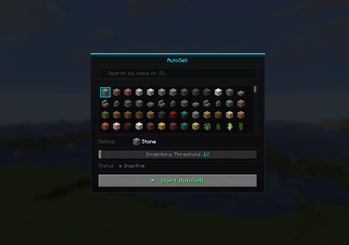
About this Mod
AutoSell




Automatically sell items on your desired server - without ever using your fingers.
Overview
AutoSell automates the entire selling process in a clean and seamless way — while staying fully aligned with vanilla gameplay mechanics.
Select the item you want to sell, configure a threshold, and the mod will take care of the rest.
Once your inventory reaches the defined fill level, AutoSell will:
- Execute your
/sellcommand automatically - Move items into the inventory using normal player-like interactions
- Complete the selling process step by step
- Close the interface when finished
All actions are performed in a natural and unobtrusive way, ensuring smooth integration with existing server systems.
Contributing
Contributions are welcome! Whether it's bug fixes, new features, or optimizations, you can help make AutoSell better.
How to contribute:
- Fork the repository
- Create a new branch with a descriptive name
- Make your changes
- Submit a pull request with a clear description of your changes
Please ensure your code follows the existing style and passes any tests before submitting.
Issues
If you encounter any bugs, errors, or unexpected behavior:
- Open a new issue on GitHub with a clear title
- Include steps to reproduce the problem
- Attach logs or screenshots if relevant
I actively monitor issues and try to respond as quickly as possible.
Feature Requests
Want to see a new feature in AutoSell?
- Open a new issue on GitHub and label it as a
feature request - Provide a detailed description and use case
- Discuss implementation ideas if possible
Community suggestions are highly appreciated and may be included in future releases.
Available Versions
How to Install AutoSell on Your Server
Order Server
Order a Minecraft Java server with at least 3 GB RAM (4 GB recommended).
Set fabric Loader
In the panel under "Egg", select the fabric loader and matching Minecraft version (26.1.2).
Install Mod
Open the mod browser in the dashboard and search for "AutoSell". Click "Install" – done! Alternatively, upload the .jar via SFTP to the /mods folder.
Compatibility
Mod Loaders
Minecraft Versions
26.1.2, 26.1.1, 26.1
Server-side
✗ UnsupportedRecommended RAM
4 GB(min. 3 GB)Frequently Asked Questions
AutoSell server crashes on startup – what to do?
Most common cause: wrong fabric version or insufficient RAM. Check the server log (latest.log) for "OutOfMemoryError" or "Mixin" errors. With Mado Hosting: ensure at least 3 GB RAM is allocated and the loader matches the mod version (26.1.2). You can switch loaders with one click in the panel.
Is AutoSell compatible with fabric?
AutoSell officially supports fabric for Minecraft 26.1.2, 26.1.1, 26.1. The Mado dashboard automatically detects incompatible loader combinations.
Server lagging with AutoSell – how to optimize performance?
Recommended RAM: 4 GB (per 8 players). Use /spark profiler to check if AutoSell consumes the most tick time. Common fixes: reduce server view-distance to 8-10, install "performant" or "starlight" as supplementary mods on Forge. With Mado Hosting, your server runs on NVMe SSDs with dedicated CPU cores for minimal latency.
Similar Mods




![CobbleDollars [Cobblemon Addon]](https://cdn.modrinth.com/data/s7N7AsqL/684040a264fc1d7f9b856ec5d2da39767398c7ad.png)
Rent Modded Server
Install AutoSell with just one click on your server.