
Avaritia at Home
This mod has many of the same items as Avaritia including the sword of the cosmos which can kill anything instantly. Mod now supports extreme crafting and REI for viewing the recipes.
Screenshots
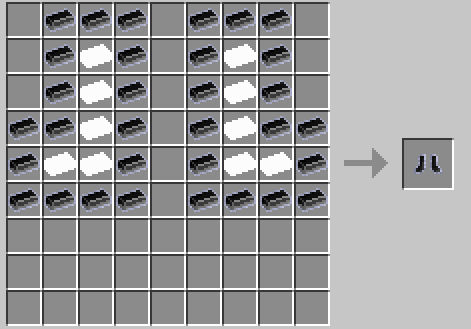
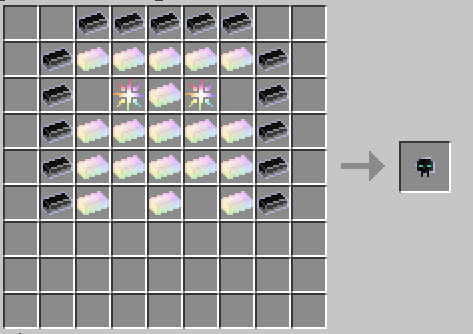
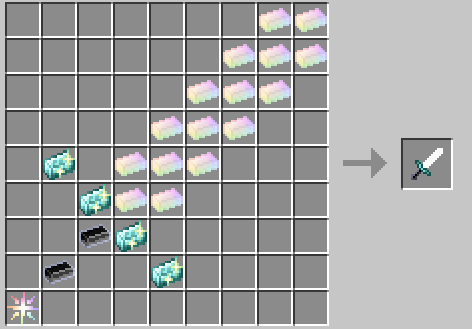
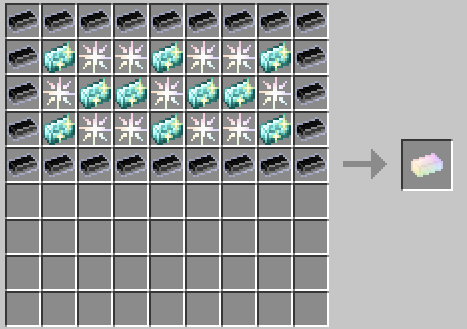
About this Mod
Mod Features (Beta)
This mod is currently in beta and introduces the following features:
Crafting
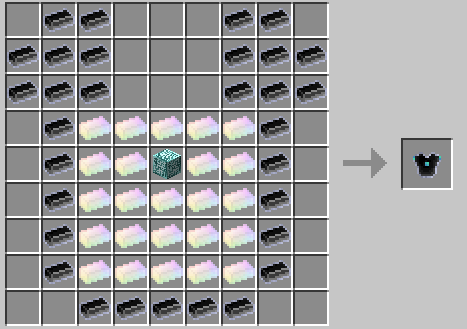
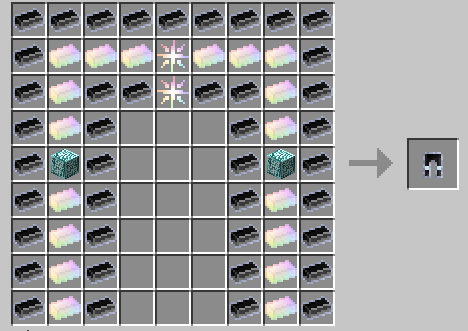
This mod now supports 9x9 crafting recipes using Bigger Crafting Table.
As a result, it is now required to download Bigger Crafting Table.
All items now have crafting recipes.
Crafting Materials
- Star Dust
- Compressed Star Dust
- Double Compressed Star Dust
- Triple Compressed Star Dust
- Neutron Star Dust
- Crystal Matrix Ingot
- Crystal Matrix Block
- Infinity Catalyst
- Neutronium Ingot
- Neutron Nugget
- Neutron Pile
- Neutron Singularity
- Diamond Lattice
- Endest Pearl
- Infinity Ingot
- Cosmic Meatballs
- Ultimate Stew
- Star Fuel
- Perfected Star
- Perfected Star Fragment
Weapons
- Sword of the Cosmos: Instantly kills anything you hit, regardless of health, effects, or armor.
- Infinity Bow: Shoots super-fast arrows that one-shot anything they hit.
Tools
- Infinity Axe
- Infinity Hoe
- Infinity Shovel
- Infinity Pickaxe
Armor
- Infinity Helmet: Grants Night Vision and Saturation
- Infinity Chestplate: Grants Flight, Flight Speed, Haste, and Strength
- Infinity Leggings: Grants Dolphin’s Grace and removes fall damage
- Infinity Boots: Grants increased Speed
Each piece of armor worn increases your Resistance level by 1. Wearing the full set makes you immortal.
Integration with REI (Roughly Enough Items)
This mod also integrates with REI (Roughly Enough Items), making it easy to view larger crafting recipes such as those used in the 9x9 crafting grid. REI allows you to:
- View larger recipes that wouldn't fit in a standard 3x3 grid
- Quickly search for crafting recipes using all included materials and items
- Easily navigate between various custom recipes added by this mod
With REI, understanding the complex crafting recipes for powerful items like the Infinity Armor and Sword of the Cosmos becomes effortless!
Available Versions
How to Install Avaritia at Home on Your Server
Order Server
Order a Minecraft Java server with at least 3 GB RAM (4 GB recommended).
Set fabric Loader
In the panel under "Egg", select the fabric loader and matching Minecraft version (1.20.1).
Install Mod
Open the mod browser in the dashboard and search for "Avaritia at Home". Click "Install" – done! Alternatively, upload the .jar via SFTP to the /mods folder.
Compatibility
Mod Loaders
Minecraft Versions
1.20.1
Server-side
✓ RequiredRecommended RAM
4 GB(min. 3 GB)Frequently Asked Questions
Avaritia at Home server crashes on startup – what to do?
Most common cause: wrong fabric version or insufficient RAM. Check the server log (latest.log) for "OutOfMemoryError" or "Mixin" errors. With Mado Hosting: ensure at least 3 GB RAM is allocated and the loader matches the mod version (1.20.1). You can switch loaders with one click in the panel.
Is Avaritia at Home compatible with fabric?
Avaritia at Home officially supports fabric for Minecraft 1.20.1. The Mado dashboard automatically detects incompatible loader combinations.
Server lagging with Avaritia at Home – how to optimize performance?
Recommended RAM: 4 GB (per 8 players). Use /spark profiler to check if Avaritia at Home consumes the most tick time. Common fixes: reduce server view-distance to 8-10, install "performant" or "starlight" as supplementary mods on Forge. With Mado Hosting, your server runs on NVMe SSDs with dedicated CPU cores for minimal latency.
Similar Mods




![[TaCZ] Timeless and Classics Zero](https://cdn.modrinth.com/data/SzzJttH8/fd27766d2bb8390d284696b1dbd358f87e081439_96.webp)

Rent Modded Server
Install Avaritia at Home with just one click on your server.