
AvM Staff API
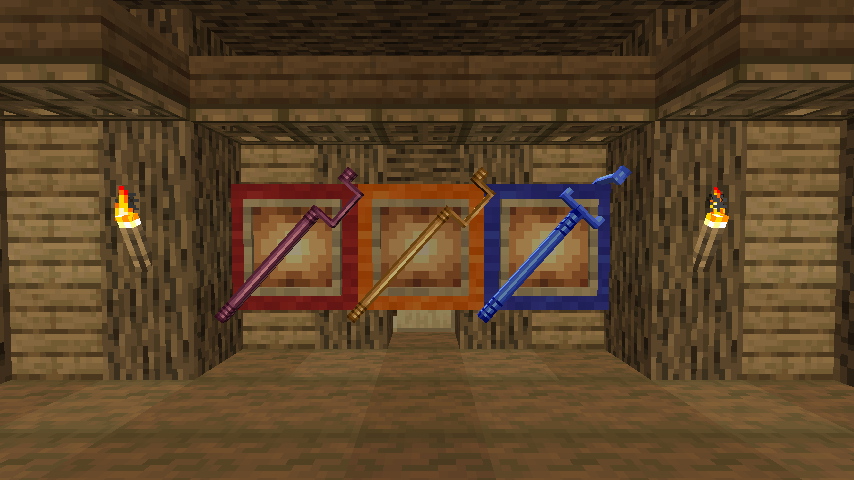
A mod that adds a staff capable of controlling the block's abilities from Animations vs Minecraft animation! A user with this API is subject to add support for his block himself and add his characteristic ability!
Screenshots
About this Mod
Проект закрыт, будет открыт с новым модом!
Hello everyone, this mod was created to simplify the addition of staffs from Animation vs Minecraft directly into the game! The mod adds three new staffs, and in order to add support for your block directly to the game, you need to know java programming or basic knowledge of MCreator!
The folder with this documentation contains three staff textures, three staff models, a block texture, an API mod, and 2 files named "AddSupportBlock.ptpl" and "AddSupportBlockCode.txt ". The file "AddSupportBlock.ptpl" is a procedure for MCreator, you only need to import this procedure and set the Event to "On player tick update". After adding it, you will need to select your block in "BlockID", "CustomStuff" for your regular staff, "CustomBlueStuff" for your blue staff, and "CustomBlueStuff" for your cloned staff! In the second file, "AddSupportBlockCode.txt" the code is written, it will be required for those who do not work for MCreator. In fact, you will only have to write the block ID and the staff ID in the same way as for the MCreator method!
In models, it is important to set the texture of the staff first, and the texture of the block second... If you are not sure what the model looks like, open the model in Blockbench.
Here is the mod data-blocked:
- Mod display name = AvM Stuff API
- Mod ID / namespace = avm_stuff_api
- Mod package name = net.ignitesizzle.avmstuffapi
- Author = IgniteSizzle
Here are the values of the numbers on the block texture:
- 1 = front
- 2 = left
- 3 = back
- 4 = right
- 5 = down
- 6 = up
Support me with a coin: DonationAlerts
Available Versions
How to Install AvM Staff API on Your Server
Order Server
Order a Minecraft Java server with at least 3 GB RAM (4 GB recommended).
Set forge Loader
In the panel under "Egg", select the forge loader and matching Minecraft version (1.20.4).
Install Mod
Open the mod browser in the dashboard and search for "AvM Staff API". Click "Install" – done! Alternatively, upload the .jar via SFTP to the /mods folder.
Compatibility
Mod Loaders
Minecraft Versions
1.20.4, 1.20.1
Server-side
✓ RequiredRecommended RAM
4 GB(min. 3 GB)Frequently Asked Questions
AvM Staff API server crashes on startup – what to do?
Most common cause: wrong forge version or insufficient RAM. Check the server log (latest.log) for "OutOfMemoryError" or "Mixin" errors. With Mado Hosting: ensure at least 3 GB RAM is allocated and the loader matches the mod version (1.20.4). You can switch loaders with one click in the panel.
Is AvM Staff API compatible with forge and neoforge?
AvM Staff API officially supports forge, neoforge for Minecraft 1.20.4, 1.20.1. The Mado dashboard automatically detects incompatible loader combinations.
Server lagging with AvM Staff API – how to optimize performance?
Recommended RAM: 4 GB (per 8 players). Use /spark profiler to check if AvM Staff API consumes the most tick time. Common fixes: reduce server view-distance to 8-10, install "performant" or "starlight" as supplementary mods on Forge. With Mado Hosting, your server runs on NVMe SSDs with dedicated CPU cores for minimal latency.
Similar Mods




Rent Modded Server
Install AvM Staff API with just one click on your server.