
Axe Warning !
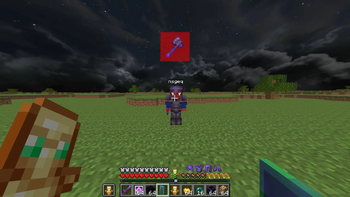
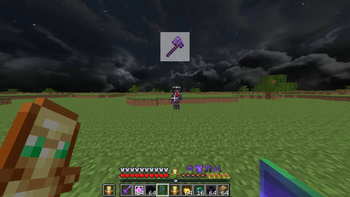
⚠️ Alerts the player if an enemy is holding an axe in their hand. 🔴 If the enemy is within less than 5 blocks, you will receive both a visual and sound warning. 🟡 If the enemy is more than 5 blocks away, you will only see a visual warning on your screen.
Screenshots
About this Mod
⚔️ Axe Alert Mod
🪓 Have you ever been caught off guard in PvP or survival by an enemy sneaking up on you with a devastating axe strike? This mod is specifically designed to give you the ultimate tactical advantage — never be surprised by an axe-wielding opponent again!
─────────────────────
🚨 Alert System
🔴 High Danger Zone (Under 5 Blocks):
If an enemy holding an axe enters a radius of fewer than 5 blocks, the mod will immediately trigger both an audio and visual warning — ensuring you can react instantly against imminent close-quarters threats!
🟡 Monitoring Zone (5+ Blocks):
If the axe-wielding enemy is further than 5 blocks away, you'll receive a visual warning only — so you can track approaching threats strategically without your audio being overwhelmed.
─────────────────────
🎨 Complete GUI Customization
Press Right Shift to open the built-in configuration GUI! From there you can:
✅ Change the on-screen position of the visual alert
✅ Customize its color and size
✅ Pick different warning sounds
✅ Fine-tune the audio volume
─────────────────────
⚙️ Technical Requirements
🧩 Modloader: Fabric only
🎮 Minecraft Version: 1.21.11
🔬 Status: Beta — fully functional but minor bugs may occur
─────────────────────
⚠️ Competitive Warning
This mod is currently strictly banned from Tierlists due to its significant situational awareness advantage. Please disable it before participating in any ranked or official Tierlist fights!
─────────────────────
🎵 TikTok: @dwmirlol
💬 Discord: https://discord.gg/JSFQwun2ZX
Available Versions
How to Install Axe Warning ! on Your Server
Order Server
Order a Minecraft Java server with at least 3 GB RAM (4 GB recommended).
Set fabric Loader
In the panel under "Egg", select the fabric loader and matching Minecraft version (1.21.11).
Install Mod
Open the mod browser in the dashboard and search for "Axe Warning !". Click "Install" – done! Alternatively, upload the .jar via SFTP to the /mods folder.
Compatibility
Mod Loaders
Minecraft Versions
1.21.11
Server-side
✗ UnsupportedRecommended RAM
4 GB(min. 3 GB)Frequently Asked Questions
Axe Warning ! server crashes on startup – what to do?
Most common cause: wrong fabric version or insufficient RAM. Check the server log (latest.log) for "OutOfMemoryError" or "Mixin" errors. With Mado Hosting: ensure at least 3 GB RAM is allocated and the loader matches the mod version (1.21.11). You can switch loaders with one click in the panel.
Is Axe Warning ! compatible with fabric?
Axe Warning ! officially supports fabric for Minecraft 1.21.11. The Mado dashboard automatically detects incompatible loader combinations.
Server lagging with Axe Warning ! – how to optimize performance?
Recommended RAM: 4 GB (per 8 players). Use /spark profiler to check if Axe Warning ! consumes the most tick time. Common fixes: reduce server view-distance to 8-10, install "performant" or "starlight" as supplementary mods on Forge. With Mado Hosting, your server runs on NVMe SSDs with dedicated CPU cores for minimal latency.
Similar Mods



![[TaCZ] Timeless and Classics Zero](https://cdn.modrinth.com/data/SzzJttH8/fd27766d2bb8390d284696b1dbd358f87e081439_96.webp)


Rent Modded Server
Install Axe Warning ! with just one click on your server.