
Axe Throw
Throwing weapons like Kratos
Screenshots
About this Mod
Throwing your Weapons
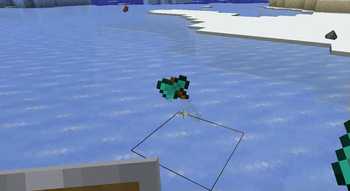
Axe Throw defines a tag axe_throw:throwable that allows items to be thrown like tridents (by default, this contains the vanilla axes and swords of gold, diamond, and netherite). Thrown weapons will spin while moving through the air and damage entities upon contact. This mod also allows items in the tag to be enchanted with Loyalty, which will work like trident Loyalty. Thrown weapons will attempt to return to the slot they were thrown from when picked up.
To retain vanilla behavior, items in the axe_throw:throwable tag cannot be thrown immediately. This means they will default to the regular behavior (and therefore delegate item use logic to the offhand item, such as a shield). Press the Shift key while hovering over a valid ItemStack in the inventory to display the throwing mode.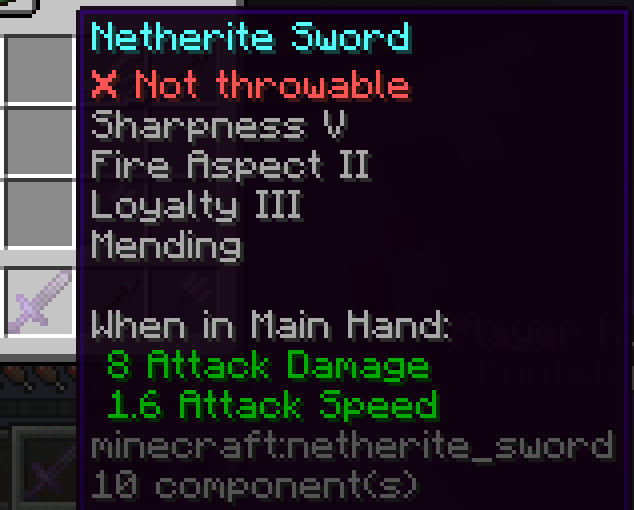
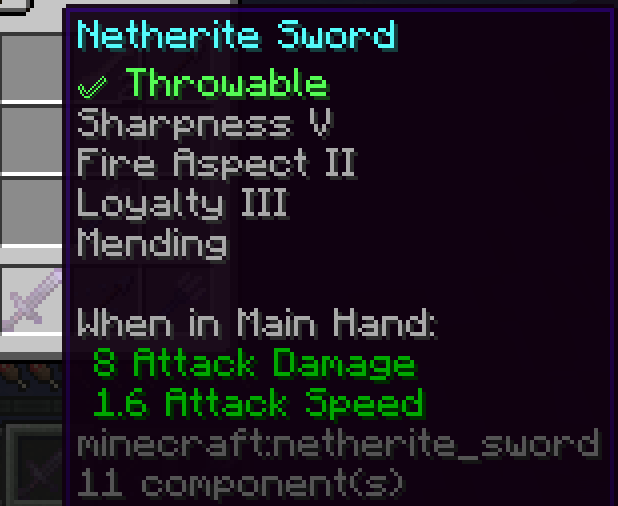
To change the throwing mode, right-click on the ItemStack in the inventory. This will allow the ItemStack to be thrown like a trident.
Configuration:
Axe Throw adds two new gamerules:
axe_throw:projectile_drag_in_water- Determines the drag in water for thrown weapons. By default, the value is set to 0.85.axe_throw:projectile_damage_multiplier- All damage dealt by thrown weapons will be multiplied by this amount. By default, the value is set to 0.7.
Axe Throw's config is powered by YetAnotherConfigLib (requires manual installation, not included). The config is accessible through ModMenu and allows the user to control how the throwing mode is displayed (SHIFT, ALWAYS, NEVER).
Available Versions
How to Install Axe Throw on Your Server
Order Server
Order a Minecraft Java server with at least 3 GB RAM (4 GB recommended).
Set fabric Loader
In the panel under "Egg", select the fabric loader and matching Minecraft version (1.21.1).
Install Mod
Open the mod browser in the dashboard and search for "Axe Throw". Click "Install" – done! Alternatively, upload the .jar via SFTP to the /mods folder.
Compatibility
Mod Loaders
Minecraft Versions
1.21.1
Server-side
✓ RequiredRecommended RAM
4 GB(min. 3 GB)Frequently Asked Questions
Axe Throw server crashes on startup – what to do?
Most common cause: wrong fabric version or insufficient RAM. Check the server log (latest.log) for "OutOfMemoryError" or "Mixin" errors. With Mado Hosting: ensure at least 3 GB RAM is allocated and the loader matches the mod version (1.21.1). You can switch loaders with one click in the panel.
Is Axe Throw compatible with fabric?
Axe Throw officially supports fabric for Minecraft 1.21.1. The Mado dashboard automatically detects incompatible loader combinations.
Server lagging with Axe Throw – how to optimize performance?
Recommended RAM: 4 GB (per 8 players). Use /spark profiler to check if Axe Throw consumes the most tick time. Common fixes: reduce server view-distance to 8-10, install "performant" or "starlight" as supplementary mods on Forge. With Mado Hosting, your server runs on NVMe SSDs with dedicated CPU cores for minimal latency.
Similar Mods




![[TaCZ] Timeless and Classics Zero](https://cdn.modrinth.com/data/SzzJttH8/fd27766d2bb8390d284696b1dbd358f87e081439_96.webp)

Rent Modded Server
Install Axe Throw with just one click on your server.