
Azurth Mod
A Small-ish Mod That Adds A Unique Set Of Tools That Can Be Upgraded, And Also A Few Blocks.
Screenshots
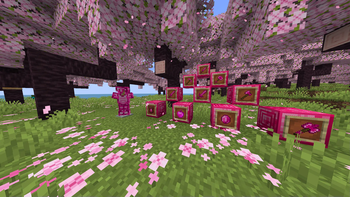
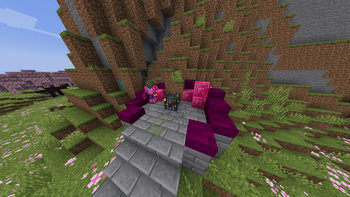

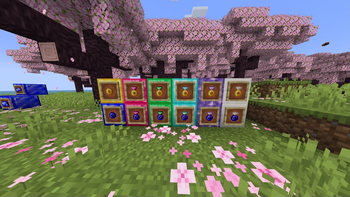

About this Mod
The Azurth Mod is a new, relatively small mod made for 1.20.1 that adds new ores, blocks, tools, and even a new miniboss, ready to provide an interesting experience to your minecraft playthrough!
Features
(as of version 1.2.1)
The Azurth Mod adds a load of new features!
- Azure is a new gem that can be found below y level 64, it has many uses, however the main uses are…
- New armour: azure armour, a new armour set as strong as diamond!
- New tools and weapons: azure tools, sword, pickaxe, axe and dagger!
All of these tools (except from the dagger) can be upgraded into faster, more powerful versions of themselves using the azure upgrade, dropped by the azurth knight. The upgraded tools are.. azure greatsword, azure sledgehammer, azure battleaxe. - New mob: Azurth knight, this mob can drop the azure dagger, and azure upgrade, along with some rotten flesh and jewellery. this mob can be found in the…
- New Structure: Azurth shrine, this structure spawns azurth knights.. And may have some secret treasure…
- Platinum is a new material also found below y level 64 it can be used to make…
- Jewellery is a new method to earn emeralds, it can be made using gold or platinum rings, along with a gem of choice, azure, emerald, diamond, amethyst and quartz and can be sold to the…
- New villager profession: jeweller, the jeweller is a villager type that cannot be found naturally in villages, instead, you have to make the new block the..
- Gem cutter
- Etherite - A New Ore Found Commonly In The End
- Etherite Block Types: Etherite Block, Etherite Bricks.
- Synth Z - A New Music Disc (Music Made By Me)
- Musician Villager - Sells Music Discs (Including Synth Z)
- Etherite Sword, A New Sword That Gives You A Speed Boost When Held
Available Versions
How to Install Azurth Mod on Your Server
Order Server
Order a Minecraft Java server with at least 3 GB RAM (4 GB recommended).
Set forge Loader
In the panel under "Egg", select the forge loader and matching Minecraft version (1.20.1).
Install Mod
Open the mod browser in the dashboard and search for "Azurth Mod". Click "Install" – done! Alternatively, upload the .jar via SFTP to the /mods folder.
Compatibility
Mod Loaders
Minecraft Versions
1.20.1
Server-side
✓ RequiredRecommended RAM
4 GB(min. 3 GB)Frequently Asked Questions
Azurth Mod server crashes on startup – what to do?
Most common cause: wrong forge version or insufficient RAM. Check the server log (latest.log) for "OutOfMemoryError" or "Mixin" errors. With Mado Hosting: ensure at least 3 GB RAM is allocated and the loader matches the mod version (1.20.1). You can switch loaders with one click in the panel.
Is Azurth Mod compatible with forge?
Azurth Mod officially supports forge for Minecraft 1.20.1. The Mado dashboard automatically detects incompatible loader combinations.
Server lagging with Azurth Mod – how to optimize performance?
Recommended RAM: 4 GB (per 8 players). Use /spark profiler to check if Azurth Mod consumes the most tick time. Common fixes: reduce server view-distance to 8-10, install "performant" or "starlight" as supplementary mods on Forge. With Mado Hosting, your server runs on NVMe SSDs with dedicated CPU cores for minimal latency.
Similar Mods




Rent Modded Server
Install Azurth Mod with just one click on your server.