
B1nd C0mmandz!
Use Powerful features of Masa's MaLiLib to bind commands to keys!
Screenshots

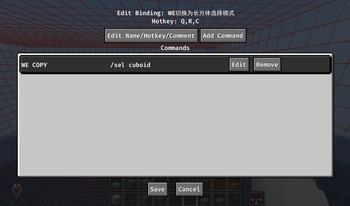
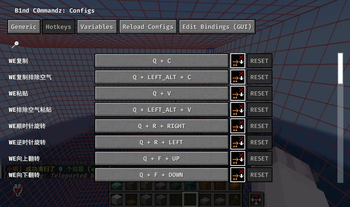
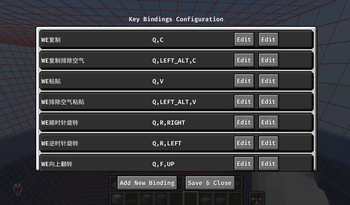
About this Mod
Welcome to B1nd C0mmandz!
We noticed that Masa's MaLiLib provides a powerful system for keybinds and configurations. So why not reimagine those standard Command Macros to leverage this wonderful system? That is exactly what this mod does! If you are an architect or a server operator and you have a set of frequently used commands, this mod is perfect for you.
THIS IS ESPECIALLY USEFUL if you HAVE TONS OF COMMANDS that you wish to bind to specific keys.
Features
- Bind a sequence of commands to a single MaLiLib keybind! (REQUIRES EDITING THE CONFIG FILE)
- A GUI config screen to quickly manage key assignments for your configured command sequences.

- Dynamic reload support within the GUI config screen.
GUI Config for Hotkeys & Keybinds

Config File
This is what the default config file looks like:
{
  "Toggles": {
    "Open config gui": {
      "keys": "B,C"
    }
  },
  "bindingNodes": [
    {
      "hotkeyStorageString": "LEFT_CONTROL,C",
      "name": "Example",
      "comment": "This is an example of how to configure the file",
      "commandNodes": [
        {
          "name": "Example Command",
          "command": "say Hello,world!",
          "comment": "Say hello world to all other players in the server!"
        },
        {
          "name": "Next Command",
          "command": "say End!",
          "comment": "You can add more to this list, and will be executed in sequence!"
        }
      ]
    }
  ]
}
欢迎使用 B1nd C0mmandz!
我们注意到 Masa 的 MaLiLib 库提供了一套强大的按键绑定与配置系统。既然如此,何不利用这个出色的系统来重新设计原版的命令宏(Command Macros)呢?这就是本模组的由来!如果你是一名建筑师或服务器管理员(OP),并且拥有一套常用的指令集,那么这个模组将非常适合你。
尤其是当你拥有“海量指令”并希望将它们绑定到特定按键上时,本模组将格外有用。
功能特性
- 将一系列指令序列绑定到单个 MaLiLib 按键上!(需要编辑配置文件)
- 提供图形化配置界面(GUI),可快速管理已配置指令序列的按键绑定。
- 支持在 GUI 配置界面中动态重载配置。
热键与按键绑定 GUI
配置文件
默认的配置文件内容如下所示:
{
  "Toggles": {
    "Open config gui": {
      "keys": "B,C"
    }
  },
  "bindingNodes": [
    {
      "hotkeyStorageString": "LEFT_CONTROL,C",
      "name": "Example",
      "comment": "This is an example of how to configure the file",
      "commandNodes": [
        {
          "name": "Example Command",
          "command": "say Hello,world!",
          "comment": "Say hello world to all other players in the server!"
        },
        {
          "name": "Next Command",
          "command": "say End!",
          "comment": "You can add more to this list, and will be executed in sequence!"
        }
      ]
    }
  ]
}
Available Versions
How to Install B1nd C0mmandz! on Your Server
Order Server
Order a Minecraft Java server with at least 3 GB RAM (4 GB recommended).
Set fabric Loader
In the panel under "Egg", select the fabric loader and matching Minecraft version (1.21.11).
Install Mod
Open the mod browser in the dashboard and search for "B1nd C0mmandz!". Click "Install" – done! Alternatively, upload the .jar via SFTP to the /mods folder.
Compatibility
Mod Loaders
Minecraft Versions
1.21.11, 1.21.10, 1.21.9 (+8 more)
Server-side
✗ UnsupportedRecommended RAM
4 GB(min. 3 GB)Frequently Asked Questions
B1nd C0mmandz! server crashes on startup – what to do?
Most common cause: wrong fabric version or insufficient RAM. Check the server log (latest.log) for "OutOfMemoryError" or "Mixin" errors. With Mado Hosting: ensure at least 3 GB RAM is allocated and the loader matches the mod version (1.21.11). You can switch loaders with one click in the panel.
Is B1nd C0mmandz! compatible with fabric?
B1nd C0mmandz! officially supports fabric for Minecraft 1.21.11, 1.21.10, 1.21.9. The Mado dashboard automatically detects incompatible loader combinations.
Server lagging with B1nd C0mmandz! – how to optimize performance?
Recommended RAM: 4 GB (per 8 players). Use /spark profiler to check if B1nd C0mmandz! consumes the most tick time. Common fixes: reduce server view-distance to 8-10, install "performant" or "starlight" as supplementary mods on Forge. With Mado Hosting, your server runs on NVMe SSDs with dedicated CPU cores for minimal latency.
Similar Mods






Rent Modded Server
Install B1nd C0mmandz! with just one click on your server.