
Backpack Side GUI
Backpack Side GUI is an unofficial addon for Sophisticated Backpacks.
Screenshots
About this Mod
Backpack Side GUI
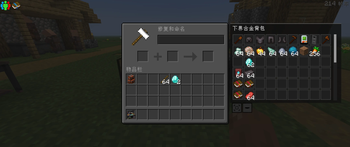
Backpack Side GUI 是一个为 Sophisticated Backpacks / 精妙背包 制作的非官方附属模组。它会在玩家打开物品栏、箱子、熔炉等容器界面时,在界面侧边显示一个可交互的背包栏,让玩家不需要单独打开背包 GUI,也能快速存取背包中的物品。
这个模组适合经常携带背包探索、整理战利品、管理大量物资的玩家。你可以在打开任意容器时直接把物品放进背包,或者从背包中取出物品,大幅减少反复打开背包界面的操作。
**
主要功能**
在玩家物品栏或任意容器界面侧边显示背包 GUI
支持从侧边背包中放入、取出、交换、合并物品
支持鼠标滚轮滚动背包内容
支持拖动分配物品
支持双击集合相同物品
支持 Sophisticated Backpacks 的堆叠升级,能够显示超过 64 的物品数量
支持 Curios / 饰品栏中的背包检测
支持移动侧边 GUI 位置
支持隐藏 / 显示侧边背包栏
提供客户端配置文件,可调整显示方向、位置和可见行数
多人游戏中由服务端处理真实物品操作,降低同步问题和作弊风险
配置
首次启动游戏后会生成配置文件:
config/backpack_side_gui-client.toml
可以调整:
背包栏显示在左侧或右侧
横向位置偏移
纵向位置偏移
可见行数
是否隐藏背包栏
依赖
必需:
Minecraft 1.20.1
Forge
Sophisticated Backpacks
可选:
Curios API
如果安装 Curios,并且背包可以放入饰品栏,本模组会尝试读取饰品栏中的背包。
注意
Backpack Side GUI 是 Sophisticated Backpacks 的非官方附属模组,并非官方项目。
多人游戏时,客户端和服务端都需要安装本模组。
Backpack Side GUI is an unofficial addon for Sophisticated Backpacks. It adds an interactive backpack panel to the side of your inventory and container screens, allowing you to access your backpack without opening the original backpack GUI separately.
This mod is designed for players who frequently explore, loot, and manage large amounts of items. Whether you are opening a chest, furnace, or your own inventory, you can quickly move items in and out of your backpack from the side panel.
Features
Displays a backpack side panel next to the player inventory and container screens
Supports inserting, extracting, swapping, and merging items
Mouse wheel scrolling for backpack contents
Drag-to-distribute item stacks
Double-click to collect matching items
Supports Sophisticated Backpacks stack upgrades and can display stack sizes above 64
Supports backpack detection from Curios slots when Curios is installed
Move button for repositioning the side panel
Show / hide button for toggling the backpack panel
Client-side configuration for side, position offsets, visible rows, and hidden state
Multiplayer-friendly design: item operations are handled on the server side
Configuration
A client config file will be generated after the first launch:
config/backpack_side_gui-client.toml
You can configure:
Whether the panel appears on the left or right side
Horizontal offset
Vertical offset
Visible row count
Hidden state
Dependencies
Required:
Minecraft 1.20.1
Forge
Sophisticated Backpacks
Optional:
Curios API
When Curios is installed, this mod will try to detect backpacks placed in Curios slots.
Notes
Backpack Side GUI is an unofficial addon for Sophisticated Backpacks and is not affiliated with the original mod authors.
For multiplayer, both the client and the server should have this mod installed.
Available Versions
How to Install Backpack Side GUI on Your Server
Order Server
Order a Minecraft Java server with at least 3 GB RAM (4 GB recommended).
Set forge Loader
In the panel under "Egg", select the forge loader and matching Minecraft version (1.20.6).
Install Mod
Open the mod browser in the dashboard and search for "Backpack Side GUI". Click "Install" – done! Alternatively, upload the .jar via SFTP to the /mods folder.
Compatibility
Mod Loaders
Minecraft Versions
1.20.6, 1.20.5, 1.20.4 (+3 more)
Server-side
✓ RequiredRecommended RAM
4 GB(min. 3 GB)Frequently Asked Questions
Backpack Side GUI server crashes on startup – what to do?
Most common cause: wrong forge version or insufficient RAM. Check the server log (latest.log) for "OutOfMemoryError" or "Mixin" errors. With Mado Hosting: ensure at least 3 GB RAM is allocated and the loader matches the mod version (1.20.6). You can switch loaders with one click in the panel.
Is Backpack Side GUI compatible with forge?
Backpack Side GUI officially supports forge for Minecraft 1.20.6, 1.20.5, 1.20.4. The Mado dashboard automatically detects incompatible loader combinations.
Server lagging with Backpack Side GUI – how to optimize performance?
Recommended RAM: 4 GB (per 8 players). Use /spark profiler to check if Backpack Side GUI consumes the most tick time. Common fixes: reduce server view-distance to 8-10, install "performant" or "starlight" as supplementary mods on Forge. With Mado Hosting, your server runs on NVMe SSDs with dedicated CPU cores for minimal latency.
Similar Mods


Rent Modded Server
Install Backpack Side GUI with just one click on your server.