
Bafchat
Bringing locally hosted AI to a Minecraft front-end through commands.
Screenshots
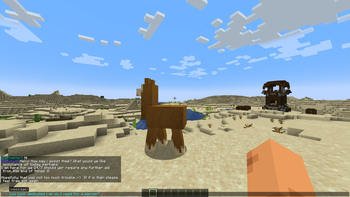
About this Mod
Bafchat
While there are already plenty of mods around which bring OpenAI's API into Minecraft, there hasn't yet been the same abundance of mods seeking to bring local LLMs into the game. Bafchat is here to save the day! Ask your new AI buddy questions, or maybe get some help when you've forgotten a command or crafting recipe. If your model can do it, Bafchat can do it too (provided you have the prompt correctly configured in Bafmod3Config.json).
Also, OpenAI's API doesn't have unlimited free use, so once you run out of credits you have to pay. Bafchat is powered by LLMs hosted on your own computer (or local network), so you can experiment without worry of racking up charges.
Default Configuration
By default, Bafchat is pre-configured to work with local.ai's server, but I believe it should work with others such as those provided by Kobold and Oobabooga.
The recommended model as of right now is RedPajama-INCITE-Chat-3B-v1 because it is a small model that processes prompts relatively fast on CPU, however as a trade-off, its responses leave much to be desired.
NOTE: If you do elect to choose a different model, you will have to modify the prompting style in Bafmod3Config.json, otherwise you may get unexpected results.
OTHER NOTE: When editing the prompt in Bafmod3Config.json, please ensure you keep the placeholder {{message}} in the prompt, placing it where you want your in-game messages to go in the template.
Features
- A mostly functional front-end for locally hosted APIs of large language models.
- Use
/llmto send a message to your model. - Modify the Bafmod3Config.json in-game! Just use
/bafmod set, or if you mess it up you can use/bafmod resetto return it to default. - Prompts and API URL can be adjusted in the Bafmod3Config.json located in your .minecraft/config
Requirements
- A locally hosted API for an LLM
- Fabric Kotlin
- Fabric API
- Fabric
- Minecraft 1.20 and newer
Slight issues
- If the API is hosted on the same machine as your Minecraft server (which includes the client if playing singleplayer) and your computer isn't particularly powerful, your game may temporarily slow down while the prompt is processed. Using smaller, and quantised language models can help counteract this.
Available Versions
How to Install Bafchat on Your Server
Order Server
Order a Minecraft Java server with at least 3 GB RAM (4 GB recommended).
Set fabric Loader
In the panel under "Egg", select the fabric loader and matching Minecraft version (1.20.1).
Install Mod
Open the mod browser in the dashboard and search for "Bafchat". Click "Install" – done! Alternatively, upload the .jar via SFTP to the /mods folder.
Compatibility
Mod Loaders
Minecraft Versions
1.20.1, 1.20
Server-side
~ OptionalRecommended RAM
4 GB(min. 3 GB)Frequently Asked Questions
Bafchat server crashes on startup – what to do?
Most common cause: wrong fabric version or insufficient RAM. Check the server log (latest.log) for "OutOfMemoryError" or "Mixin" errors. With Mado Hosting: ensure at least 3 GB RAM is allocated and the loader matches the mod version (1.20.1). You can switch loaders with one click in the panel.
Is Bafchat compatible with fabric?
Bafchat officially supports fabric for Minecraft 1.20.1, 1.20. The Mado dashboard automatically detects incompatible loader combinations.
Server lagging with Bafchat – how to optimize performance?
Recommended RAM: 4 GB (per 8 players). Use /spark profiler to check if Bafchat consumes the most tick time. Common fixes: reduce server view-distance to 8-10, install "performant" or "starlight" as supplementary mods on Forge. With Mado Hosting, your server runs on NVMe SSDs with dedicated CPU cores for minimal latency.
Similar Mods






Rent Modded Server
Install Bafchat with just one click on your server.