
Balanced Crates
Nifty Storage Blocks That Make Good Decorations.
Screenshots
About this Mod

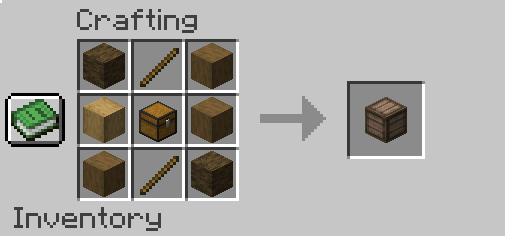
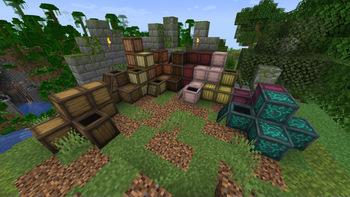
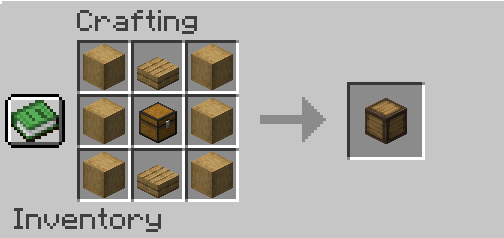
📖 About Balanced Crates: This mod adds new vanilla-friendly crate blocks. Crates have large amounts of storage compared to single chests. Crates can also be used as building blocks/decorations. Crates are designed to be vanilla-friendly chest alternatives that allow compact storage. Crates come in every wood type.
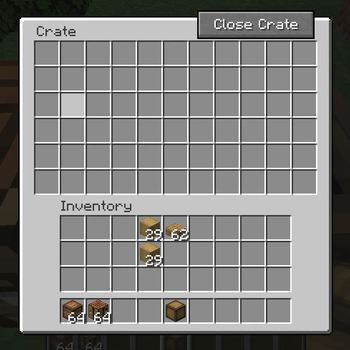
📦Storage: While a single chest has 27 slots, crates have 66 slots of inventory space! This allows for highly compacted storage. Right-clicking on a create will manually open it, allowing any player to take from, it's inventory, A player will be able to tell if a create is open when the top lid is removed. A crate can be closed by pressing the "Close Crate" button within the crate's GUI.
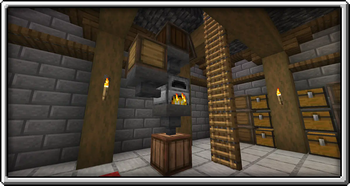
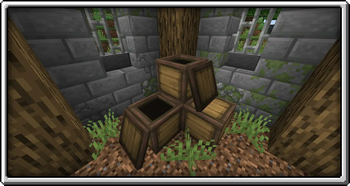
📚Decoration: Crates can easily be used as decorative blocks in many situations. a crate's texture is based upon what wood type is used to craft it, giving the player more option when building with wood. A crate can also be rotated much like a furnace, allowing the player to create patterns. A crate's open state can also be used in many ways.
⚒️Redstone: Being storage blocks, crates can be used in place of a chest in any Redstone situation where a Chest might be needed. This allows for higher amounts of storage and enables the player to make much more compact machines.


📃Support & Credits:
Mod Authors: LicitLettuce (Owner, Artist, Mod Creator) Mcreator (Program for Simple Mod Creation)
Mods Used In Screenshots: Farmers Delight, Just Enough Items (JEI), Metal Works, Mario 64 Paintings.
Shaders Used In Screeenshots: Complementary Reimagined
If you experience any problems while using this mod let me know through the issue tracker. If you have any feature suggestions let me know in the comments! You can use this mod in modpacks. This mod is not allowed to be redistributed. This mod will be updated to the next Minecraft version. This mod is a Forge only mod for the time being. Feel Free to Join Our Discord!: HERE
Available Versions
How to Install Balanced Crates on Your Server
Order Server
Order a Minecraft Java server with at least 3 GB RAM (4 GB recommended).
Set forge Loader
In the panel under "Egg", select the forge loader and matching Minecraft version (1.21.4).
Install Mod
Open the mod browser in the dashboard and search for "Balanced Crates". Click "Install" – done! Alternatively, upload the .jar via SFTP to the /mods folder.
Compatibility
Mod Loaders
Minecraft Versions
1.21.4, 1.21.1, 1.20.1 (+2 more)
Server-side
✓ RequiredRecommended RAM
4 GB(min. 3 GB)Frequently Asked Questions
Balanced Crates server crashes on startup – what to do?
Most common cause: wrong forge version or insufficient RAM. Check the server log (latest.log) for "OutOfMemoryError" or "Mixin" errors. With Mado Hosting: ensure at least 3 GB RAM is allocated and the loader matches the mod version (1.21.4). You can switch loaders with one click in the panel.
Is Balanced Crates compatible with forge and neoforge?
Balanced Crates officially supports forge, neoforge for Minecraft 1.21.4, 1.21.1, 1.20.1. The Mado dashboard automatically detects incompatible loader combinations.
Server lagging with Balanced Crates – how to optimize performance?
Recommended RAM: 4 GB (per 8 players). Use /spark profiler to check if Balanced Crates consumes the most tick time. Common fixes: reduce server view-distance to 8-10, install "performant" or "starlight" as supplementary mods on Forge. With Mado Hosting, your server runs on NVMe SSDs with dedicated CPU cores for minimal latency.
Similar Mods


Rent Modded Server
Install Balanced Crates with just one click on your server.