
Balanced Crystals
Adds a delay between placing and interacting with an End Crystal, making it more fair for combat.
Screenshots
About this Mod
| DESCRIPTION |
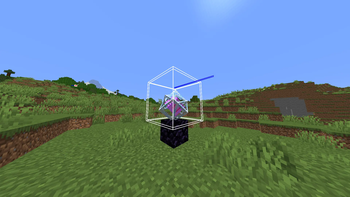
Adds a cooldown to every End Crystal, preventing interaction for the first 0.5 seconds. This prevents any left- or right-clicks on the crystal entity, making it impossible to detonate it by attacking it or throwing a projectile while looking at it. This delay is shown when using hitboxes (f3 + b) as a second, slightly larger, hitbox layer.
Some methods that may be used to detonate an End Crystal during cooldown include:
- Throwing multiple snowballs or eggs up, then spamming crystals when they land, allowing for multiple quick detonations
- Shooting a bow then placing a crystal before it lands, similar to methods used in Cart PvP
- Standing at a distance where you can reach the obsidian but not the crystal (there is about a 1 block range where this is possible), and throwing a snowball or egg after placing the crystal
| VERSIONS |
Currently supports Minecraft Java 1.21-1.21.10. No versions before 1.21 will work, however an update may be made to add support for these versions in the future.
| COMPATIBILITY |
Incompatible with any datapack using minecraft:balanced_crystals_tick.mcfunction, an interaction entity with the Crystal tag, or a CrystalLife scoreboard (all will probably be unlikely to happen). Will significantly affect gameplay in late-game survival, especially Crystal PvP.
| Patreon |
Join my new Patreon to support my projects!
Available Versions
How to Install Balanced Crystals on Your Server
Order Server
Order a Minecraft Java server with at least 3 GB RAM (4 GB recommended).
Set datapack Loader
In the panel under "Egg", select the datapack loader and matching Minecraft version (1.21.10).
Install Mod
Open the mod browser in the dashboard and search for "Balanced Crystals". Click "Install" – done! Alternatively, upload the .jar via SFTP to the /mods folder.
Compatibility
Mod Loaders
Minecraft Versions
1.21.10, 1.21.9, 1.21.8 (+8 more)
Server-side
✓ RequiredRecommended RAM
4 GB(min. 3 GB)Frequently Asked Questions
Balanced Crystals server crashes on startup – what to do?
Most common cause: wrong datapack version or insufficient RAM. Check the server log (latest.log) for "OutOfMemoryError" or "Mixin" errors. With Mado Hosting: ensure at least 3 GB RAM is allocated and the loader matches the mod version (1.21.10). You can switch loaders with one click in the panel.
Is Balanced Crystals compatible with datapack and fabric and forge and neoforge and quilt?
Balanced Crystals officially supports datapack, fabric, forge, neoforge, quilt for Minecraft 1.21.10, 1.21.9, 1.21.8. Note: Forge and Fabric mods are NOT cross-compatible – pick one loader and stick with it. The Mado dashboard automatically detects incompatible loader combinations.
Server lagging with Balanced Crystals – how to optimize performance?
Recommended RAM: 4 GB (per 8 players). Use /spark profiler to check if Balanced Crystals consumes the most tick time. Common fixes: reduce server view-distance to 8-10, install "performant" or "starlight" as supplementary mods on Forge. With Mado Hosting, your server runs on NVMe SSDs with dedicated CPU cores for minimal latency.
Similar Mods




Rent Modded Server
Install Balanced Crystals with just one click on your server.